
Go to SPRO → SAP Reference IMG → Controlling → Profit Center Accounting → Assignments of Account Assignment objects to Profit Center → Material → Assign Material Masters → Execute.
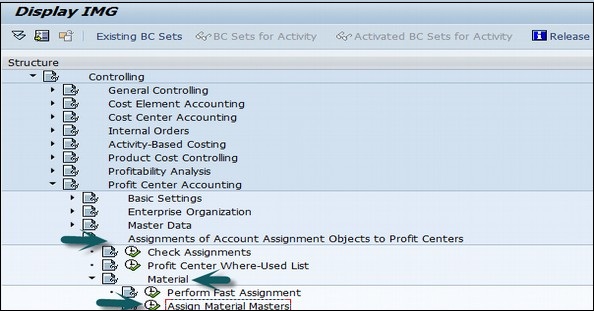
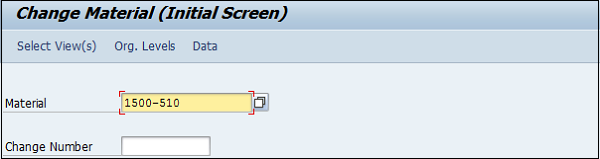
A new window will open. Enter the material Id for which the profit center is to be assigned and press Enter.
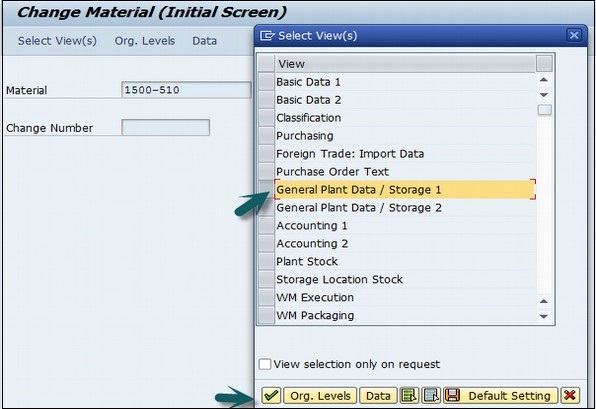
Select the view of the material master.
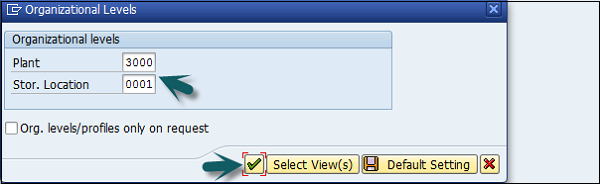
In the next window, enter the following details −
In the next window, enter the Profit Center and click the Save icon at the top.
A new window will open. Enter the material Id for which the profit center is to be assigned and press Enter.
Select the view of the material master.
In the next window, enter the following details −
In the next window, enter the Profit Center and click the Save icon at the top.
Continue exploring
Knowledge guide
Continue with related SAP knowledge.
Save this guide, return to the Knowledge Navigator or review the author profile for more practical SAP context.

Sachin H. Patil
View full profile →SAP FI-CA Consultant & Architect
Practical SAP notes, structured for review, reuse and long-term maintenance.