
SAP CO internal order monitors the parts of the costs and in a few cases, it also monitors the revenues of the organization.
You can create an internal order to monitor the costs of a time-restricted job or the costs for the production of activities. Internal orders can also be used for the long-term monitoring of costs.
Investment cost related to fixed assets are monitored using Investment orders.
Period-related accrual calculation between expenses in FI and the costing-based costs debited in Cost Accounting are monitored using Accrual orders.
Costs and revenues incurred for activities for external partners or for internal activities that do not form a part of the core business for your organization are monitored using order with revenues.
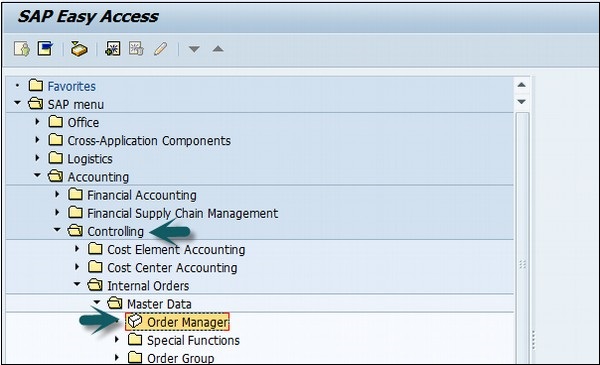
Use the T-code KO04 or go to Accounting → Controlling → Internal Orders → Master Data → Order Manager.
In the next screen, input the controlling area as shown below −

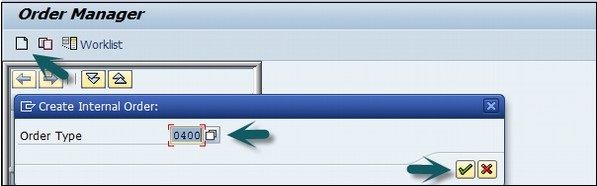
Click the Create button at the top to create a new internal order and enter the order type.
In the next window, enter the following details −
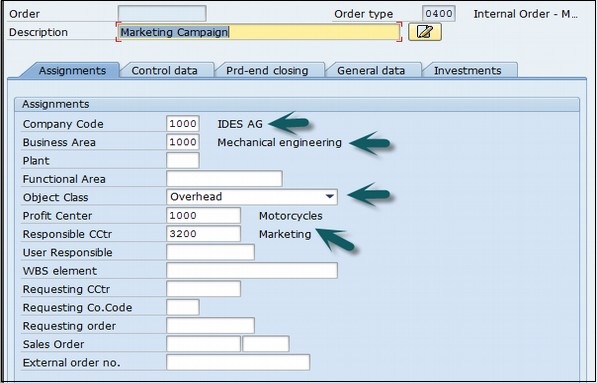
After entering the above details, click the Save button at the top to create the internal order.
You can create an internal order to monitor the costs of a time-restricted job or the costs for the production of activities. Internal orders can also be used for the long-term monitoring of costs.
Investment cost related to fixed assets are monitored using Investment orders.
Period-related accrual calculation between expenses in FI and the costing-based costs debited in Cost Accounting are monitored using Accrual orders.
Costs and revenues incurred for activities for external partners or for internal activities that do not form a part of the core business for your organization are monitored using order with revenues.
How to create an Internal Order in SAP CO?
Use the T-code KO04 or go to Accounting → Controlling → Internal Orders → Master Data → Order Manager.
In the next screen, input the controlling area as shown below −
Click the Create button at the top to create a new internal order and enter the order type.
In the next window, enter the following details −
- Company Code
- Business area
- Object Class of the Order
- Profit Center
- Cost Center responsible for the internal order
After entering the above details, click the Save button at the top to create the internal order.
Continue exploring
Knowledge guide
Continue with related SAP knowledge.
Save this guide, return to the Knowledge Navigator or review the author profile for more practical SAP context.

Sachin H. Patil
View full profile →SAP FI-CA Consultant & Architect
Practical SAP notes, structured for review, reuse and long-term maintenance.