
To post to a Profit Center, use the T-code FB50. It will take you to the following window.
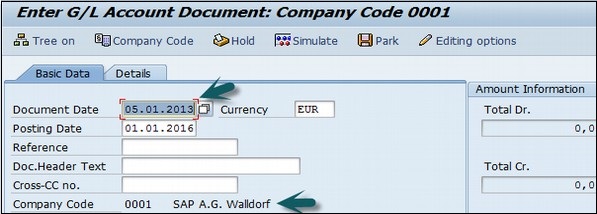
Enter the Document date and the Company code. Thereafter, provide input data in the fields as shown in the following screenshot.

After entering the line items, select the debit line item and click the button Detail Item button. Refer the following screenshot.
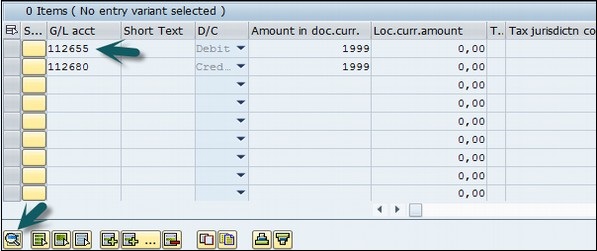
A new window will open. Enter the Profit Center and click the Save icon at the top.
Enter the Document date and the Company code. Thereafter, provide input data in the fields as shown in the following screenshot.
After entering the line items, select the debit line item and click the button Detail Item button. Refer the following screenshot.
A new window will open. Enter the Profit Center and click the Save icon at the top.
Continue exploring
Knowledge guide
Continue with related SAP knowledge.
Save this guide, return to the Knowledge Navigator or review the author profile for more practical SAP context.

Sachin H. Patil
View full profile →SAP FI-CA Consultant & Architect
Practical SAP notes, structured for review, reuse and long-term maintenance.