
Function Areas in finance accounting are used to define the expenses in a company according to individual function units. The most common Functional Areas are −
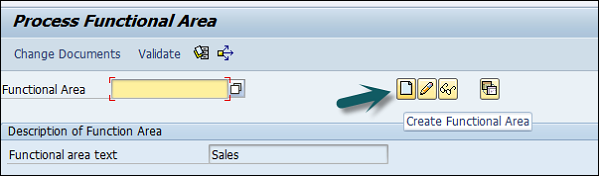
You can define a Functional Area using the T-code FM_FUNCTION (Earlier it was OKBD, but this is obsolete). It will open a new window.
Click on Create Functional Area as shown below and a new window will open.
Enter the following details −
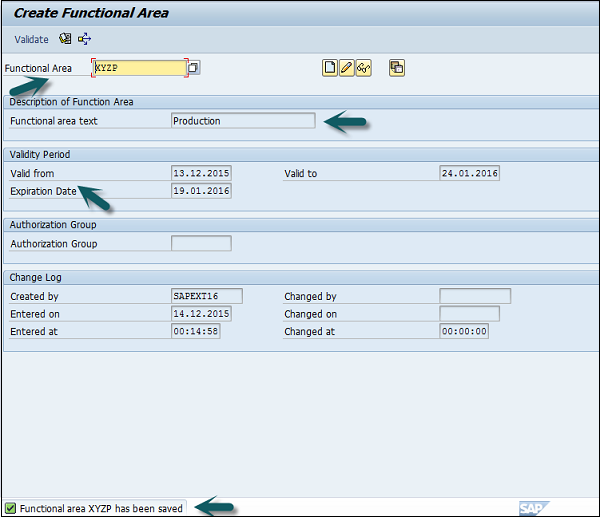
Once all the details are provided, click the Save button at the top. Once you click Save, you will see a message at the bottom that a new functional area has been created.
Functional Areas are used to create Profit and Loss statements using the cost of sales accounting and they are also used to analyze the cost of sales accounting. For this, you need to activate the cost of sales accounting as follows −
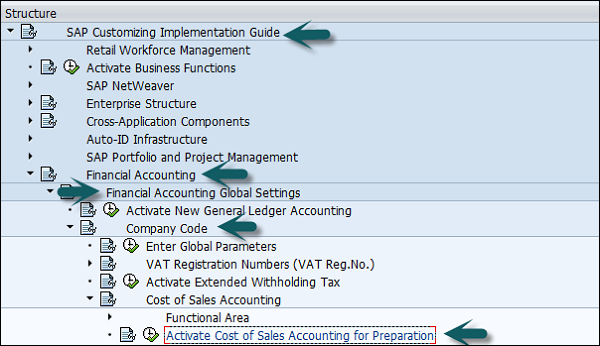
Go to SPRO → SAP Reference IMG → Financial Accounting → FI Global Settings → Company Code → Cost of Sales Accounting → Activate cost of sales accounting for preparation.
- Manufacturing
- Sales and Distribution
- Production
- Administration
How to Define a Functional area in SAP FI?
You can define a Functional Area using the T-code FM_FUNCTION (Earlier it was OKBD, but this is obsolete). It will open a new window.
Click on Create Functional Area as shown below and a new window will open.
Enter the following details −
- Name of Functional Area.
- Description
- Validity to and from date
- Expiration date and Authorization.
Once all the details are provided, click the Save button at the top. Once you click Save, you will see a message at the bottom that a new functional area has been created.
Functional Areas are used to create Profit and Loss statements using the cost of sales accounting and they are also used to analyze the cost of sales accounting. For this, you need to activate the cost of sales accounting as follows −
Go to SPRO → SAP Reference IMG → Financial Accounting → FI Global Settings → Company Code → Cost of Sales Accounting → Activate cost of sales accounting for preparation.
Continue exploring
Knowledge guide
Continue with related SAP knowledge.
Save this guide, return to the Knowledge Navigator or review the author profile for more practical SAP context.

Sachin H. Patil
View full profile →SAP FI-CA Consultant & Architect
Practical SAP notes, structured for review, reuse and long-term maintenance.