
You can assign one or more document types to number range. The number range is applicable to document type as mentioned in the document posting and entry.
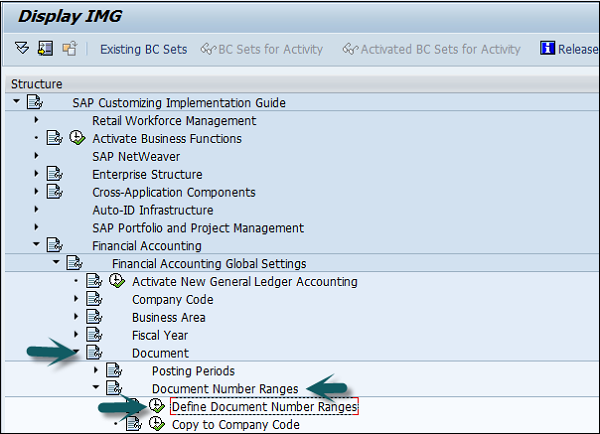
You can define document number ranges in SAP FI in two way. You can either use the T-code FBN1 or go to SPRO → SAP Reference IMG → Financial Accounting → Financial Accounting Global Setting → Document → Define Document Number Ranges → Execute.
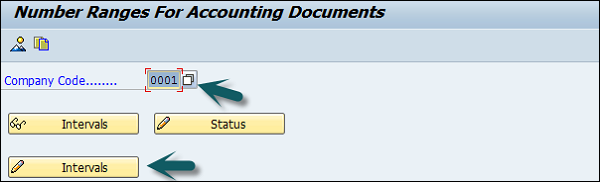
A new window will open. Enter the company code and click Change Intervals as shown below.
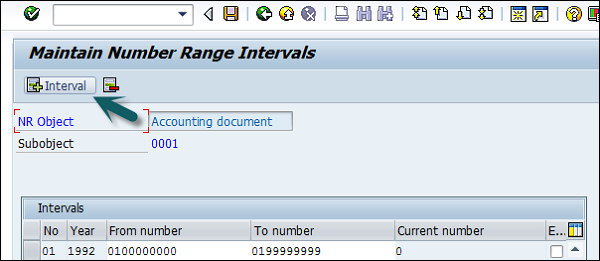
It will open another window. Click Insert Interval.
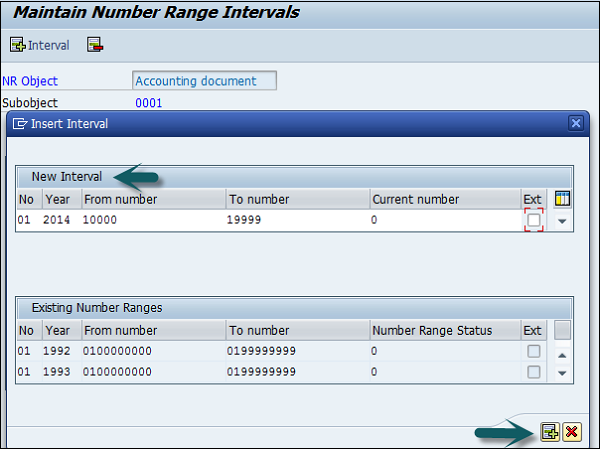
Enter the following details −
After providing all these details, click Save to save the changes.
Configure Document Number Ranges
You can define document number ranges in SAP FI in two way. You can either use the T-code FBN1 or go to SPRO → SAP Reference IMG → Financial Accounting → Financial Accounting Global Setting → Document → Define Document Number Ranges → Execute.
A new window will open. Enter the company code and click Change Intervals as shown below.
It will open another window. Click Insert Interval.
Enter the following details −
- No − Number range code.
- Year − Enter Year.
- From Number − From number.
- To Number − To Number.
- Current Number − (By default it will be 0).
- Ext − (Internal or External)
After providing all these details, click Save to save the changes.
Continue exploring
Knowledge guide
Continue with related SAP knowledge.
Save this guide, return to the Knowledge Navigator or review the author profile for more practical SAP context.

Sachin H. Patil
View full profile →SAP FI-CA Consultant & Architect
Practical SAP notes, structured for review, reuse and long-term maintenance.