
In SAP Simple Finance, only primary cost elements have an associated G/L account. Secondary cost elements which are used to allocate costs for internal activities, they don’t have any corresponding G/L account.
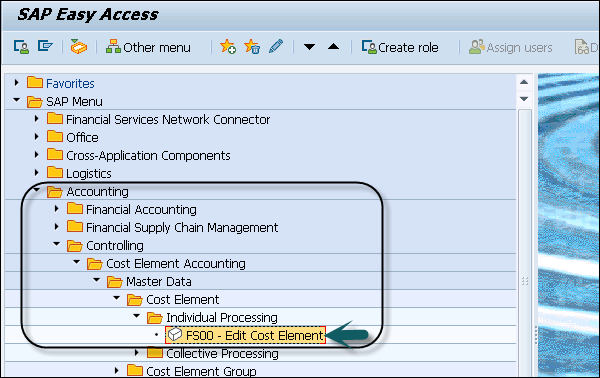
Step 1 − To create a secondary cost element, navigate to Accounting → Controlling → Cost Element Accounting → Master Data → Cost Element → Individual Processing → Edit Cost Element.
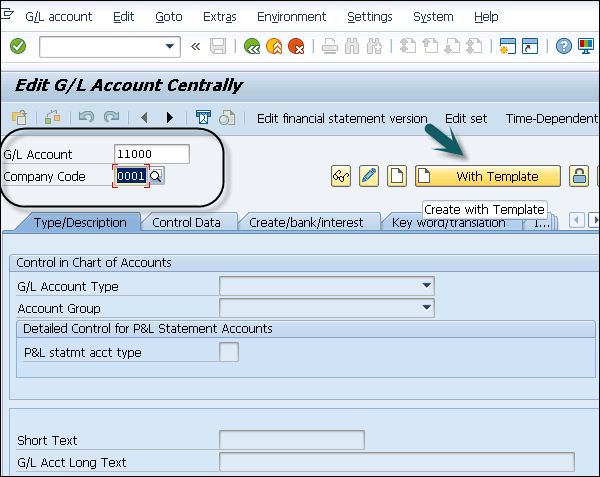
 Step 2 − In the next window, enter G/L account. Enter the Company Code and click the Template button.
 Step 3 − You will be prompted to enter the value in the Reference G/L account box.
Step 4 − You will be prompted to enter the value in the Reference Company Code box.
Step 5 − Click the Continue button. In the next window, enter the text box and Consumption, raw material 2 in the G/L Acct Long Text box.
You can create a secondary cost by selecting ChartOfAccounts as Secondary and by following the steps as used in primary.
Step 1 − To create a secondary cost element, navigate to Accounting → Controlling → Cost Element Accounting → Master Data → Cost Element → Individual Processing → Edit Cost Element.
Step 2 − In the next window, enter G/L account. Enter the Company Code and click the Template button.
Step 3 − You will be prompted to enter the value in the Reference G/L account box.Step 4 − You will be prompted to enter the value in the Reference Company Code box.
Step 5 − Click the Continue button. In the next window, enter the text box and Consumption, raw material 2 in the G/L Acct Long Text box.
You can create a secondary cost by selecting ChartOfAccounts as Secondary and by following the steps as used in primary.
Continue exploring
Knowledge guide
Continue with related SAP knowledge.
Save this guide, return to the Knowledge Navigator or review the author profile for more practical SAP context.

Sachin H. Patil
View full profile →SAP FI-CA Consultant & Architect
Practical SAP notes, structured for review, reuse and long-term maintenance.