
Use Transaction code FAGL_EHP4_T001B_COFI or navigate as mentioned in Period Lock under FI. Enter Pstng period variant and click the Continue button.
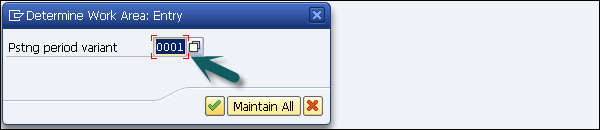
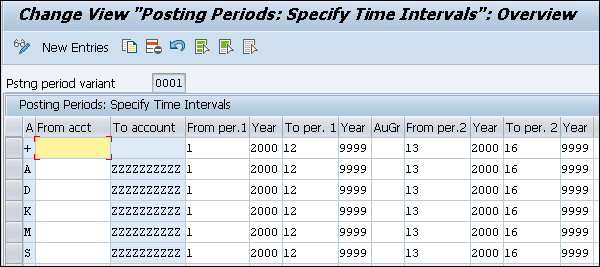
You can assign a separate posting period variant to a ledger/company code combination. You can also control the opening and the closing of a period by ledger in this way.
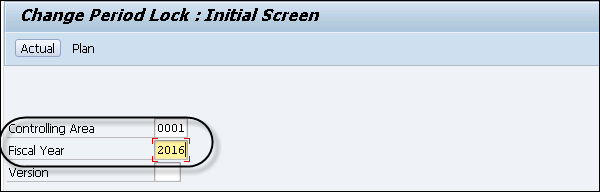 Step 2 − In the next window, you have to enter the Current Year in the Fiscal Year box and click the Actual button or press F5. Select a period that you want to lock and click the Lock Period.
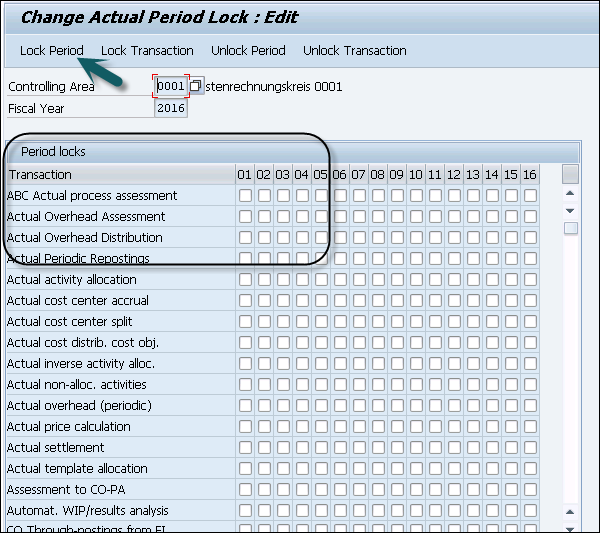 Step 3 − You can also Unlock Period, Lock Transaction, or Unlock Transaction.
You can assign a separate posting period variant to a ledger/company code combination. You can also control the opening and the closing of a period by ledger in this way.
CO Transaction for Opening/Closing Periods
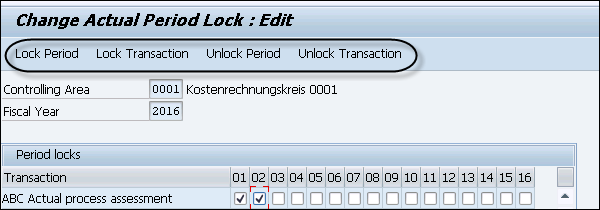
Step 1 − To perform opening/closing period under Controlling, use Transaction code OKP1.
Step 2 − In the next window, you have to enter the Current Year in the Fiscal Year box and click the Actual button or press F5. Select a period that you want to lock and click the Lock Period.
Step 3 − You can also Unlock Period, Lock Transaction, or Unlock Transaction. Continue exploring
Knowledge guide
Continue with related SAP knowledge.
Save this guide, return to the Knowledge Navigator or review the author profile for more practical SAP context.

Sachin H. Patil
View full profile →SAP FI-CA Consultant & Architect
Practical SAP notes, structured for review, reuse and long-term maintenance.