
In SAP Accounting CO relevant postings do not check only the CO Period Lock as in the past but the GL period opening/closing as well. Therefore, you have to allow postings to accounts from account type secondary Costs in the GL period opening/closing.
In Controlling, it is possible to define which transactions you want to lock, and for which periods.
For example: Let us say that you lock period - 1&2 against the actual overhead assessment postings and all other postings in this periods are allowed.
In SAP Simple Finance, you can specify which account type you want to allow for posting in FI and you can also specify the period and Fiscal Year. In SAP Simple Finance, it is also necessary to open accounts from account type Secondary Costs for FI postings.
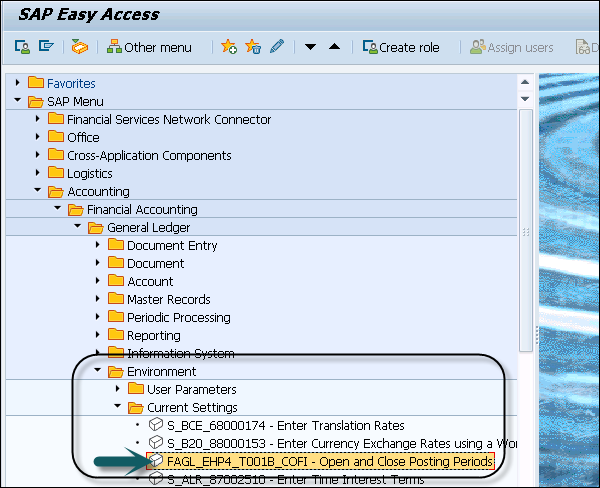
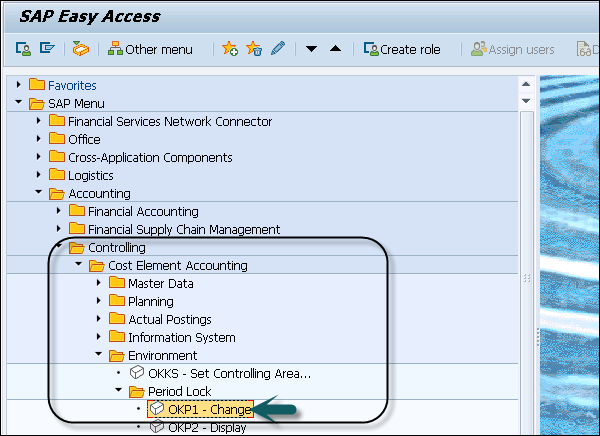
In Controlling, you can define which transactions you want to lock and period. You need to select Controlling Area and Fiscal year.
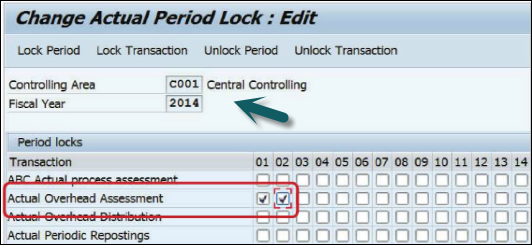
In Controlling, it is possible to define which transactions you want to lock, and for which periods.
For example: Let us say that you lock period - 1&2 against the actual overhead assessment postings and all other postings in this periods are allowed.
Period Lock in FI
In SAP Simple Finance, you can specify which account type you want to allow for posting in FI and you can also specify the period and Fiscal Year. In SAP Simple Finance, it is also necessary to open accounts from account type Secondary Costs for FI postings.
Period Lock in CO
In Controlling, you can define which transactions you want to lock and period. You need to select Controlling Area and Fiscal year.
Continue exploring
Knowledge guide
Continue with related SAP knowledge.
Save this guide, return to the Knowledge Navigator or review the author profile for more practical SAP context.

Sachin H. Patil
View full profile →SAP FI-CA Consultant & Architect
Practical SAP notes, structured for review, reuse and long-term maintenance.