
Contract Accounts Receivable and Payable (FI-CA) enables subledger accounting for receivables and payables, typically in industries that require processing of huge volumes of business transactions and business partners. It also enables necessary capabilities to manage accounts receivable and payable (e.g., open item management and account balance display) along with capabilities like dunning and interest calculation.
SAP FI-CA is a cross-application component used in utilities, telecom, insurance, public sector and other industries. This solution makes it simpler to manage the operations for the businesses with a very large consumer base and expected to grow, needs to make millions of postings each single day.
Why FI-CA over FI-CO:
- Why FI-CA instead of standard accounts receivable and payable
- Basis for industry & Customer specific function
- FI-CA is an industry-specific subledger accounting system & it is a cross-application component used in SAP IS-U, telecommunications, insurance, public sector and other utilities sectors.
- Business partner concept: documents are assigned to a business partner, contract account and contract.
- Agent-friendly processing of accounting transactions.
- Summarization of general ledger information.
- FI-CA is well suited for B2C scenarios with very large customer populations and recurring periodic transactions.
- Business partner represents the consumers. Using FI-CA, one or more contract accounts can be created under Business Partner.
- Contract account master data supports FI-CA and downstream FI postings.
- Businesses requires mass processing and parallel processing
- Optimized storage space use thanks to the special document structure type
What Actually Makes FI-CA Different
FI-CA isn’t “FI-AR/AP with a new name” — a few architectural choices explain why industries with huge transaction volumes standardize on it:
- Business-partner-centric account model. Every posting is assigned to a business partner, contract account and contract — not just a customer/vendor master record — so one business partner can hold many contract accounts (e.g. multiple utility connections) while still rolling up to a single credit-standing and dunning history.
- Business-transaction-based account determination. Each posting carries a main transaction and sub-transaction (e.g. a specific charge type or payment method), and FI-CA uses that combination — along with company code and division — to determine G/L and revenue accounts automatically, instead of relying on document-type-only determination.
- The event framework (FQEVENTS). Customer- and industry-specific logic hooks into FI-CA processing through predefined events maintained in transaction FQEVENTS, rather than modifying standard code — see Events in FI-CA below.
- Mass activities as a first-class concept, not an afterthought. Payment runs, dunning runs and account maintenance are built to split large datasets into parallel technical jobs from the start — see Mass Processing in FI-CA below — which is why FI-CA scales to millions of postings a day where document-by-document FI-AR/AP processing would not.
- Business locks instead of manual holds. Dunning, payment, interest, clearing and posting can each be blocked independently at the contract-account or document level, with the block and the user who set it recorded in the blocking history — useful for suspending automation during a dispute without stopping unrelated processing.
SAP BRIM
Financial Contract Accounting (FI-CA) is part of the SAP Billing and Revenue Innovation Management (BRIM) solution. (image.png)
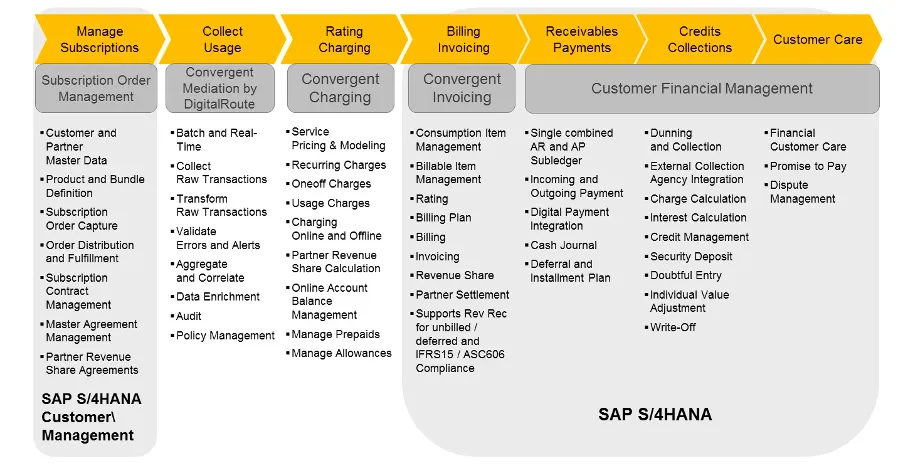
The Order-to-Cash (O2C) process is covered by SAP Billing and Revenue Innovation Management. The process starts in SAP S/4HANA for Customer Management and ends with the contract and order creation.
The Usage-To-Cash (U2C) process starts after the sales and fulfillment processes are completed. The main process steps are charging and rating (SAP Convergent Charging), followed by billable items management, billing and invoicing (SAP Convergent Invoicing). After invoicing, SAP Customer Financial Management ensures a consistent process flow, supporting, among other things, Contract Accounting, Collection Management and Revenue Management
SAP Fiori
You want to ensure that your users have the best possible experience when interacting with SAP Business Suite. You want to ensure that users can access critical business applications on any device without compromises. Finally, you want to ensure that the solution integrates with your existing IT system landscape and can expand to cover your specific needs. You want to make sure that SAP Fiori meets these requirements.
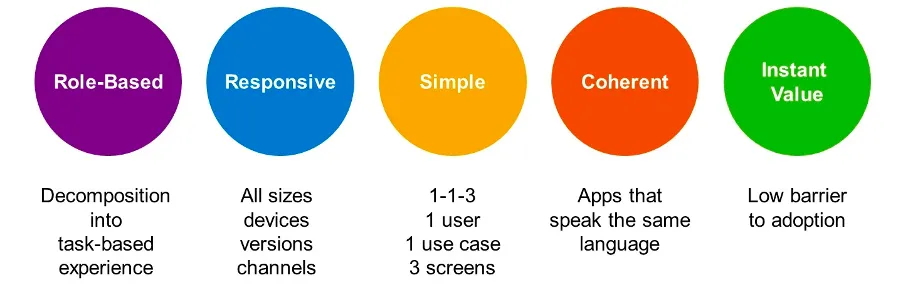
The SAP Fiori user experience paradigm consists of the following pillars:
-
Role-based: Users have access to the applications where they perform their tasks, and the applications are specific to completing this task.
-
Responsive: The application interface is responsive; it adapts to the size and device used by the users to access it.
-
Simple: The scope of the application is simple. There is one user, one use case, and up to three screens for each application.
-
Coherent: The applications are developed with a coherent structure. The apps all speak the same language, and can be implemented in multiple landscapes and environments.
-
Instant value: A low adoption barrier provides instant value, both on the IT-system side and on the user-adoption side.
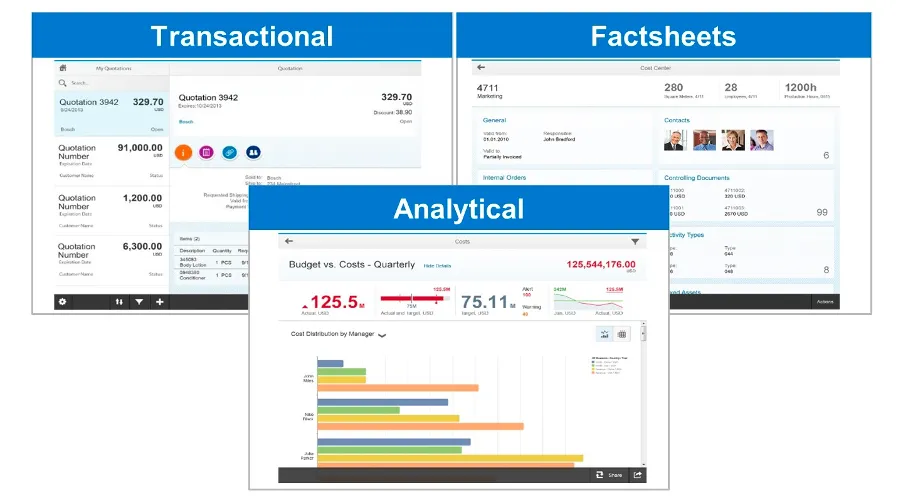
Different types of Fiori apps (UI5):
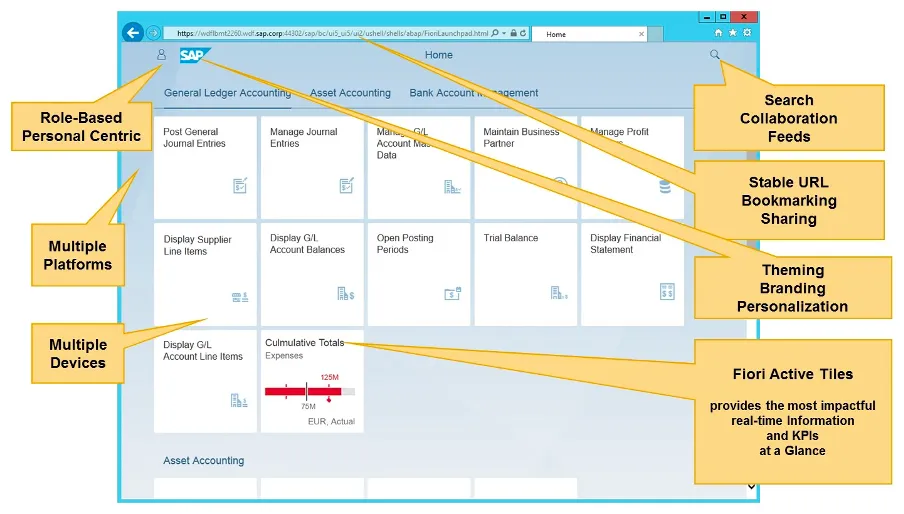
Typical Landing Page:
Events in FI-CA
You can use transaction FQEVENTS to maintain events and their function modules in FI-CA. You can use the function module FKK_FUNC_MODULE_DETERMINE to check the sequence:
- TFKFBM sample function module
- TFKFBS standard function module
- TFKFBC installation-specific function module
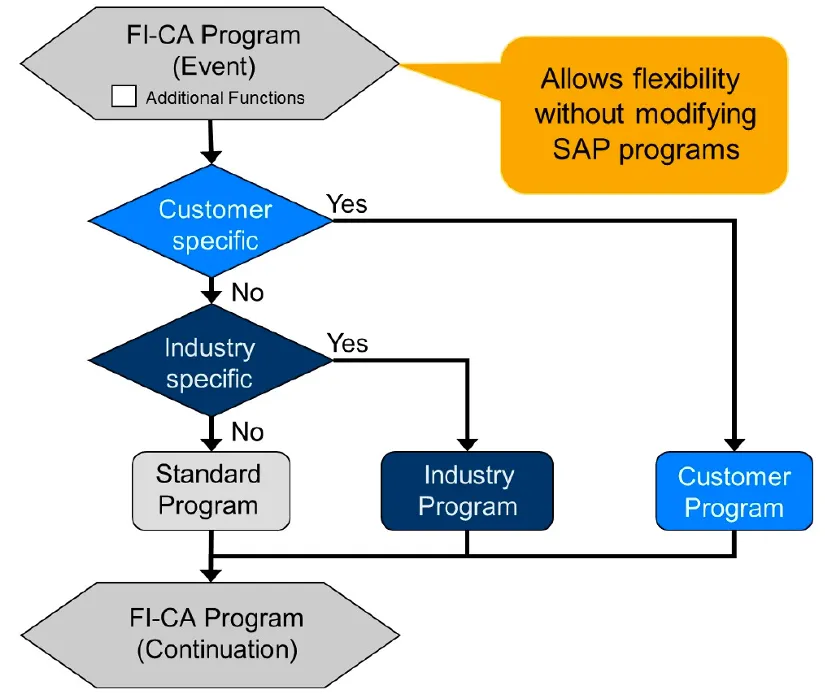
The technical name of the sample function module is formed from code FKK_SAMPLE* and the name (Number/ID) of the event. In the case of a sample function module defined at event 0010, the name would be FKK_SAMPLE_0010. If the Additional functions indicator is set, several industry-specific function modules and several customer-specific function modules can be processed. Along with events that are available to all industry components, additional industry-specific events also exist. You can recognize these from the encryption of the application area in the technical name.
| From Event | To Event | Application |
|---|---|---|
| 0000 | 9999 | Application-Independent |
| M000 | M999 | Media |
| R000 | R999 | Utilities |
| V000 | V999 | Insurance |
| P000 | P999 | Public Sector |
| T000 | T999 | Telecommunication |
| X000 | X999 | Partner Development |
| Z000 | Z999 | Customer Development |
| S000 | S999 | Extended FI-CA |
FI-CA event configuration on SAP Help Portal
Mass Processing in FI-CA
Business processes, such as payment run or dunning run, in which large volumes of data are processed, are realized in FI-CA by using mass activities. Mass activities automatically split the dataset (such as a number of business partners or contract accounts) into multiple technical jobs and process them in parallel, at the same time.
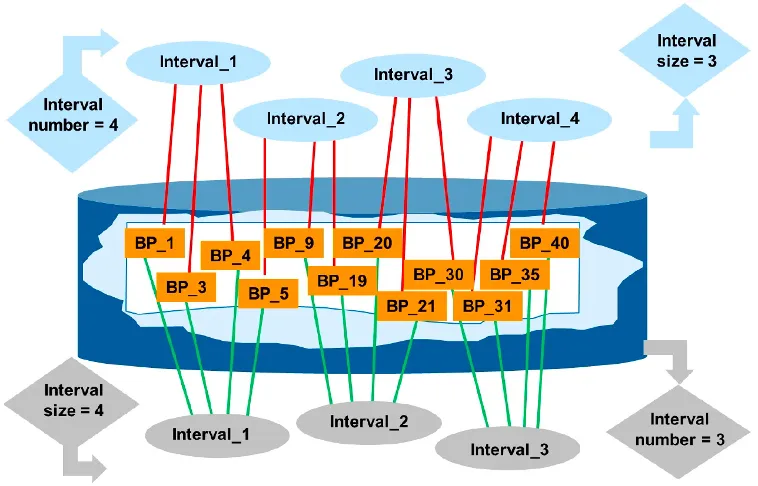
When processing data, the system automatically splits the dataset into multiple parallel jobs. The specifications for distributing the key for the parallel objects are saved in variants, which you must update periodically. For example, you can create a variant for business partners that splits the business partner set to be processed into ten equal intervals. During parallel processing, the system makes sure that the processes do not block each other due to changing accesses to the same database resources.
Mass Activities on SAP Help Portal
Frequently asked questions
Is SAP FI-CA the same as FI-AR/AP?
No. FI-CA (Contract Accounts Receivable and Payable) is a separate subledger built for high-volume, high-frequency transaction processing using mass activities and parallel jobs, while classic FI-AR/AP in FI-CO is designed for lower-volume, document-level receivables and payables in general company accounting.
What industries use SAP FI-CA?
FI-CA was built for industries with very large numbers of business partners and documents — utilities, telecommunications, insurance and public sector are the classic cases — and it is also the subledger underneath SAP BRIM for other high-volume billing scenarios.
Is FI-CA part of S/4HANA or a separate module?
FI-CA runs on both SAP ECC (as part of industry solutions like IS-U) and S/4HANA. In S/4HANA it continues as the FI-CA subledger, integrated with the Universal Journal rather than shipped as a separate bolt-on product.
What is FQEVENTS used for in FI-CA?
FQEVENTS is the transaction used to assign customer-specific and industry-specific function modules to FI-CA's predefined events, so you can hook custom logic into standard FI-CA processing without modifying SAP standard code.
Why does FI-CA rely on mass activities instead of processing documents one at a time?
Because FI-CA is designed for very large data volumes — potentially millions of business partners and documents — mass activities split a run, such as a payment run or dunning run, into parallel technical jobs so it completes within a practical processing window.
Further reading
- FI-CA event configuration — SAP Help Portal
- Mass Activities in FI-CA — SAP Help Portal
Continue your trail
You now have the Fundamentals context.
Save this guide, continue to the next concept or return to the Knowledge Library with your context intact.
Fundamentals
9 resources in this area.

Practical SAP notes, structured for review, reuse and long-term maintenance.
Working on an FI-CA or IS-U implementation? I take on a limited number of advisory and architecture engagements.
Get in touch →