
The master data contains data that remains unchanged over a long period of time.
Mainly categorized as,
- Business Master Data
- Technical Master Data
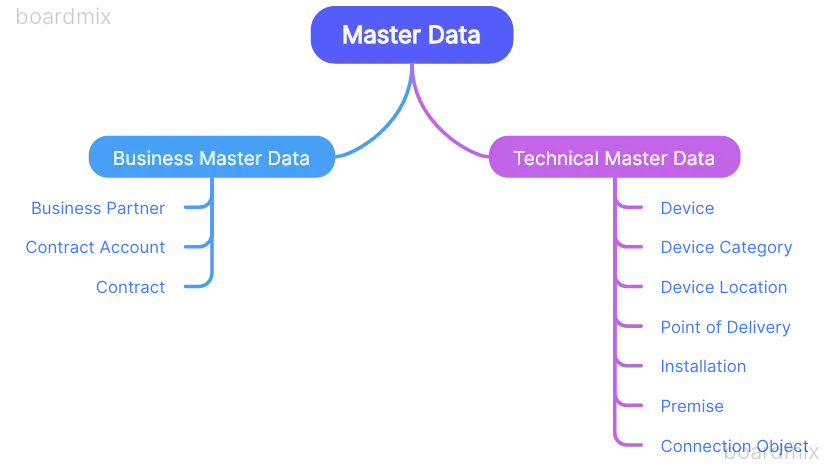
Depending on the industry type there are different data models.
BRIM Master Data:
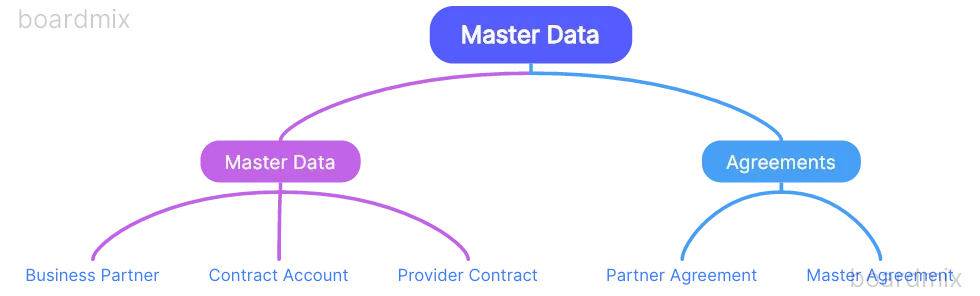
ISU Data Model
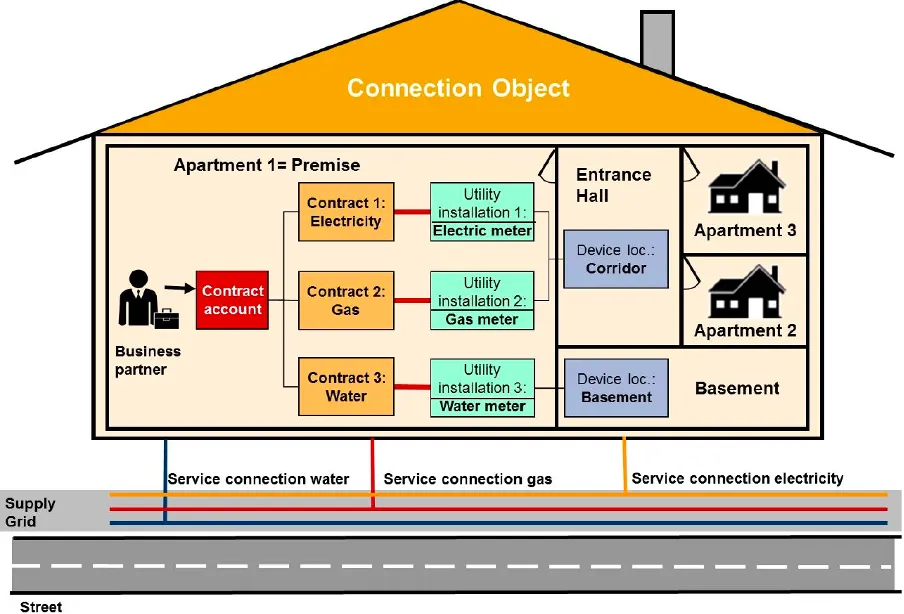
Relationship:
- 1 Business Partner : n Contract Accounts
- 1 Contract Account : n Contracts
- 1 Contract : 1 Installation (time-dependent)
- 1 Connection Object : n Premises
- 1 Connection Object : n Device Locations
- 1 Premise : n Installations
- Device relations depend on scenario
Business Master Data
Any master data that is used for billing a customer for the services provided is grouped under Business data. For e.g., a business partner who is a person or an organization
Business Partner
The business partner represents a person or organization for which you have to process receivables and payments.
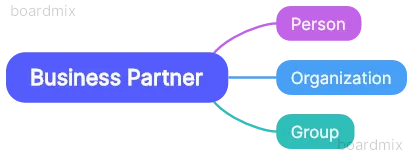 “Business partner” is the generic term used to refer to the parties involved in your interactions with customers.
It can be any of Account, Contact or Employee.
“Business partner” is the generic term used to refer to the parties involved in your interactions with customers.
It can be any of Account, Contact or Employee.
A business partner can also be extended to various partner roles (e.g., general business partner, contract partner, customer, or vendor)
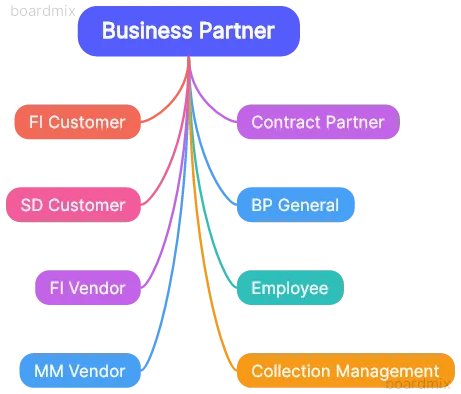
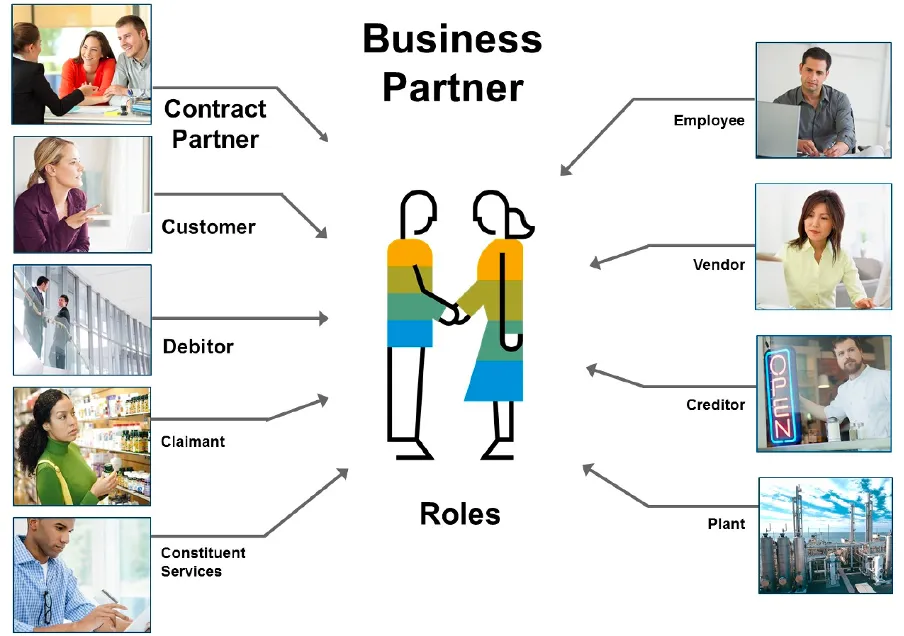
The business partner must exist in the role MKK Contract Partner to be usable in FI-CA.
The business partner role MKK must have a validity period to December 31, 9999.
For business partners who should be used as contract partners in subscription order processing, add the role Customer (FLCU01) or any other role belonging to this category.
For business partners associated with sales processes executed in S/4HANA, add the role FI Customer (FLCU00).
When working in a partner settlement scenario, add the role Vendor (FLVN00).
The business partner category must be selected when a business partner is created and cannot be changed afterwards. It is not possible to create any other business partner categories in customizing. The business partner group can freely be defined and controls the number range.
The business partner can have different addresses for different functions, which are classified according to address types defined in customizing (correspondence and delivery address). The business partner can only have one single standard address
| Concept | Remark |
|---|---|
| Business Partner Category | The data that is available for your business transactions depends on the business partner category |
| Business Partner Role | A business partner can take on different business partner roles , which allow different views of the business partner data depending on the business function |
| Business Partner Relationship | A relationship connects two business partners and is characterized by the business partner relationship category |
| Business Partner Group Hierarchy | You can represent the structure of an organization using the business partner group hierarchy |
Sample Transaction Codes
| Transaction Code | Description |
|---|---|
| BUPT | Business Partner Configuration Menu |
| CAWM | Business Partner Configuration Menu |
| FPP1 | Create Contract Partner |
| FPP2 | Change Contract Partner |
| FPP3 | Display Contract Partner |
| FPP4 | Maintain Payment Data |
| BP | Display Business Partner |
| UKM_BP | Display Credit Management Business Partner |
Sample Process Flow
Customizing
SPRO
SAP Reference IMG
- Financial Accounting
-- Contract Accounts Receivable and Payable
--- Basic Function
---- Contract Partner
Business Partner Number Range:
SPRO
SAP Reference IMG
- Cross Application Components
-- SAP Business Partner
--- Business Partner
---- Basic Settings
----- Number Ranges and Groupings
------ Define number ranges
Assign Business Partner number range to Grouping:
SPRO
SAP Reference IMG
- Cross Application Components
-- SAP Business Partner
--- Business Partner
---- Basic Settings
----- Number Ranges and Groupings
------ Define Groupings and assign number ranges
BP Role: (T-Code: BUSD)
SPRO
SAP Reference IMG
- Cross Application Components
-- SAP Business Partner
--- Business Partner
---- Basic Settings
----- Business Partner Roles
------ Define BP Roles
Make any field as mandatory or optional or hide based for BP role we can do in below path:
SPRO
SAP Reference IMG
- Cross Application Components
-- SAP Business Partner
--- Business Partner
---- Basic Settings
----- Field Groupings
------ Configure Field Attribute per BP role
Iden tification Categores:
SPRO
SAP Reference IMG
- Cross Application Components
-- SAP Business Partner
--- Business Partner
---- Basic Settings
----- identification numbers
------ Define identification Categories
Identification Types:
SPRO
SAP Reference IMG
- Cross Application Components
-- SAP Business Partner
--- Business Partner
---- Basic Settings
----- identification numbers
------ Define identification types
Create Partner Roles:
SPRO
SAP Reference IMG
- Material Management
-- Purchasing
--- Partner Determination
---- Partner Roles
----- Define Partner Roles
Assign Partner Roles to Account Group:
SPRO
SAP Reference IMG
- Material Management
-- Purchasing
--- Partner Determination
---- Partner Roles
----- Define Permissible partner roles per account group
Define Partner Schema:
SPRO
SAP Reference IMG
- Material Management
-- Purchasing
--- Partner Determination
---- Partner settings in supplier master record
----- Define partner schemas
Assign Partner Schema to account groups:
SPRO
SAP Reference IMG
- Material Management
-- Purchasing
--- Partner Determination
---- Partner settings in supplier master record
----- Assign Partner Schemas to account group
Authorization Objects
Authorization objects for the business partner:
Business Partner: Authorization Groups
B_BUPA_GRPWith this authorization object, you control which BPs can be accessed based on the authorization group. This authorization object is used to group the BPs so that only a selected number of users can access these BPs. The value for the group is entered when a BP is being created or changed.
Activity
This field controls which activities are allowed.
Possible values:
01 = Create,
02 = Change,
03 = Display,
F4 = Display in input help,
06 = Delete,
* = All activities
Authorization Group field controls the BP groups that the activities are defined for.
Business Partner: Authorization Types
B_BUPA_ATTWith this authorization object, you control which BP roles can be accessed.
Possible values:
01 = Create,
02 = Change,
03 = Display,
F4 = Display in input help,
06 = Delete,
* = All activities
BP Role field controls the BP roles that the activities are defined for. You can use an asterisk (*) to apply the authorization to all BP roles.
Business Partner: Field Groups
B_BUPA_FDGWith this authorization object you can define authorizations for individual field groups in business partner maintenance. You thereby define which fields in business partner maintenance can be maintained or viewed by a user.
The authorization object consists of the following fields:
Field Group
Here you define which field groups require authorization.
Activity
This field controls which activities are allowed.
Possible values:
01 = Create
02 = Change
03 = Display
06 = Delete
* = All activities
Business Partner: BP Roles
B_BUPA_RLTBusiness Partner Relationships: Relationship Categories
B_BUPR_BZTWith this authorization object, you control which BP relationship categories can be processed.
Possible values:
01 = Create,
02 = Change,
03 = Display,
F4 = Display in input help,
06 = Delete,
* = All activities
Relationship Category field controls the BP relationship categories that the activities are defined for. You can use an asterisk (*) to apply the authorization to all BP relationship categories.
Business Partner Relationships: Field Groups
B_BUPR_FDGWith this authorization object, you can define authorizations for individual field groups in business partner relationship maintenance. You thereby define which fields of the business partner relationship can be maintained or viewed by a user.
The authorization object consists of the following fields:
Field Group
Here you define which field groups require authorization.
Activity
This field controls which activities are allowed.
Possible values:
01 = Create
02 = Change
03 = Display
06 = Delete
* = All activitiesB_BUP_PCPTWith this authorization object, you control whether a user has the authorization to view, block, or unblock BPs. The authorization object consists of the field Activity. This field controls which activities are allowed.
Possible values:
03 = Display
05 = Block
95 = Unblock
49 = RequestB_BUPA_ADRWith this authorization object, you control authorizations for addresses of BPs. This check is performed only on BP instances with employee personal addresses. The authorization object consists of the following fields:
Activity
This field controls which activities are allowed.
Possible values:
01 = Create
02 = Change
03 = Display
06 = Delete
F4 = Display in input help
* = All activities

SENSTVT To grant access to the employee personal address data, use E.B_BUPA_BNKWith this authorization object, you control authorizations for bank records of BPs. This check is performed only on BP instances with employee personal bank records.
The authorization object consists of the following fields:
Activity
This field controls which activities are allowed.
Possible values:
01 = Create
02 = Change
03 = Display
06 = Delete
F4 = Display in input help
* = All activities

SENSTVT To grant access to the employee personal bank data, use E.
Authorization object for customer master data:
V_KNA1_VKOFunction Modules
| Function Module | Description |
|---|---|
| BAPI_BUPA_ADDRESSES_GET | SAP BP, BAPI: Determine All Addresses |
| BAPI_BUPA_ADDRESS_CHANGE | SAP BP, BAPI: Change Address |
| BAPI_BUPA_ADDRESS_GETDETAIL | SAP BP, BAPI: Read Address |
| BAPI_BUPA_BANKDETAILS_GET | SAP BP, BAPI: Determine All Bank Details |
| BAPI_BUPA_BANKDETAIL_CHANGE | SAP BP, BAPI: Change Bank Details |
| BAPI_BUPA_BANKDETAIL_GETDETAIL | SAP BP, BAPI: Read Bank Details |
| BUPA_SEPA_MANDATES_CHANGE | Wrapper API to change SEPA Mandates for a Business Partners |
| BUPA_SEPA_MANDATES_GETLIST | Wrapper API to get SEPA Mandates for Business Partners |
Below function module can search for objects in the technical master data (such as installation, installation facts, devices, and registers) belonging to a business partner or contract account.
ISU_ENVIRONMENT_PREMISEBelow function module can be used to determine address numbers.
ISU_DB_PARTNER_SINGLEEvents
| Event | Description | Sample Module |
|---|---|---|
| 1050 | Business Partner: Check Dependencies to Partner | |
| 1051 | Business Partner: Add Check Digits | |
| 1052 | Business Partner: Report Changes | |
| 1053 | Business Partner: Determine BKVID for Automatic Creation | |
| 1054 | Business Partner: Determine CCARD_ID for Automatic Creation | |
| 1055 | Emulation of Parameters in FKK_BUPA_MAINTAIN_SINGLE | |
| 1056 | Business Partner: Determine Business Partner | |
| 1080 | Change Bank Data: Determine Contracts for Business Partner | |
| 1081 | Change Bank Data: Print Correspondence | |
| 1082 | Change Bank Data: Create Correspondence | |
| 1083 | Change Payment Data: Modify Contract Account Change | |
| 1084 | Change Payment Data: Restrict VKONT/VTREF Selected | |
| 1085 | Change Payment Data: Enqueue/Dequeue for VTREF | |
| 1086 | Change Payment Data: Display VTREF | |
| 1087 | Change Payment Data: Modify VTREF Changes |
Package
| Package | Short Description |
|---|---|
| BUPA | SAP Business Partner |
| FKKB | Contract A/R & A/P: Central Objects |
| FKK_PRIVACY | FI-CA: Data Privacy for Personal Data |
Function Group
| Function Group | Program | Short Description |
|---|---|---|
| BUBA_3 | SAPLBUBA_3 | SAP BP: External BAPI Function Modules |
| BUBA_5 | SAPLBUBA_5 | SAP BP: APIs |
| FKBV | SAPLFKBV | FI-CA: Business Partner |
| FKG0 | SAPLFKG0 | FI-CA applic. for BP maintenance (CBP) |
| FKG1 | SAPLFKG1 | Mass Activities for Shadow Table |
| FKGP | SAPLFKGP | Subscreen: Business Partner Header Line |
| FKGP_DUPL | SAPLFKGP_DUPL | Duplicate Check on Creation of BPartner |
| FKKC | SAPLFKKC | Contract Acct Maint. in Bus.Partner Meth. |
| FKKC2 | SAPLFKKC2 | Contract Account Functions |
| FKKDPB | SAPLFKKDPB | Data Protection: Central Check Modules |
| FKKG | SAPLFKKG | Business Partner Selection Window |
| FKKU | SAPLFKKU | Update Modules for Account |
Tables
| Table | Description |
|---|---|
| BUT000 | BP: General data I |
| BUT001 | BP: General data II |
| BUT020 | BP: Addresses |
| BUT021 | BP: Address usages |
| BUT021_FS | Time-Dependent Address Usages |
| BUT0BANK | Business Partner: Bank Data |
| BUT0BK | BP: Bank Details |
| BUT100 | BP: Roles |
Archiving Objects
The archiving object for business partners
CA_BUPAIf a business partner is a customer, you have to archive all FI data using archiving object FI_ACCRECV before you can archive the business partner. This principle also applies to vendors (archiving object FI_ACCPAYB) and contract accounts (archiving object FI_FICA) accordingly.
Contract Account
The contract account is a unit that groups business partner postings. Before a document can be posted, a contract account must be assigned to a business partner in the role MKK.
The contract account category defines the following attributes:
- The number range that is allowed for external or internal number assignment.
- The editing screens or data fields of the contract account transaction
- Whether you can assign one or more business partners
- Whether you can assign one or more contracts
- Whether it is a collective bill account
- Whether it is a one-time account
The contract account data controls the FI-CA processes:
- The clearing category controls payment allocation and the clearing of receivables.
- The dunning procedure determines the dunning levels and the dunning activities.
- The account determination ID is used to determine the general ledger accounts.
- The payment term determines the due date and the cash discount deadline.
- The creditworthiness reflects a business partner’s payment patterns.
- The interest key determines the conditions for interest calculation.
- The tolerance group defines limits for payment differences.
Payment Terms:
The FI-CA payment terms contain data for determining the due date and cash discount terms.
The FI-CA payment terms reference FI payment terms for receivables (incoming payment) and payables (outgoing payment).
The FI-CA payment terms support the due date correction to a working day in connection with the factory calendar.
The FI-CA payment terms support the single-level cash discount procedure.
The FI payment terms provide different rules for determining the due date for receivables and payables.
Processing Locks
Postings to a contract account can be prevented by a central posting lock. This prevents postings, clearing, reversal and clearing reset for the involved account.
In addition, the open items in this account are not dunned.
During online clearing processing, open items of locked contract accounts are flagged with an appropriate icon. It is not possible to activate these items.
Individual business processes can also be prevented by locks. You can set these locks for all items at contract account level or at the level of an individual item in the parametrization table.
The lock reason is defined in customizing and can have a time limit. Once this limit has expired, the locks are deactivated.
Company Code Group
The company code group includes all company codes that can be used to post to a contract account.
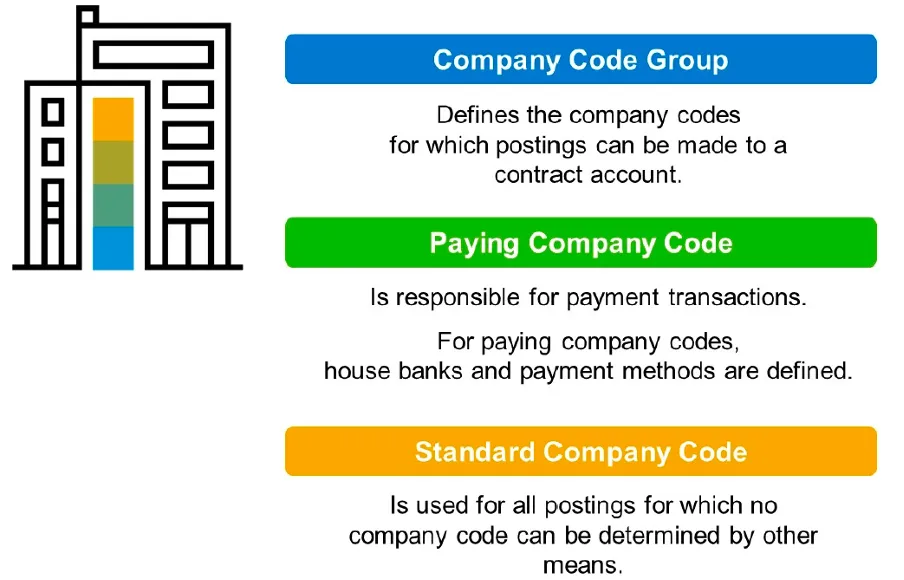
One company code group is assigned to each contract account. Company code groups can overlap.
For example, group 1 can consist of company codes 0001, 0002 and 0003, and group 2 can consist of company codes 0001 and 0003.
You can use event 1010 to check whether a company code group is permitted in a contract account. This enables you to prevent cross-country groups from being used, for example. Paying Company Code.
Paying Company Code
Exactly one paying company code is always assigned to each company code group in customizing.
A paying company code is responsible for payment transactions.
You have to define house banks and payment methods for paying company codes.
Several company code groups can have the same paying company code. The paying company code does not have to be in the company code group itself.
You can also specify the paying company code in a business partner item. In this case, the specified code overrides the paying company code determined via the company code group of the contract account. If a paying company code specified in the line item is in a different country than the paying company code determined via the contract account, you also have to specify a payment method in the line item. In this case, you cannot use the payment methods from the contract accounts because they refer to a different country.
Standard Company Code
A standard company code is allocated to each contract account. You use the standard company code for all postings for which no company code can be determined by other means (payment on account).
Sample Transaction Codes
| Transaction Code | Description |
|---|---|
| CAA1 | Create Contract Account |
| CAA2 | Change Contract Account |
| CAA3 | Display Contract Account |
Sample Process Flow
Customizing
SPRO
SAP Reference IMG
- Financial Accounting
-- Contract Accounts Receivable and Payable
--- Basic Function
---- Contract Accounts
Number Range Object
Posting Areas:
| Posting Area | Description |
|---|
Tables
| Table | Description |
|---|---|
| FKKVK | Contract Account Header |
| FKKVKP | Contract Account Partner-Specific |
Authorization Objects
FI-CA Contract Account: Authorization Group
F_KKVK_BEGFI-CA Contract Account: Company Code Authorization
F_KKVK_BUKContract Account: Authorization for Individual Field Groups
F_KKVK_FDGFI-CA Contract Acct: Contract Acct Type Authorization
F_KKVK_VKTFunction Modules / BAPI
| Function Module | Description |
|---|---|
| FKK_ACCOUNT_UPDATE | Fortschreiben des Kontos zu einem Geschäftspartner |
| FKK_PARTNER_CHECK | Geschäftspartner prüfen |
| FKK_PARTNER_NAME_GET | setzt den Namen des Geschäftspartners zu einem String zusammen |
| BAPI | Description |
|---|
Events
| Event | Description | Sample Module |
|---|---|---|
| 1010 | Contract Account: Check Company Code Group | |
| 1017 | Contract Account: Determine Proposal Values | |
| 1018 | Contract Account: Header Data for Direct Input | |
| 1019 | Contract Account: Add Check Digits | |
| 1020 | Contract Account: Hold Data for Exchange with CRM | |
| 1021 | Contract Account: Trigger Data Exchange with CRM | |
| 1022 | Contract Account: Set Business Agreement Class for CRM | |
| 1023 | Contract Account: Set Standard Agreement for CRM | |
| 1024 | Contract Account: Set Contr. Acct Cat. for Creation via CRM | |
| 1025 | Contract Account: Report Changes | |
| 1026 | Contract Account: Check Dependencies for Deletion Indicator | |
| 1027 | Contract Account: Determine Name for Display | |
| 1028 | Account: Region Check | |
| 1030 | Contract Account: Update BI Delta Queue | |
| 9501 | BAPI: Create Contract Account | |
| 9502 | BAPI: Change Contract Account |
Archiving Objects
Contract
Sample Transaction Codes
| Transaction Code | Description |
|---|---|
| ES20 | Create Contract |
| ES21 | Change Contract |
| ES22 | Display Contract |
Sample Process Flow
Customizing
SPRO
SAP Reference IMG
- Financial Accounting
-- Contract Accounts Receivable and Payable
--- Business Transactions
---- Security Deposits
Number Range Object
Posting Areas:
| Posting Area | Description |
|---|---|
| 0500 | Contract: Determine Standard Account Assignment |
Available functions: Company Code, Profit Center, Segment, Std Division, Business Area.
Technical Field Names: BUKRS, PRCTR, SEGMT, STDSP, GSBER
Tables
| Table | Description |
|---|
Authorization Objects
Possible values
Function Modules / BAPI
| Function Module | Description |
|---|
| BAPI | Description |
|---|
Events
| Event | Description | Sample Module |
|---|---|---|
| 0200 | Contract: Determine Account and Partner | |
| 0201 | Contract: Determine Name | |
| 0202 | Contract: Search Help VTREF/GPART/VKONT | |
| 0203 | Contract Interval: Determine Account and Partner | |
| 0204 | Contract: Search for Similar Numbers | |
| 0205 | Contract: Master Data Existence Check | |
| 0206 | Contract: Collective Search Help for Contract Ref. | |
| 0207 | Input Help VTRE2 Dependent on VTREF/GPART/VKONT | |
| 0208 | Accounting Transfer: Determine Contract ID from GUID | |
| 0209 | Determine GPART/VKONT for VTREF/VTREF Table |
Continue your trail
You now have the Basic Functions context.
Save this guide, continue to the next concept or return to the Knowledge Library with your context intact.
Basic Functions
22 resources in this area.

Practical SAP notes, structured for review, reuse and long-term maintenance.
Working on an FI-CA or IS-U implementation? I take on a limited number of advisory and architecture engagements.
Get in touch →