
Ask a project team to “map the UAE eInvoice fields” and most will start by screenshotting a sample PDF invoice and drawing arrows to XML tags. That approach breaks the first time a Free Zone supplier, a self-billing arrangement or a foreign-currency invoice shows up — because a PDF label and a PINT-AE business term are not always the same thing.
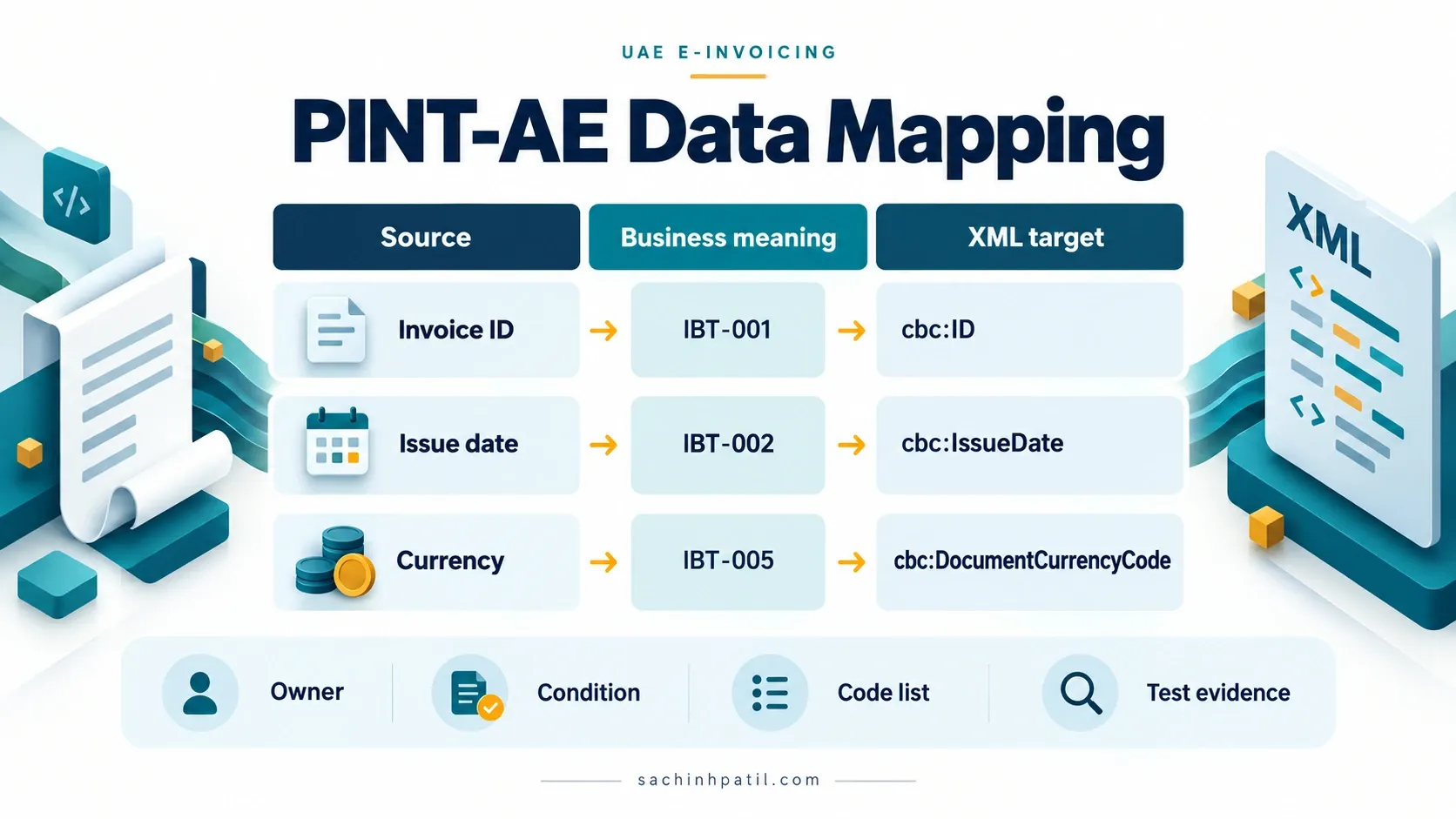
The real target is a structured PINT-AE document with defined business terms, code lists, cardinalities and validation rules. Some data comes directly from the invoice transaction. Some comes from supplier or buyer master data. Some is derived from the business scenario. And some technical values, such as the UUID, are generated as part of the Electronic Invoicing process rather than entered by a business user.
This guide takes an ERP-neutral view. It explains the data that an enterprise needs to identify and govern before deciding where a particular field is stored in SAP, Oracle, Microsoft Dynamics or a custom billing platform — and, further down, how that mapping shifts for a self-billing arrangement or for the separate Tax Data Document your ASP reports to the FTA.
What you will walk away with: the complete 51/49-field mandatory catalogue with plain-English descriptions, every controlled code list you actually need (not the full UNECE encyclopedia), a worked XML skeleton you can hold up against your own mapping sheet, and the mistakes that most commonly slip through review.
Quick answer
For an Electronic Tax Invoice, the UAE Ministry of Finance Mandatory Fields publication identifies 51 mandatory business fields across six groups:
The full PINT-AE semantic model contains additional optional and conditional business terms for references, delivery, payment instructions, allowances, charges, supporting documents, tax representatives, billing periods, item classifications and special UAE scenarios.
The safest mapping approach is:
Mandatory does not always mean XML cardinality 1..1
This is one of the most important points in the UAE data model.
The Ministry of Finance Mandatory Fields publication identifies the business data that is mandatory for an Electronic Tax Invoice. The PINT-AE semantic model separately defines XML cardinality and conditional business rules.
These concepts are related, but they are not identical.
For example:
- the MoF Mandatory Fields document lists Payment due date as mandatory;
- the PINT-AE semantic model defines
IBT-009 Payment due datewith cardinality0..1; - other PINT rules and invoice conditions determine when it must actually be present.
The same pattern occurs with tax identifiers, tax rates and scenario-specific information.
Do not convert a PINT cardinality into a business rule by itself. The semantic model, AE-specific Schematron rules and Ministry guidance need to be read together.
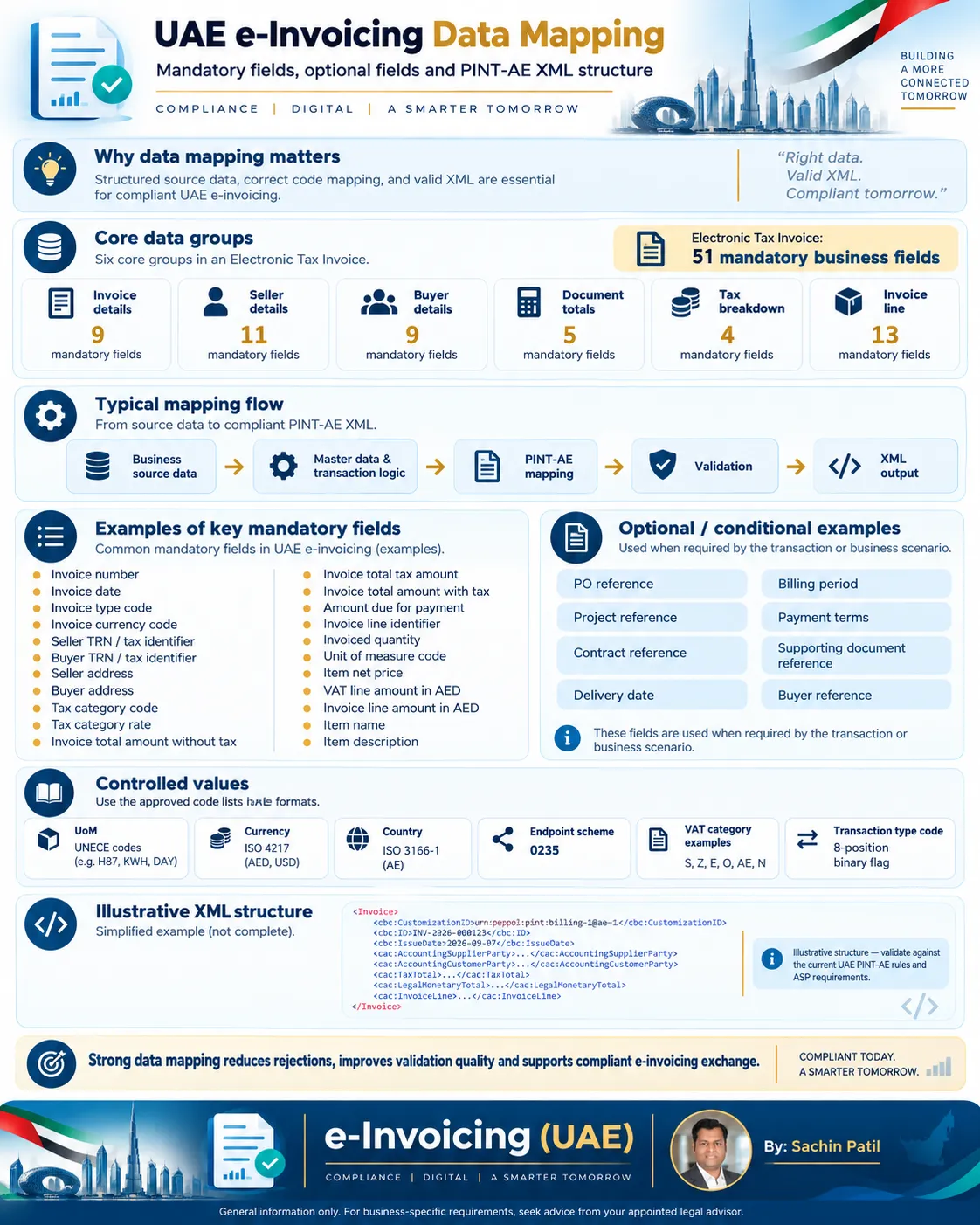
Where the data usually comes from
Before looking at individual fields, it helps to separate the data into source domains.
A field should have a single governed source wherever possible. If the same TRN, address or invoice total can be populated from two systems independently, reconciliation problems are almost guaranteed.
Mandatory field catalogue — Electronic Tax Invoice
The tables below use the Ministry of Finance field names. The “Value / format” column gives the official format, governing code list, or a safe example where the source provides one.
Invoice details — 9 mandatory fields
| # | Status | Field | Description | Value / format |
|---|---|---|---|---|
| 1 | M | Invoice number | Unique identification of the Invoice. | Unique business identifier, e.g. INV-2026-000123 |
| 2 | M | Invoice date | Date when the Invoice was issued. | YYYY-MM-DD |
| 3 | M | Invoice type code | Functional type of the document. | Tax Invoice 380; out-of-scope Commercial Invoice 480. Credit Note codes are handled by the Credit Note transaction. |
| 4 | M | Invoice currency code | Currency in which invoice amounts are stated, except amounts specifically required in tax accounting currency. | ISO 4217 alpha-3, e.g. AED, USD, EUR |
| 5 | M | Invoice transaction type code | Eight-position binary scenario flag. More than one position can be 1. |
Example standard transaction 00000000; continuous supply 00001000; export 00000001 |
| 6 | M | Payment due date | Date when payment is due. | YYYY-MM-DD |
| 7 | M | Business process type | Business process context used to process the document. | urn:peppol:bis:billing for standard billing |
| 8 | M | Specification Identifier | Identifies the PINT-AE ruleset the document declares compliance with. | Must start with urn:peppol:pint:billing-1@ae-1 for standard billing |
| 9 | M | Payment means type code | Coded method by which payment is expected or settled. | UAE PINT-AE subset of UN/CEFACT 4461 — 9 codes only; see Payment means codes below |
Seller details — 11 mandatory fields
| # | Status | Field | Description | Value / format |
|---|---|---|---|---|
| 10 | M | Seller name | Full formal name of the Seller. | Registered legal name |
| 11 | M | Seller electronic address | Electronic address used for routing/status. For UAE participants, this is based on the TIN. | 10-digit TIN as endpoint value |
| 12 | M | Seller electronic identifier | Scheme identifying the Seller electronic address. | 0235 for UAE |
| 13 | M | Seller legal registration identifier | Official identifier of the Seller as a legal entity/person. | Trade licence / other official registration number |
| 14 | M | Seller legal registration identifier type | Nature of the UAE legal registration identifier. | TL Trade/Commercial Licence; EID Emirates ID; PAS Passport; CD Cabinet Decision |
| 15 | M | Seller tax identifier | Seller tax identifier. For a UAE VAT-registered Seller, provide TRN. | 15-digit TRN where applicable |
| 16 | M | Seller tax scheme code | Scheme of the tax identifier. | VAT when TRN is supplied |
| 17 | M | Seller address line 1 | Main Seller address line. | Text |
| 18 | M | Seller city | City/town/village of Seller address. | Text |
| 19 | M | Seller country subdivision | Emirate/state/province/region. | Text, e.g. Dubai |
| 20 | M | Seller country code | Country code of Seller address. | ISO 3166-1 alpha-2; UAE = AE |
Buyer details — 9 mandatory fields
| # | Status | Field | Description | Value / format |
|---|---|---|---|---|
| 21 | M | Buyer name | Full name of the Buyer. | Registered / business name |
| 22 | M | Buyer electronic address | Electronic address to which the invoice is delivered. | Normally buyer TIN; predefined endpoints apply in specific official scenarios |
| 23 | M | Buyer electronic identifier | Scheme identifying the Buyer electronic address. | 0235 for UAE |
| 24 | M | Buyer tax identifier | Buyer tax identifier where applicable. For a UAE VAT-registered Buyer, this is the TRN. | 15-digit TRN where applicable |
| 25 | M | Buyer tax scheme code | Scheme of Buyer tax identifier. | VAT when TRN is supplied |
| 26 | M | Buyer address line 1 | Main Buyer address line. | Text |
| 27 | M | Buyer city | City/town/village of Buyer address. | Text |
| 28 | M | Buyer country subdivision | Emirate/state/province/region. | Text |
| 29 | M | Buyer country code | Country code of Buyer address. | ISO 3166-1 alpha-2; UAE = AE |
Document totals — 5 mandatory fields
| # | Status | Field | Description | Value / format |
|---|---|---|---|---|
| 30 | M | Sum of Invoice line net amount | Sum of all invoice line net amounts. | Decimal in invoice currency |
| 31 | M | Invoice total amount without tax | Total invoice value excluding tax. | Decimal |
| 32 | M | Invoice total tax amount | Total tax amount for the Invoice. | Decimal |
| 33 | M | Invoice total amount with tax | Total invoice amount including tax. | Decimal |
| 34 | M | Amount due for payment | Outstanding amount requested for payment. | Decimal |
The core total relationship should be designed so that the source system can explain each number, not only produce a final value.
Tax breakdown — 4 mandatory fields
| # | Status | Field | Description | Value / format |
|---|---|---|---|---|
| 35 | M | Tax category taxable amount | Sum of taxable amounts for a specific tax category and rate. | Decimal |
| 36 | M | Tax category tax amount | Total tax amount for the category. | Decimal |
| 37 | M | Tax category code | Coded UAE VAT category. | PINT-AE AETaxCat code list |
| 38 | M | Tax category rate | Percentage applying to the tax category where relevant. | Percentage; UAE standard rate is normally 5 for standard-rated supplies |
Current PINT-AE VAT category codes include:
| PINT-AE code | Meaning |
|---|---|
S |
Standard rate |
E |
Exempt from tax |
O |
Outside scope / not subject to tax |
AE |
VAT Reverse Charge |
Z |
Zero rated |
Ν |
Standard rate additional VAT |
Ν (U+039D), not the Latin N a keyboard produces by default — verbatim as published. Copy it from the source code list rather than typing it, or a byte-level comparison will fail even though the character looks identical on screen. AE (Reverse Charge — the buyer self-accounts VAT instead of the seller charging it) and this Ν category are both valid but are not exercised in the worked example later in this guide; treat them as scenario-specific additions to test deliberately.
Invoice line — 13 mandatory fields
| # | Status | Field | Description | Value / format |
|---|---|---|---|---|
| 39 | M | Invoice line identifier | Unique identifier of the line within the Invoice. | e.g. 1, 10, 0001 |
| 40 | M | Invoiced quantity | Quantity of goods/services charged on the line. | Decimal |
| 41 | M | Unit of measure code | UoM applicable to invoiced quantity. | UNECE Recommendation 20 / 21 codes |
| 42 | M | Invoice line net amount | Total line amount before tax. | Decimal in invoice currency |
| 43 | M | Item net price | Unit price excluding tax after item price discount. | Decimal |
| 44 | M | Item gross price | Unit price excluding tax before item price discount. | Decimal |
| 45 | M | Item price base quantity | Number of item units to which the price applies. | Decimal, commonly 1 |
| 46 | M | Invoiced item tax category code | UAE tax category applicable to the line. | S, E, O, AE, Z, N as allowed by current PINT-AE rules |
| 47 | M | Invoiced item tax rate | Tax rate applying to the line where relevant. | Percentage |
| 48 | M | VAT line amount in AED | Tax amount for the line expressed in AED. | Decimal, currencyID="AED" |
| 49 | M | Invoice line amount in AED | Total amount payable for the line expressed in AED. | Decimal, currencyID="AED" |
| 50 | M | Item name | Short name of the item. | Text |
| 51 | M | Item description | Description of goods/services. | Text |
Common UNECE UoM examples include:
| Code | Meaning |
|---|---|
H87 |
Piece |
KGM |
Kilogram |
MTR |
Metre |
LTR |
Litre |
MTK |
Square metre |
MTQ |
Cubic metre |
KWH |
Kilowatt hour |
DAY |
Day |
HUR |
Hour |
MIN |
Minute |
C62 |
Unit (“one” — a dimensionless count) |
H87 (Piece) is what the reference examples actually use for physical goods — a countable, discrete item. C62 (Unit/"one") is a dimensionless count, better suited to services billed as a single occurrence. Defaulting every non-obvious line to C62 because it sounds generic is a common shortcut worth avoiding — check what your product/service master actually represents first.
Packaging codes from UNECE Recommendation 21 are used with the required X prefix where applicable.
Electronic Tax Invoice vs Commercial Electronic Invoice
The Ministry Mandatory Fields document distinguishes the mandatory dataset for an Electronic Tax Invoice from a Commercial Electronic Invoice.
Do not assume one mapping template can be applied blindly to every document category. Document type, VAT status and transaction scenario determine the applicable rules.
PINT-AE Billing, Self-Billing and TDD: three specifications, one mapping sheet
Most implementations only ever need the standard Billing mapping covered above. But two other UAE Peppol Authority specifications reuse the same underlying data model, and confusing them with “more optional fields” is a common source of scope-creep in a mapping workshop.
The standard specification. The supplier issues the Tax Invoice, Commercial Invoice or Credit Note. Everything mapped above applies exactly as written.
Document types 380, 480, 381.Used when the buyer produces the invoice on the supplier's behalf under a self-billing agreement. It reuses the entire PINT-AE Billing data model — every code list in this article is identical between the two specifications.
Document types 389, 261 replace 380/381.CustomizationID becomes urn:peppol:pint:selfbilling-1@ae-1 and ProfileID becomes urn:peppol:bis:selfbilling.
A separate reporting envelope the ASP builds to report an invoice to the FTA — it is not a field on your Invoice mapping sheet and not a wrapper around the invoice itself.
Root elementpxs:TaxData, its own urn:peppol:taxdata:ae-1 / urn:peppol:taxreporting identifiers.
cac:AccountingSupplierParty still holds the real seller's TRN, TIN and legal identity, and cac:AccountingCustomerParty still holds the real buyer's — exactly as in standard Billing. The only confirmed differences are the document-type code and the two profile identifiers above; there is no separate "self-billing authorisation" business term in the XML.
A TDD deserves its own line in a mapping workshop, not a spot on the invoice checklist:
- Its
pxs:ReportedDocumentlayer is a flattened data extract — VAT TRNs and totals only, no full address or legal-entity detail — built from your already-mapped invoice, not something you map independently. - Its optional
pxs:SourceDocumentlayer can carry the entire original UBL invoice when the ASP’s implementation requires it. - It carries a reporting action (Submit / Resubmit / Withdraw / Failed), a reporting role (Sender / Receiver) and a scope (Domestic / International Peppol / International non-Peppol) — three small controlled code lists that belong to the ASP integration, not to ERP invoice mapping.
If your organisation only issues standard invoices as a supplier, you can safely treat this section as background — the rest of this guide is everything you need. If you also self-bill suppliers, or you are building the interface that talks to an ASP for FTA reporting, use the callouts above to keep the two specifications from bleeding into one mapping sheet.
Important system-generated or technical fields
The MoF’s 51-field list focuses on business invoice data. The final PINT-AE XML contains additional technical elements that still matter.
| Status | PINT-AE term | Why it matters | Typical handling |
|---|---|---|---|
| S | Unique Identifier Number / UUID (BTAE-07) |
Globally unique identifier for the Electronic Invoice. | Official Guidelines assign UUID generation to the ASP. |
| M | Specification identifier (IBT-024) |
Declares the PINT-AE specialization. | urn:peppol:pint:billing-1@ae-1 prefix |
| M | Business process type (IBT-023) |
Identifies the billing process context. | urn:peppol:bis:billing |
| M | Endpoint scheme | Identifies the electronic address scheme. | UAE scheme 0235 |
| C | Tax accounting currency (IBT-006) |
Required when tax accounting/reporting currency differs from document currency under the applicable rule. | UAE uses AED for required tax/accounting values |
| C | Currency exchange rate (BTAE-04) |
Exchange between document currency and tax currency. | Decimal exchange rate |
This separation is useful in interface design:
Business / ERP data
        +
Derived compliance data
        +
ASP / technical data
        =
Final PINT-AE XML
Optional and conditional fields worth mapping deliberately
PINT-AE provides many more business terms than the 51-field minimum. They should not all be forced into every invoice.
Use them when the transaction needs them.
References and document context
Open reference fields
| Status | PINT-AE field | Description | Typical value / condition |
|---|---|---|---|
| O | Invoice issue time (IBT-168) |
Time when invoice was issued. | Time value |
| C | VAT point date (IBT-007) |
Date VAT becomes accountable when different from invoice issue date. | YYYY-MM-DD |
| O | Buyer reference (IBT-010) |
Buyer’s internal routing reference. | Department / requester / routing ID |
| O | Project reference (IBT-011) |
Project to which invoice relates. | Project ID |
| O | Contract reference (IBT-012) |
Contract identifier. | Contract number |
| O | Contract value (BTAE-05) |
Current contract value. | Decimal |
| O | Purchase order reference (IBT-013) |
Buyer’s PO identifier. | PO number |
| O | Sales order reference (IBT-014) |
Seller sales order reference. | SO number |
| O | Receiving advice reference (IBT-015) |
Reference to receiving advice. | Reference ID |
| O | Despatch advice reference (IBT-016) |
Reference to despatch advice. | Reference ID |
| O | Tender / lot reference (IBT-017) |
Procurement/tender identifier. | Tender / lot number |
| O | Invoiced object identifier (IBT-018) |
Object on which invoice is based. | Asset, meter, contract object, etc., using appropriate scheme |
| O | Buyer accounting reference (IBT-019) |
Buyer-side accounting booking reference. | Cost centre / account reference text |
| O | Customs reference number (BTAE-21) |
Customs reference for export/import transaction. | Customs reference |
| O | Invoice note (IBT-022) |
Unstructured note relevant to the Invoice. | Free text |
| C | Principle ID (BTAE-14) |
Principal’s TRN in disclosed-agent billing. | TRN when agent scenario applies |
Payment terms and preceding invoices
Open payment and preceding invoice fields
| Status | Field | Description | Typical value / condition |
|---|---|---|---|
| O/C | Payment terms (IBT-020) |
Textual payment conditions. | Within 30 days |
| O/C | Terms amount (IBT-176) |
Amount to which an instalment/payment term applies. | Decimal |
| O/C | Terms instalment due date (IBT-177) |
Due date for the terms amount. | YYYY-MM-DD |
| O/C | Terms payment instructions ID (IBT-187) |
Links terms to payment instruction. | Identifier |
| C | Preceding Invoice reference (IBT-025) |
Previous invoice identifier. | Required in scenarios such as adjustments/crediting as applicable |
| O | Preceding Invoice issue date (IBT-026) |
Issue date of preceding invoice. | YYYY-MM-DD |
The June 2026 Guidelines also explain the use of preceding invoice references for advance-payment handling.
Seller, Buyer and party detail enrichments
Open party detail fields
| Status | Field | Description | Typical value / condition |
|---|---|---|---|
| O | Seller trading name (IBT-028) |
Trading/business name different from legal Seller name. | Text |
| O | Seller identifier (IBT-029) |
Additional Seller identifier. | ISO 6523 scheme when used |
| C | Authority Name (BTAE-12) |
Authority issuing Seller Trade/Commercial Licence. | Required when legal registration type is TL |
| C | Passport issuing country (BTAE-18) |
Country issuing passport. | Required when type is PAS; ISO country code |
| O | Seller address lines 2/3 | Additional Seller address information. | Text |
| O | Seller postcode | Seller postal code where relevant. | Text |
| O | Seller contact point / phone / email | Operational contact information. | Text |
| O | Buyer trading name (IBT-045) |
Buyer trading name. | Text |
| O | Buyer identifier (IBT-046) |
Additional Buyer identifier. | Identifier + optional scheme |
| O/C | Buyer legal registration identifier (IBT-047) |
Official Buyer legal registration. | Particularly relevant to Commercial Electronic Invoice dataset |
| O/C | Buyer legal registration identifier type (BTAE-16) |
Nature of Buyer legal registration. | TL, EID, PAS, CD |
| C | Buyer Authority Name (BTAE-11) |
Trade licence issuing authority. | Required when applicable |
| C | Buyer passport issuing country (BTAE-19) |
Passport issuing country. | Required when type is PAS |
| O | Buyer address lines 2/3 | Additional Buyer address information. | Text |
| O | Buyer postcode | Buyer postal code. | Text |
| O | Buyer contact point / phone / email | Buyer contact information. | Text |
| C | Beneficiary ID (BTAE-01) |
TRN/TIN of beneficiary in relevant Free Zone scenario. | Scenario dependent |
| O/C | Payee fields | Payee details where Payee differs from Seller. | Payee name/identifier |
| O/C | Seller tax representative | Tax representative identity/address where applicable. | Scenario dependent |
Delivery and billing period
Open delivery and billing-period fields
| Status | Field | Description | Possible values / condition |
|---|---|---|---|
| O | Deliver-to party name (IBT-070) |
Recipient of delivered goods/services. | Text |
| O | Incoterms (BTAE-22) |
International trade term. | Applicable Incoterm |
| O | Deliver-to location identifier (IBT-071) |
Identifier of delivery location. | Identifier + optional scheme |
| O | Actual delivery date (IBT-072) |
Date supply was delivered/completed. | YYYY-MM-DD |
| O | Invoicing period start (IBT-073) |
Start of billing period. | YYYY-MM-DD |
| O | Invoicing period end (IBT-074) |
End of billing period. | YYYY-MM-DD |
| O | Frequency of Billing (BTAE-06) |
Billing frequency. | DLY, WKY, Q15, MTH, Q45, Q60, QTR, YRL, HYR, OTH |
| O/C | Deliver-to address | Address where goods/services are delivered. | Address lines, city, subdivision, country |
For utilities, telecom and recurring service models, billing period and frequency are often more useful than a free-text line description alone.
Payment instructions
Open payment instruction fields
| Status | Field | Description | Value / condition |
|---|---|---|---|
| O/C | Payment Instructions ID (IBT-178) |
Identifier of a payment instruction. | Text/identifier |
| M within group | Payment means type code (IBT-081) |
Payment method code. | UN/CEFACT 4461 UAE subset |
| O | Payment means text (IBT-082) |
Human-readable payment method. | Text |
| O | Remittance information (IBT-083) |
Routing/reconciliation information. | Text/reference |
| C | Payment account identifier (IBT-084) |
Account to which credit transfer is made. | Account/IBAN when credit transfer group applies |
| O | Payment account name (IBT-085) |
Name of payment account. | Text |
| O | Payment service provider identifier (IBT-086) |
Bank/payment service provider ID. | BIC/other identifier where used |
| C | Payment card PAN (IBT-087) |
Card account information when card payment group applies. | Follow PINT security/format rules |
| O | Payment card holder name (IBT-088) |
Card holder name. | Text |
| O/C | Direct debit mandate reference (IBT-089) |
Direct debit mandate identifier. | Mandate reference |
| O/C | Bank assigned creditor identifier (IBT-090) |
Creditor reference assigned by bank. | Identifier |
| O/C | Debited account identifier (IBT-091) |
Account used for direct debit. | Identifier |
Do not populate credit transfer, card and direct debit groups together merely because the fields exist. Map the group that corresponds to the actual payment method.
Allowances, charges and totals
Open allowance, charge and additional total fields
| Status | Field | Description | Condition / code list |
|---|---|---|---|
| O/C | Document level allowance amount (IBT-092) |
Allowance without VAT. | Required when allowance group is used |
| O | Allowance base / percentage | Basis for calculating allowance. | Base and percentage are paired by PINT rule |
| O/C | Allowance reason / code | Reason for discount/allowance. | UNCL5189 subset where coded |
| C | Allowance VAT category | Tax category of allowance. | Required by PINT rule when allowance exists |
| O/C | Document level charge amount (IBT-099) |
Charge without VAT. | Required when charge group is used |
| O | Charge base / percentage | Basis for calculating charge. | Paired where used |
| O/C | Charge reason / code | Reason for charge. | UNCL7161 where coded |
| C | Charge VAT category | Tax category of charge. | Required by PINT rule when charge exists |
| O | Sum of document allowances (IBT-107) |
Total allowances. | Decimal |
| O | Sum of document charges (IBT-108) |
Total charges. | Decimal |
| O | Paid amount (IBT-113) |
Amount paid in advance. | Decimal |
| O | Rounding amount (IBT-114) |
Amount added for invoice-level rounding. | Decimal |
| O | Tax inclusive pricing (IBT-200) |
Indicates prices/totals include tax. | PINT-defined indicator |
| C | Tax accounting currency totals | VAT total / total with VAT in tax accounting currency. | Required by AE rules when document currency differs from AED and tax accounting currency is AED |
The Ministry Guidelines state that rounding is applied at invoice total level up to two decimal places, not at tax-category or line level.
Supporting documents
Open supporting-document fields
| Status | Field | Description | Possible values |
|---|---|---|---|
| O/C | Supporting document reference (IBT-122) |
Identifier of supporting document. | Reference ID |
| O | Supporting document description (IBT-123) |
Description of attachment/reference. | Text |
| O | External document location (IBT-124) |
URL of external document. | HTTPS URL |
| O | Attached document (IBT-125) |
Embedded/sent attachment. | Binary object |
| C | Attached document MIME code (IBT-125-1) |
File type when document is attached. | application/pdf, image/png, image/jpeg, text/csv, application/xml, supported spreadsheet MIME types |
| C | Attached document filename (IBT-125-2) |
File name when attachment is used. | File name |
Invoice-line enrichments
Open line-level optional and conditional fields
| Status | Field | Description | Condition / value |
|---|---|---|---|
| O | Invoice line note (IBT-127) |
Free-text line note. | Text |
| O | Invoice line object identifier (IBT-128) |
Object on which the line is based. | Identifier |
| O | Line PO / PO line reference (IBT-183, IBT-132) |
Purchase order linkage. | PO / line ID |
| O | Line despatch reference (IBT-184) |
Despatch advice reference. | Reference |
| O | Line Buyer accounting reference (IBT-133) |
Buyer-side accounting reference. | Text |
| O | Batch Number (BTAE-24) |
Production batch/lot identifier. | Batch/lot ID |
| O | Line period start/end (IBT-134, IBT-135) |
Period relevant to the line. | YYYY-MM-DD |
| O/C | Line allowance amount / base / percentage / reason | Line discount detail. | Amount, percentage, reason/code |
| O/C | Line charge amount / base / percentage / reason | Line surcharge detail. | Amount, percentage, reason/code |
| O | Item price discount (IBT-147) |
Discount between gross and net unit price. | Decimal |
| O | Item price base UoM (IBT-150) |
Unit applying to price base quantity. | UNECE UoM code |
| C | VAT exemption reason text/code (IBT-185, IBT-186) |
Reason no VAT is charged. | Required for exempt treatment under applicable AE rule |
| O | Item type (BTAE-13) |
Goods/services classification. | G Goods, S Services, B Both |
| C | Type of goods or services (BTAE-09) |
RCM goods/service classification. | Required where Reverse Charge rule applies |
| O | Seller item ID (IBT-155) |
Seller product/service identifier. | SKU/service code |
| O | Buyer item ID (IBT-156) |
Buyer product/service identifier. | Buyer SKU |
| O/C | Item standard identifier (IBT-157) |
Standard product identifier. | Identifier + scheme |
| O | Item classification identifier (IBT-158) |
Classification of item. | UNTDID 7143 scheme |
| O | Service Accounting Code (BTAE-17) |
Service classification code. | Scheme/version as applicable |
| O | Item country of origin (IBT-159) |
Country of origin. | ISO 3166-1 alpha-2 |
| O | Item attributes (IBT-160, IBT-161) |
Name/value properties. | Attribute pairs |
| O | HSN code | Ministry Guidelines currently describe HSN codes as optional. | Timeline for making HSN mandatory is to be announced |
Key code lists and controlled values
Good data mapping should not hard-code descriptions where an official code list is required.
Invoice and credit-note document types
| Document | Official code |
|---|---|
| UAE Tax Invoice | 380 |
| Commercial Invoice / Invoice out of scope of tax | 480 |
| UAE Tax Credit Note | 381 |
| Commercial Credit Note / out-of-scope credit note | 81 |
| Self-billed Tax Invoice | 389 |
| Self-billed Tax Credit Note | 261 |
Credit Notes use the PINT-AE Credit Note transaction; do not simply change the number while keeping an Invoice XML root.
Invoice transaction type code
The value is exactly 8 positions. Each position is 1 when the scenario applies and 0 when it does not. Multiple positions can be active.
| Position | Scenario | Example flag |
|---|---|---|
| 1 | Free Trade Zone | 10000000 |
| 2 | Deemed Supply | 01000000 |
| 3 | Profit Margin Scheme | 00100000 |
| 4 | Summary Invoice | 00010000 |
| 5 | Continuous Supply | 00001000 |
| 6 | Disclosed Agent Billing | 00000100 |
| 7 | Supply through e-Commerce | 00000010 |
| 8 | Exports | 00000001 |
| — | No special scenario | 00000000 |
Interactive transaction-type decoder
UAE participant endpoints
The UAE scheme identifier is 0235.
The Guidelines / PINT-AE business guidance define special predefined endpoints for specific situations:
| Situation | Scheme | Endpoint |
|---|---|---|
| Deemed Supply | 0235 |
9900000097 |
| Buyer not subject to / not yet onboarded for UAE eInvoicing, as specified in the official scenario | 0235 |
9900000098 |
| Export where buyer has no Peppol ID | 0235 |
9900000099 |
For a normal UAE participant, the endpoint uses the entity’s TIN.
Legal registration identifier type
| Code | Meaning |
|---|---|
TL |
Commercial / Trade Licence |
EID |
Emirates ID |
PAS |
Passport |
CD |
Cabinet Decision |
If TL is used, the applicable issuing Authority Name is required by the relevant AE rule. If PAS is used, the passport-issuing country becomes relevant.
Payment means codes (curated UAE subset of UN/CEFACT 4461)
PINT-AE for the UAE does not expose the entire ~90-code UN/CEFACT 4461 standard list — only this curated 9-code subset is valid.
| Code | Meaning |
|---|---|
1 |
Instrument not defined |
10 |
In cash |
20 |
Cheque |
21 |
Banker’s draft |
30 |
Credit transfer |
49 |
Direct debit |
54 |
Credit card |
55 |
Debit card |
68 |
Online payment service |
Credit and debit note reason codes
Required whenever a Credit Note is issued — the code and the free-text explanation are mapped together, not as alternatives to each other.
| Code | Meaning |
|---|---|
DL8.61.1.A |
The supply was cancelled |
DL8.61.1.B |
The tax treatment of the supply changed due to a change in the nature of the supply |
DL8.61.1.C |
The previously agreed consideration was altered for any reason (including bad debt relief) |
DL8.61.1.D |
Goods or services — and the consideration — were returned in full or in part |
DL8.61.1.E |
Tax was charged, or a tax treatment was applied, in error |
VD |
Volume discount |
This is the complete official list — there is no undocumented seventh code to account for in a mapping sheet.
Tax exemption reason codes
A short, UAE-specific list — this is not the longer generic EU exemption-reason catalogue some ERP tax engines ship with by default.
| Code | Meaning |
|---|---|
DL8.46.1 |
Certain financial services |
DL8.46.2 |
Supply of residential units (lease or sale) |
DL8.46.3 |
Bare land |
DL8.46.4 |
Local passenger transport |
Billing frequency
| Code | Meaning |
|---|---|
DLY |
Daily |
WKY |
Weekly |
Q15 |
Once in 15 days |
MTH |
Monthly |
Q45 |
Once in 45 days |
Q60 |
Once in 60 days |
QTR |
Quarterly |
YRL |
Yearly |
HYR |
Half-Yearly |
OTH |
Others |
Item type
| Code | Meaning |
|---|---|
G |
Goods |
S |
Services |
B |
Both |
A practical mapping worksheet
A field-by-field implementation document should record more than “source field → XML field”.
Use a structure like this:
| PINT-AE term | Requirement | Business source | Source field / logic | Transformation | Validation | Owner |
|---|---|---|---|---|---|---|
| Invoice number | M | Billing / AR | Document number | None / formatting only | Unique, non-blank | Billing |
| Seller electronic address | M | Legal entity master | TIN | Endpoint value | 10-digit TIN | Master Data |
| Buyer electronic address | M | Buyer master / scenario | TIN or official predefined endpoint | Derive according to scenario | Scheme 0235; endpoint validity |
Master Data + Tax |
| Transaction type code | M | Business scenario | Derived | Build 8-position string | Exactly 8 binary positions | Tax + Functional |
| UoM | M | Item / billing line | Internal UoM | Map to UNECE code | Code-list validation | Product Master |
| VAT category | M | Tax logic | Tax classification | Map to PINT-AE category | Category/rate consistency | Tax |
| VAT line amount in AED | M | Tax calculation | Line tax | Convert/report in AED | Arithmetic + currency rules | Tax / Finance |
A useful mapping design distinguishes four types of transformation:
Sample PINT-AE XML structure
The example below is an illustrative mapping skeleton for a simple UAE standard-rated Tax Invoice in AED.
It intentionally uses sample identifiers and values. It is designed to show where the mandatory business data sits in UBL/PINT-AE, not to replace the official PINT-AE Schematron or ASP validation.
It includes:
- all 51 fields listed as mandatory by the MoF for an Electronic Tax Invoice;
- the PINT-AE UUID and technical identifiers;
- a few common optional fields to make the hierarchy easier to understand.
<?xml version="1.0" encoding="UTF-8"?>
<Invoice
  xmlns="urn:oasis:names:specification:ubl:schema:xsd:Invoice-2"
  xmlns:cac="urn:oasis:names:specification:ubl:schema:xsd:CommonAggregateComponents-2"
  xmlns:cbc="urn:oasis:names:specification:ubl:schema:xsd:CommonBasicComponents-2">

  <!-- =========================================================
       PROCESS CONTROL / DOCUMENT IDENTIFICATION
       ========================================================= -->

  <!-- M: Specification Identifier -->
  <cbc:CustomizationID>urn:peppol:pint:billing-1@ae-1</cbc:CustomizationID>

  <!-- M: Business process type -->
  <cbc:ProfileID>urn:peppol:bis:billing</cbc:ProfileID>

  <!-- M: Invoice transaction type code
       00000000 = no special UAE scenario -->
  <cbc:ProfileExecutionID>00000000</cbc:ProfileExecutionID>

  <!-- M: Invoice number -->
  <cbc:ID>INV-2026-000123</cbc:ID>

  <!-- S: UUID / Unique Identifier Number.
       Official guidance assigns UUID generation to the ASP. -->
  <cbc:UUID>19e2c9a3-b000-4fb0-9bd5-a9c4ebda2358</cbc:UUID>

  <!-- M: Invoice date -->
  <cbc:IssueDate>2026-09-07</cbc:IssueDate>

  <!-- M: Payment due date -->
  <cbc:DueDate>2026-10-07</cbc:DueDate>

  <!-- M: Invoice type code: 380 = UAE Tax Invoice -->
  <cbc:InvoiceTypeCode>380</cbc:InvoiceTypeCode>

  <!-- O: Invoice note -->
  <cbc:Note>Standard UAE Tax Invoice example for data-mapping illustration.</cbc:Note>

  <!-- M: Invoice currency code -->
  <cbc:DocumentCurrencyCode>AED</cbc:DocumentCurrencyCode>

  <!-- O: Buyer reference -->
  <cbc:BuyerReference>BUYER-REF-10001</cbc:BuyerReference>


  <!-- =========================================================
       SELLER
       ========================================================= -->
  <cac:AccountingSupplierParty>
    <cac:Party>

      <!-- M: Seller electronic address
           M: Seller electronic identifier / scheme = 0235
           Endpoint value is the 10-digit TIN -->
      <cbc:EndpointID schemeID="0235">1234567890</cbc:EndpointID>

      <!-- O: Seller trading / additional identifier example -->
      <cac:PartyIdentification>
        <cbc:ID>SUPPLIER-001</cbc:ID>
      </cac:PartyIdentification>

      <cac:PostalAddress>
        <!-- M: Seller address line 1 -->
        <cbc:StreetName>Sheikh Zayed Road</cbc:StreetName>

        <!-- M: Seller city -->
        <cbc:CityName>Dubai</cbc:CityName>

        <!-- M: Seller country subdivision -->
        <cbc:CountrySubentity>Dubai</cbc:CountrySubentity>

        <cac:Country>
          <!-- M: Seller country code -->
          <cbc:IdentificationCode>AE</cbc:IdentificationCode>
        </cac:Country>
      </cac:PostalAddress>

      <!-- M: Seller tax identifier
           M: Seller tax scheme code -->
      <cac:PartyTaxScheme>
        <cbc:CompanyID>123456789012003</cbc:CompanyID>
        <cac:TaxScheme>
          <cbc:ID>VAT</cbc:ID>
        </cac:TaxScheme>
      </cac:PartyTaxScheme>

      <cac:PartyLegalEntity>
        <!-- M: Seller name -->
        <cbc:RegistrationName>Supplier Name LLC</cbc:RegistrationName>

        <!-- M: Seller legal registration identifier
             M: Seller legal registration identifier type
             schemeAgencyID = TL
             Authority name held in schemeAgencyName for TL -->
        <cbc:CompanyID
          schemeAgencyID="TL"
          schemeAgencyName="Dubai Economy and Tourism">1122334455</cbc:CompanyID>
      </cac:PartyLegalEntity>

    </cac:Party>
  </cac:AccountingSupplierParty>


  <!-- =========================================================
       BUYER
       ========================================================= -->
  <cac:AccountingCustomerParty>
    <cac:Party>

      <!-- M: Buyer electronic address
           M: Buyer electronic identifier / scheme -->
      <cbc:EndpointID schemeID="0235">1245780912</cbc:EndpointID>

      <cac:PostalAddress>
        <!-- M: Buyer address line 1 -->
        <cbc:StreetName>Business Bay</cbc:StreetName>

        <!-- M: Buyer city -->
        <cbc:CityName>Dubai</cbc:CityName>

        <!-- M: Buyer country subdivision -->
        <cbc:CountrySubentity>Dubai</cbc:CountrySubentity>

        <cac:Country>
          <!-- M: Buyer country code -->
          <cbc:IdentificationCode>AE</cbc:IdentificationCode>
        </cac:Country>
      </cac:PostalAddress>

      <!-- M: Buyer tax identifier
           M: Buyer tax scheme code -->
      <cac:PartyTaxScheme>
        <cbc:CompanyID>124578091212003</cbc:CompanyID>
        <cac:TaxScheme>
          <cbc:ID>VAT</cbc:ID>
        </cac:TaxScheme>
      </cac:PartyTaxScheme>

      <cac:PartyLegalEntity>
        <!-- M: Buyer name -->
        <cbc:RegistrationName>Buyer Name LLC</cbc:RegistrationName>

        <!-- O for this Tax Invoice example:
             Buyer legal registration details are supported in PINT-AE -->
        <cbc:CompanyID
          schemeAgencyID="TL"
          schemeAgencyName="Dubai Economy and Tourism">2233557788</cbc:CompanyID>
      </cac:PartyLegalEntity>

    </cac:Party>
  </cac:AccountingCustomerParty>


  <!-- =========================================================
       OPTIONAL ORDER / BILLING CONTEXT
       ========================================================= -->

  <!-- O: Purchase order reference -->
  <cac:OrderReference>
    <cbc:ID>PO-4500012345</cbc:ID>
  </cac:OrderReference>

  <!-- O: Billing period / frequency -->
  <cac:InvoicePeriod>
    <cbc:StartDate>2026-08-01</cbc:StartDate>
    <cbc:EndDate>2026-08-31</cbc:EndDate>
    <cbc:Description>MTH</cbc:Description>
  </cac:InvoicePeriod>


  <!-- =========================================================
       PAYMENT
       ========================================================= -->
  <cac:PaymentMeans>
    <!-- M: Payment means type code
         30 = credit transfer -->
    <cbc:PaymentMeansCode>30</cbc:PaymentMeansCode>

    <!-- O: Remittance information -->
    <cbc:PaymentID>INV-2026-000123</cbc:PaymentID>

    <!-- C: Credit transfer details when used -->
    <cac:PayeeFinancialAccount>
      <cbc:ID>AE000000000000000000001</cbc:ID>
      <cbc:Name>Supplier Name LLC</cbc:Name>
    </cac:PayeeFinancialAccount>
  </cac:PaymentMeans>

  <!-- O: Payment terms -->
  <cac:PaymentTerms>
    <cbc:Note>Payment due within 30 days.</cbc:Note>
  </cac:PaymentTerms>


  <!-- =========================================================
       DOCUMENT TAX TOTAL + TAX BREAKDOWN
       ========================================================= -->
  <cac:TaxTotal>

    <!-- M: Invoice total tax amount -->
    <cbc:TaxAmount currencyID="AED">500.00</cbc:TaxAmount>

    <cac:TaxSubtotal>

      <!-- M: Tax category taxable amount -->
      <cbc:TaxableAmount currencyID="AED">10000.00</cbc:TaxableAmount>

      <!-- M: Tax category tax amount -->
      <cbc:TaxAmount currencyID="AED">500.00</cbc:TaxAmount>

      <cac:TaxCategory>

        <!-- M: Tax category code -->
        <cbc:ID>S</cbc:ID>

        <!-- M where applicable: Tax category rate -->
        <cbc:Percent>5</cbc:Percent>

        <cac:TaxScheme>
          <cbc:ID>VAT</cbc:ID>
        </cac:TaxScheme>
      </cac:TaxCategory>

    </cac:TaxSubtotal>
  </cac:TaxTotal>


  <!-- =========================================================
       DOCUMENT TOTALS
       ========================================================= -->
  <cac:LegalMonetaryTotal>

    <!-- M: Sum of Invoice line net amount -->
    <cbc:LineExtensionAmount currencyID="AED">10000.00</cbc:LineExtensionAmount>

    <!-- M: Invoice total amount without tax -->
    <cbc:TaxExclusiveAmount currencyID="AED">10000.00</cbc:TaxExclusiveAmount>

    <!-- M: Invoice total amount with tax -->
    <cbc:TaxInclusiveAmount currencyID="AED">10500.00</cbc:TaxInclusiveAmount>

    <!-- M: Amount due for payment -->
    <cbc:PayableAmount currencyID="AED">10500.00</cbc:PayableAmount>
  </cac:LegalMonetaryTotal>


  <!-- =========================================================
       INVOICE LINE
       ========================================================= -->
  <cac:InvoiceLine>

    <!-- M: Invoice line identifier -->
    <cbc:ID>1</cbc:ID>

    <!-- M: Invoiced quantity
         M: Unit of measure code -->
    <cbc:InvoicedQuantity unitCode="H87">2000</cbc:InvoicedQuantity>

    <!-- M: Invoice line net amount -->
    <cbc:LineExtensionAmount currencyID="AED">10000.00</cbc:LineExtensionAmount>

    <!-- O: Line PO reference -->
    <cac:OrderLineReference>
      <cbc:LineID>10</cbc:LineID>
      <cac:OrderReference>
        <cbc:ID>PO-4500012345</cbc:ID>
      </cac:OrderReference>
    </cac:OrderLineReference>

    <!-- M: Line amounts in AED -->
    <cac:ItemPriceExtension>

      <!-- M: Invoice line amount in AED -->
      <cbc:Amount currencyID="AED">10500.00</cbc:Amount>

      <cac:TaxTotal>
        <!-- M: VAT line amount in AED -->
        <cbc:TaxAmount currencyID="AED">500.00</cbc:TaxAmount>
      </cac:TaxTotal>
    </cac:ItemPriceExtension>

    <cac:Item>

      <!-- M: Item description -->
      <cbc:Description>Fountain Pen</cbc:Description>

      <!-- M: Item name -->
      <cbc:Name>Pen</cbc:Name>

      <!-- O: Item type G = Goods -->
      <cac:CommodityClassification>
        <cbc:ItemClassificationCode listID="AE-ItemType">G</cbc:ItemClassificationCode>
      </cac:CommodityClassification>

      <!-- M: Invoiced item tax category code
           M where applicable: Invoiced item tax rate -->
      <cac:ClassifiedTaxCategory>
        <cbc:ID>S</cbc:ID>
        <cbc:Percent>5</cbc:Percent>
        <cac:TaxScheme>
          <cbc:ID>VAT</cbc:ID>
        </cac:TaxScheme>
      </cac:ClassifiedTaxCategory>

    </cac:Item>

    <cac:Price>

      <!-- M: Item net price -->
      <cbc:PriceAmount currencyID="AED">5.00</cbc:PriceAmount>

      <!-- M: Item price base quantity -->
      <cbc:BaseQuantity unitCode="H87">1</cbc:BaseQuantity>

      <!-- Item gross price is carried in the price allowance structure -->
      <cac:AllowanceCharge>
        <cbc:ChargeIndicator>false</cbc:ChargeIndicator>

        <!-- O: Item price discount; zero here for illustration -->
        <cbc:Amount currencyID="AED">0.00</cbc:Amount>

        <!-- M: Item gross price -->
        <cbc:BaseAmount currencyID="AED">5.00</cbc:BaseAmount>
      </cac:AllowanceCharge>

    </cac:Price>

  </cac:InvoiceLine>

</Invoice>
What is not shown in the single XML example?
PINT-AE contains valid optional/conditional groups that do not belong together in every invoice. The example therefore does not force in:
- Free Zone beneficiary;
- deemed-supply predefined endpoint;
- export predefined endpoint;
- disclosed-agent Principal ID;
- tax representative;
- card payment;
- direct debit;
- document allowances/charges;
- multiple instalment payment terms;
- foreign-currency exchange rate;
- supporting binary attachments;
- Reverse Charge item classification;
- multiple tax categories;
- multiple lines;
- credit-note-specific fields.
Adding unused groups simply to make an XML look “complete” can create the opposite result: an invalid or misleading document.
Foreign-currency mapping deserves its own control
The June 2026 Ministry Guidelines state that VAT line amount and the total amount payable must be available in AED for applicable supplies even where the invoice is issued in another currency.
Where the document currency differs from AED and the tax accounting currency is AED, current PINT-AE rules also require the relevant tax accounting currency totals.
This should not be left to a generic currency-conversion routine without Tax/Finance ownership.
Data-quality rules that should fail before transmission
A good eInvoicing solution validates data before it reaches the ASP.
Identity checks
- Seller and Buyer endpoint scheme/value are present and valid.
- TIN/TRN values belong to the correct legal entity.
- Legal registration type is valid.
- Authority name is present when Trade Licence rules require it.
- Buyer endpoint follows the correct normal or predefined endpoint scenario.
Document checks
- Invoice number is not blank.
- Invoice date follows
YYYY-MM-DD. - Invoice type matches the intended document category.
- Transaction type code is exactly eight binary positions.
- Currency code is valid ISO 4217.
Arithmetic checks
- line quantities × price logic reconcile to line net amounts after allowances/charges;
- sum of line net amounts reconciles to document line total;
- tax category totals reconcile to invoice tax total;
- tax-inclusive and payable amounts reconcile;
- required AED values reconcile with the transaction currency/exchange rate.
Tax checks
- tax category is an allowed PINT-AE code;
- rate is appropriate for the tax category;
- exemption reason is present when required;
- Reverse Charge classification is present when required;
- tax line amount in AED follows the applicable AE rules.
Code-list checks
- UoM is a valid UNECE code;
- country is ISO 3166-1 alpha-2;
- currency is ISO 4217;
- payment method is from the UAE PINT-AE payment means list;
- attachment MIME type is supported.
Common mapping mistakes
Mapping the PDF label instead of the business meaning
A field called Customer No. on a printed invoice is not automatically the PINT-AE Buyer identifier. Map by semantic meaning, not screen label.
Using an internal code directly
Internal values such as EA, PCS, KG, MONTHLY or custom tax codes may need conversion to the official PINT-AE / UNECE code.
Treating addresses as one free-text string
PINT-AE separates address line, city, country subdivision and country. Splitting a legacy free-text address during transmission is fragile; improve master data instead.
Hard-coding 00000000 for every transaction
The transaction type code carries eight UAE scenario indicators. It must be derived from actual business context.
Assuming TRN and TIN are interchangeable
They have different roles. The Participant Identifier is based on the TIN, while VAT tax identification uses the TRN where applicable.
Generating a local UUID inside the ERP without checking the operating model
The Ministry Guidelines assign UUID generation to the ASP. Do not create a parallel identity scheme unless the official interface contract requires a separate technical correlation ID.
Adding custom XML fields
The June 2026 Guidelines state that Persons and Government Entities are not allowed to add their own optional fields to PINT-AE. Industry-specific requirements should be discussed with the ASP.
Reusing a general UN/CEFACT code instead of the curated UAE subset
Payment means 42, less common currency codes, or a UNECE unit that never appears in the UAE examples can all be individually valid in their parent international standard while still being outside the specific PINT-AE-for-UAE list. Validate against the AE-scoped code list, not the generic one your ERP tax engine ships with.
Swapping party roles for a self-billed invoice
Even when the buyer issues the document under a self-billing agreement, the supplier stays in the Seller party block and remains legally responsible for the invoice. Only the document-type code and the two profile identifiers change — see the comparison earlier in this guide.
Treating the Tax Data Document as another invoice field
A TDD is a separate reporting envelope your ASP builds, not a business term that belongs anywhere inside your Invoice or Credit Note mapping sheet. If a requirement mentions TDD, route it to the ASP integration workstream, not the ERP field-mapping workshop.
Recommended mapping ownership
Data mapping is not an “integration team only” activity.
| Data area | Primary owner | Supporting owner |
|---|---|---|
| Legal entity / licence / TIN / TRN | Tax / Finance Master Data | Legal / Corporate Services |
| Buyer identity / address / endpoint | Customer Master Data | Tax / Sales / AP-AR |
| Invoice dates / numbers / terms | Billing / Finance | ERP Functional |
| Transaction scenario | Tax / Business Process | ERP Functional |
| Tax category / rate / VAT amount | Tax | Finance / ERP |
| UoM / item classification | Product / Service Master | Business |
| PO / contract / project reference | Procurement / Commercial | Finance |
| XML syntax / PINT transformation | Integration / ASP | ERP Technical |
| Validation / Schematron | Integration / ASP | Tax + Functional |
| Reconciliation / rejected documents | Finance Operations | Tax + IT Operations |
The mapping workshop should therefore include Tax, Finance, Master Data, business process owners, ERP functional teams, integration and the selected ASP.
Three actions to take now
1. Build a PINT-AE data dictionary against your actual source systems
Do not stop at a 51-row checklist. Record the PINT term, source application, source field, transformation rule, code list, owner, validation and sample value.
2. Separate “missing data” from “mapping logic”
If a required buyer address, tax identifier or legal registration value does not exist in the source system, that is a data-readiness gap, not an interface mapping problem.
3. Validate with the current specification, not a spreadsheet frozen early in the project
The current published PINT-AE Billing specification is version 1.0.4 as of this article. Treat the semantic model, code lists and Schematron as version-controlled implementation dependencies.
Related practical guides
Frequently asked questions
How many mandatory fields are there in a UAE Electronic Tax Invoice?
The Ministry of Finance Mandatory Fields V1.0 publication identifies 51 mandatory business fields for an Electronic Tax Invoice.
How many mandatory fields are there in a Commercial Electronic Invoice?
The same Ministry publication identifies 49 mandatory business fields for a Commercial Electronic Invoice.
Are all PINT-AE fields mandatory?
No. The PINT-AE semantic model contains mandatory, optional and conditional terms. Groups such as tax representative, delivery, payment card, direct debit, allowances, charges and supporting documents are used according to the transaction.
Is the UUID one of the 51 fields a business must map?
The 51-field MoF list does not include UUID, while the PINT-AE semantic model requires a Unique Identifier Number. The UAE Guidelines state that UUID generation is an ASP responsibility.
What is the UAE eInvoice format?
Electronic Invoices are exchanged in XML and follow PINT-AE. The underlying syntax is based on UBL 2.1 structures used by PINT.
Can a company add its own custom XML elements to PINT-AE?
The June 2026 Guidelines state that businesses are not permitted to add their own optional fields into PINT-AE. Industry-specific needs should be discussed with the appointed ASP.
What is the electronic address scheme for UAE participants?
The UAE scheme identifier is 0235, and the electronic address is based on the TIN for normal UAE participants.
What should be mapped first?
Start with legal-entity identity, buyer identity, invoice header, tax treatment and line data. Then add scenario-specific, payment, delivery and supporting fields.
What is PINT-AE Self-Billing, and does it need a separate mapping sheet?
No — it reuses the entire PINT-AE Billing data model and every code list in this guide. The only differences are the document-type code (389/261 instead of 380/381) and the two profile identifiers. The Seller and Buyer party blocks are not swapped: the real supplier still owns the invoice.
What is the AE Tax Data Document (TDD), and do I map fields into it?
It is a separate reporting document the ASP builds — using its own pxs:TaxData structure — to report your invoice to the FTA, not a wrapper around the invoice or a set of extra fields inside it. Treat it as an ASP integration concern rather than part of the ERP invoice field mapping.
Is payment means code 42 valid for a UAE invoice?
No. It is a real code in the general UN/CEFACT 4461 standard, but the UAE PINT-AE subset only permits nine codes (1, 10, 20, 21, 30, 49, 54, 55, 68), and 42 is not one of them. Map a bank-transfer payment method to 30 (Credit transfer) instead.
Official references
- UAE Ministry of Finance — eInvoicing portal
- UAE Electronic Invoice Mandatory Fields V1.0 — 23 February 2026
- UAE Electronic Invoicing Guidelines V1.1 — 01 June 2026
- OpenPeppol — UAE Electronic Document Specifications
- OpenPeppol — PINT-AE Billing 1.0.4
- OpenPeppol — PINT-AE Invoice Semantic Model
- OpenPeppol — PINT-AE Invoice Code Lists
- OpenPeppol — PINT-AE Invoice Rules
- OpenPeppol — PINT-AE Self-Billing 1.0.4
- OpenPeppol — AE Tax Data Document (TDD) 1.0.4
Disclaimer: this article is to provide you the general info for your business specific requirements, get the advise from your appointed legal advisor.
Frequently asked questions
How many mandatory fields does a UAE Electronic Tax Invoice have?
The UAE Ministry of Finance Mandatory Fields publication identifies 51 mandatory business fields for an Electronic Tax Invoice, across six groups: invoice details, seller details, buyer details, document totals, tax breakdown and invoice line.
What is the target format when mapping UAE eInvoice fields?
The target is a structured PINT-AE document with defined business terms, code lists, cardinalities and validation rules, not a PDF layout. Mapping to arrows on a sample PDF breaks when Free Zone, self-billing or foreign-currency invoices appear.
Does mandatory mean XML cardinality 1..1 in PINT-AE?
No. The Ministry list says what business data must be collected, while the PINT-AE model separately defines cardinality and conditional rules. For example, payment due date is listed as mandatory, but IBT-009 has cardinality 0..1, so other rules decide when it must be present.
What status tags should a UAE mapping sheet use?
Tag each field with one of four statuses: M for MoF mandatory, O for optional, C for conditional on a related scenario, and S for system or ASP generated, such as values created during processing rather than sourced as normal invoice data.
Continue your trail
You now have the E-Invoicing context.
Save this guide, continue to the next concept or return to the Knowledge Library with your context intact.
E-Invoicing
14 resources in this area.

Practical SAP notes, structured for review, reuse and long-term maintenance.
Working on an FI-CA or IS-U implementation? I take on a limited number of advisory and architecture engagements.
Get in touch →