
For SAP customers, UAE eInvoicing is not a separate XML utility bolted onto billing. SAP’s documented approach brings together the Electronic Document Processing Framework in the business system and SAP Document and Reporting Compliance, cloud edition for Peppol exchange.
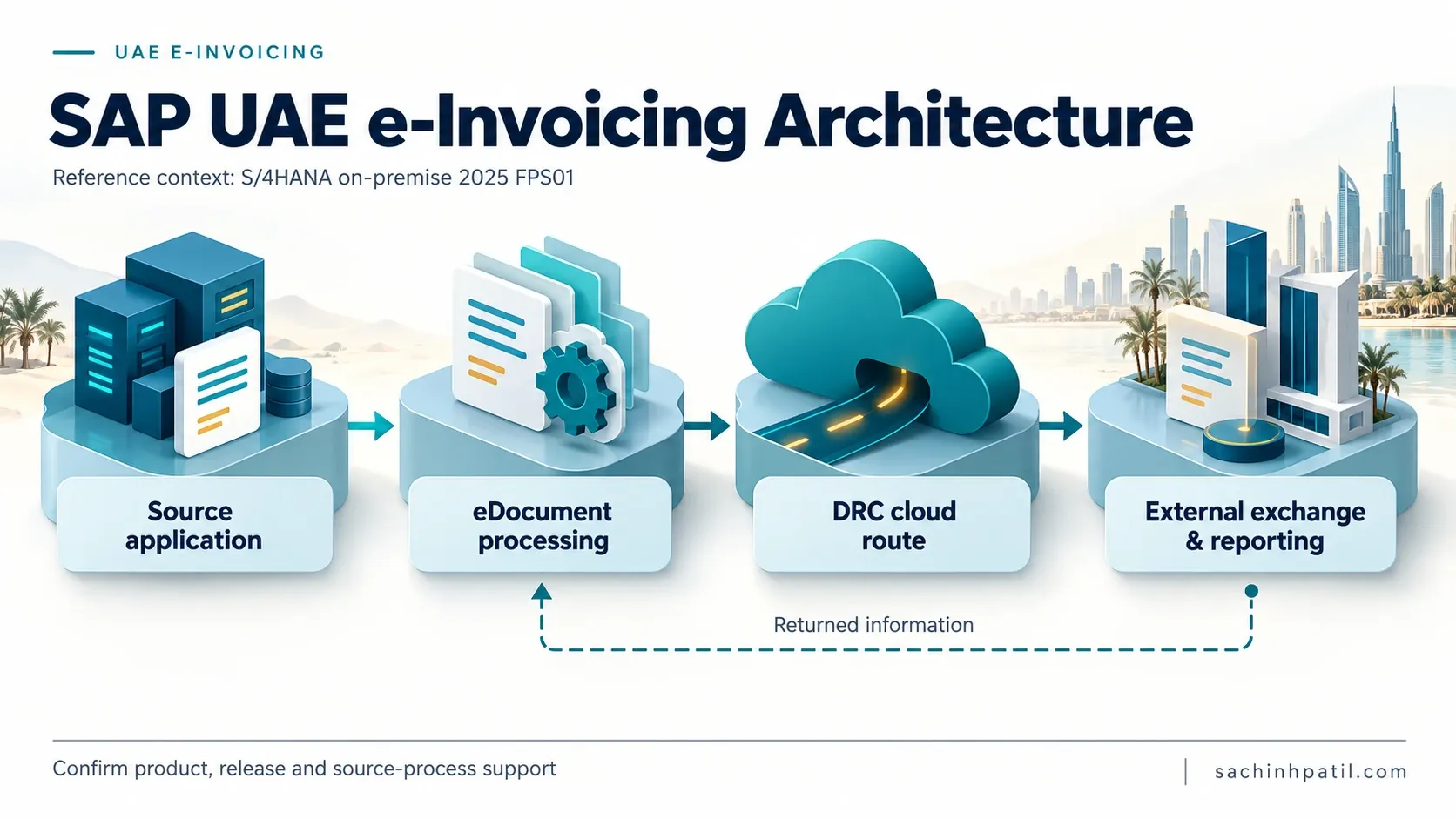
The business invoice still starts in the normal SAP process. SAP creates an eDocument from the source document, maps the required data, sends it through the cloud edition, receives exchange/reporting responses, and updates the eDocument so Finance and support teams can see what happened.
That is the architecture worth understanding before configuration starts.
If you need the regulatory foundation first, read The Dawn of E-Invoicing in the UAE and ERP Systems & UAE eInvoicing Integration Architecture.
Quick answer
SAP Document and Reporting Compliance (SAP DRC) provides the SAP compliance layer used to create, process, monitor and exchange electronic documents.
For the UAE, SAP currently documents the Peppol Exchange process for:
- SAP ERP;
- SAP S/4HANA and SAP S/4HANA Cloud Private Edition;
- SAP S/4HANA Cloud Public Edition;
- outbound Electronic Customer Invoices;
- inbound Electronic Supplier Invoices.
A simplified outbound view is:
What exactly is SAP Document and Reporting Compliance?
SAP describes SAP DRC as capabilities for creating, processing and monitoring electronic documents and statutory reports.
For eInvoicing, two layers matter most:
Many SAP practitioners still use the shorthand eDocument Framework or simply eDocument. That is useful terminology, but SAP DRC is broader than the cockpit or the framework alone.
Official SAP references
- What Is SAP Document and Reporting Compliance?
- What Is SAP Document and Reporting Compliance, Cloud Edition?
SAP is now listed as a UAE Accredited Service Provider
The UAE requires a Person within scope to appoint an Accredited Service Provider (ASP).
As of 08 September 2026, the UAE Ministry of Finance official ASP list includes:
| Official MoF field | Value |
|---|---|
| Company | SAP Middle East & North Africa LLC |
| Accreditation number | 197202 |
| Status | Listed as a UAE eInvoicing Accredited Service Provider |
SAP Help separately documents SAP DRC, cloud edition as the Peppol access point in the UAE process.
Together, these sources establish a documented SAP DRC/Peppol route and SAP’s accredited ASP presence in the UAE.
Official UAE reference: UAE Ministry of Finance — Accredited Service Providers
Where SAP DRC fits in the UAE 5-corner model
The legal model does not change because SAP is involved:
| Corner | UAE role |
|---|---|
| Corner 1 | Supplier |
| Corner 2 | Supplier ASP |
| Corner 3 | Buyer ASP |
| Corner 4 | Buyer |
| Corner 5 | Federal Tax Authority |
For an outbound SAP invoice using SAP’s documented Peppol route:
The Central Data Platform is internal to the FTA/Corner 5 environment. It should not be drawn as a direct endpoint for the SAP business system or ASP.
Outbound processing: from SAP invoice to Peppol
SAP’s current UAE customer-invoice documentation describes this sequence:
Create the source invoiceA supported SAP business process posts the commercial/accounting document.
Create the eDocumentSAP automatically creates an electronic-document instance from the source document.
SubmitUse eDocument Cockpit / Manage Electronic Documents, or automate the action using jobs.
Map transactional dataSAP converts source data into the required electronic format.
Call SAP DRC, cloud editionThe service acts as the Peppol access point and runs Schematron checks.
Resolve the receiverPeppol metadata services identify the buyer's receiver access point.
Report to Corner 5SAP Help explicitly documents Corner 2 creating and sending the TDD to the FTA through the Peppol network.
Receive confirmationsDelivery/reporting notifications return through the cloud edition.
Update the eDocumentThe SAP business system stores the latest process status against the electronic document.
Official SAP reference: Submitting Customer Invoices Using SAP Document and Reporting Compliance, Cloud Edition — UAE
Inbound processing: supplier invoices matter too
SAP also documents UAE Electronic Supplier Invoices.
For SAP ERP, SAP Help describes the cloud edition acting as Corner 3:
The documented inbound sequence includes:
- receive the supplier invoice from the sender access point;
- run business and technical checks;
- return a delivery notification;
- create and send the TDD to Corner 5;
- receive Corner 5 notification;
- forward the invoice into the SAP eDocument processing layer;
- update the eDocument status.
That is why UAE SAP architecture should include AR and AP from the beginning.
Official SAP reference: Receiving Supplier Invoices Using SAP Document and Reporting Compliance, Cloud Edition — UAE
Which SAP product families are currently documented?
SAP’s current Supported Compliance Tasks lists UAE customer and supplier invoices through Peppol Exchange for:
| SAP product family | Customer invoices | Supplier invoices |
|---|---|---|
| SAP S/4HANA | Supported in current task list | Supported |
| SAP S/4HANA Cloud Private Edition | Supported | Supported |
| SAP S/4HANA Cloud Public Edition | Supported | Supported |
| SAP ERP | Supported | Supported |
“Supported” does not mean configuration-free. Check the country localization, support package/SAP Notes, onboarding and communication prerequisites for the exact release.
Official SAP reference: SAP DRC — Supported Compliance Tasks
Interactive SAP landscape starting point
On-premise / Private Edition connectivity
For SAP S/4HANA or SAP S/4HANA Cloud Private Edition, SAP’s Peppol Exchange integration documentation includes activities such as:
- define process communication through cloud services;
- configure the provider service used for inbound messages;
- connect the SAP BTP subaccount to SAP Cloud Connector;
- configure access control and allowed resources;
- set up the cloud-edition-to-business-system connection;
- configure service-binding authentication;
- obtain the service-binding URL;
- download and trust the server certificate;
- create logical ports/proxies in SOA Management.
This current documented architecture is the reason SAP Integration Suite should not be inserted as a mandatory layer unless your enterprise has a separate architectural reason to use it.
Official SAP reference: Integrating Peppol Exchange with SAP S/4HANA or SAP S/4HANA Cloud Private Edition
Source document, eDocument and XML are different objects
An eDocument is not the original accounting invoice.
This distinction makes troubleshooting easier:
- source document = business/accounting record;
- eDocument = SAP compliance-processing object;
- XML = structured electronic representation exchanged externally.
UAE eDocument types
Current UAE SAP documentation includes examples such as:
| eDocument type | Description shown in SAP documentation |
|---|---|
AE_INV |
UAE Customer Invoice |
AE_CRE |
UAE Credit Memo |
AE_INVSB |
UAE Self-Billing Invoice |
SAP Help shows these eDocument types being assigned to accounting, billing or settlement document types depending on the supported business process.
Mapping: where AIF fits
For current UAE S/4HANA documentation, SAP explicitly states that Application Interface Framework (AIF) is used to map source-document fields to the electronic document, normally the XML file.
A useful mapping view is:
SAP Help documents UAE value mappings around topics such as:
- allowances and charges;
- credit-note reasons;
- Free Trade Zone scenarios;
- deemed supply;
- profit-margin scenarios;
- self-billing variants.
SAP S/4HANA Cloud also documents extension BAdIs including:
- Peppol: Filling of Invoice XML Files
- Peppol: Filling of Credit Note XML Files
Use extensions only when the requirement is confirmed. A BAdI should not be used to hide missing or poor-quality master data.
Official SAP references
For the actual UAE field catalogue, refer to UAE eInvoicing Data Mapping.
What happens inside SAP DRC, cloud edition?
SAP documents the cloud edition as an SAP-hosted service on SAP BTP. For Peppol Exchange, the processing includes network-facing responsibilities such as:
This creates several status layers:
SAP source document
        ↓
eDocument process status
        ↓
SAP DRC cloud exchange status
        ↓
Peppol / MLS response
        ↓
UAE TDD reporting response
These statuses should be correlated rather than collapsed into a generic “Sent” flag.
External / non-SAP billing can feed SAP DRC
SAP also documents UAE electronic invoices created in external systems.
For applicable SAP ERP/S/4HANA releases, the API for External Documents can be used so that a non-SAP or external SAP source passes a document into the SAP eDocument process.
SAP’s UAE external-document documentation describes the external source providing a generic UBL document, creation of an eDocument in SAP, transformation/validation into the required format, and subsequent exchange through the cloud edition.
Official SAP reference: Submitting Electronic Invoices Created in External Systems — UAE
Operations: EDOC_COCKPIT and Manage Electronic Documents
Depending on product and release, SAP provides:
- eDocument Cockpit (
EDOC_COCKPIT) - Manage Electronic Documents
SAP Help states that EDOC_COCKPIT supports:
- displaying eDocuments created from source documents;
- submitting electronic documents;
- manually creating/submitting documents in specific cases;
- monitoring status;
- performing subsequent actions.
For UAE, SAP also documents an HTML display so users can review a readable representation rather than raw XML.
The detailed operational lifecycle belongs in a later article, but the architectural lesson is simple: the cockpit is the control surface, not the entire DRC solution.
Automation: avoid turning the cockpit into manual invoice processing
SAP’s UAE customer-invoice documentation states that eDocument creation/submission can be automated using jobs.
A sensible operating pattern is:
For high volumes, exception-first operations are more scalable than manually submitting every invoice.
Global SAP DRC lessons — reuse architecture, not regulation
SAP DRC provides a common compliance framework across countries, but the legal model is different in each market.
Reuse architectural patterns. Never reuse regulatory assumptions.
Saudi Arabia: learn lifecycle discipline, not UAE clearance logic
SAP Help for Saudi Arabia documents tax invoices being submitted to the tax authority for approval, with approved/rejected responses and signed XML. SAP also documents simplified invoices, Convergent Invoicing and Utilities scenarios.
Useful lessons for UAE
- source document → eDocument separation;
- XML generation;
- country value mappings;
- job automation;
- reversal/correction discipline;
- status-based operations;
- high-volume industry patterns.
Do not copy
- Saudi clearance/approval assumptions;
- cryptographic stamp / solution unit requirements;
- Saudi tax categories and response semantics.
The UAE uses Peppol 5-corner exchange plus TDD reporting to Corner 5.
Official SAP reference: Saudi Arabia — Creating and Submitting Electronic Customer Tax Invoices
India: learn real-time integration and regulatory-reference handling
SAP’s India documentation describes B2B invoices submitted to the Invoice Registration Portal (IRP), with an Invoice Reference Number (IRN) returned by the authority.
Useful lessons for UAE
- reliable correlation between ERP and regulatory transaction;
- high-volume automated submission;
- response-driven status updates;
- controlled migration/versioning;
- reconciliation.
Do not copy
- IRP/IRN semantics;
- GST Suvidha Provider rules;
- Indian GST schema;
- central registration assumptions.
Official SAP reference: India — Electronic Customer Invoices
European Peppol: the closest reusable network pattern
SAP’s Peppol integrations in European countries use DRC cloud edition to exchange business documents through Peppol.
A typical documented pattern includes:
- create source document;
- create eDocument;
- map XML;
- call cloud edition as Peppol access point;
- run Schematron validation;
- identify receiver access point;
- exchange the document;
- return delivery notification.
This is directly useful for the network layer of UAE eInvoicing.
What the UAE adds is its own:
- PINT-AE;
- participant-identifier rules;
- UAE transaction scenarios;
- Corner 5;
- TDD;
- UAE MLS/reporting requirements.
Official SAP reference: Belgium — Peppol Exchange example
Comparison at a glance
| Market | SAP-documented external model | Reusable lesson | Do not copy into UAE |
|---|---|---|---|
| Saudi Arabia | Authority approval/integration | eDocument lifecycle, mappings, automation, reversals | Clearance/signature/cryptography assumptions |
| India | IRP registration | Regulatory correlation, high-volume processing | IRN/GST/GSP semantics |
| European Peppol | Peppol access-point exchange | Discovery, Schematron, inbound/outbound network flow | Country-specific European rules |
| UAE | Peppol 5-corner + TDD to Corner 5 | eDocument + Peppol + UAE reporting | Do not simplify to another country’s CTC model |
Standard DRC vs custom compliance architecture
A sound architecture principle is:
Use standard localization for regulatory semantics first. Customize only for a confirmed business or product gap.
SAP architecture validation checklist
Product and release
- Which SAP ERP/S/4HANA product and exact release is used?
- Is UAE Electronic Customer/Supplier Invoice support available?
- Which SAP Notes/support packages are required?
- Is the deployment Public Cloud, Private Edition or on-premise?
Business processes
- Which invoice sources are in scope: FI, SD, Settlement Management, Convergent Invoicing or external billing?
- Is self-billing required?
- Are inbound supplier invoices included from the start?
Mapping
- Which fields are covered by standard SAP mapping?
- Which UAE value mappings are required?
- Is AIF configuration enough?
- Are BAdIs actually necessary?
- Which PINT-AE version is being validated?
Connectivity
- Is SAP DRC, cloud edition subscribed and onboarded?
- Is Peppol Exchange activated?
- Is Cloud Connector required for the deployment?
- Are service bindings, certificates and logical ports configured?
- Is inbound message delivery working?
Operations
- Who owns
EDOC_COCKPIT/ Manage Electronic Documents? - Which actions are automated?
- How are errors routed to Tax, Master Data, Billing and IT?
- How are exchange and TDD/MLS responses reconciled?
- Where are final structured documents and status evidence retained?
Common architecture mistakes
Treating SAP DRC as only EDOC_COCKPIT
The cockpit is an operational UI. DRC also includes source-document integration, mapping, localization and cloud exchange.
Assuming SAP Integration Suite is mandatory
Current SAP UAE Peppol documentation provides a DRC cloud-edition integration path without making Integration Suite a mandatory hop.
Building only outbound
SAP currently documents UAE supplier-invoice receiving as well. Design inbound AP early.
Assuming DRC fixes poor master data
DRC maps and validates. It cannot determine the correct legal entity, TRN, address or tax treatment if the source is wrong.
Copying Saudi or India regulatory behavior
Common framework does not mean common law. UAE logic must follow UAE PINT-AE, TDD and 5-corner rules.
Over-customizing before testing standard mapping
Every enhancement increases maintenance when SAP localization or PINT-AE changes.
Assuming SAP accreditation completes onboarding
ASP accreditation does not automatically complete your commercial agreement, EmaraTax onboarding, technical setup or testing.
Three actions for implementation teams
1. Confirm the exact SAP release path before designing
Use SAP Supported Compliance Tasks and UAE country documentation to establish what your release supports and what prerequisites apply.
2. Separate the three document layers
Always distinguish:
source business document → eDocument → exchanged Electronic Invoice XML
This makes mapping and status reconciliation far clearer.
3. Start standard, then prove the need for custom logic
Use SAP’s standard UAE eDocument process, mappings and Peppol Exchange first. Add AIF extensions/BAdIs only for a verified gap.
Related practical guides
Frequently asked questions
Is SAP DRC supported for UAE eInvoicing?
Current SAP Supported Compliance Tasks lists UAE Electronic Customer and Supplier Invoices through Peppol Exchange for SAP ERP, SAP S/4HANA / Private Edition and SAP S/4HANA Cloud Public Edition.
Is SAP an accredited UAE ASP?
As of 08 September 2026, the UAE Ministry of Finance ASP list includes SAP Middle East & North Africa LLC, accreditation number 197202.
Does SAP DRC connect directly to the FTA Central Data Platform?
No direct customer/ASP connection to the Central Data Platform should be modelled. UAE Corner 2/Corner 3 report to Corner 5. The Central Data Platform sits inside the FTA/Corner 5 environment.
Is SAP Integration Suite mandatory?
Current SAP Help does not make it a mandatory UAE DRC hop. For S/4HANA and Private Edition, SAP documents Cloud Connector, service bindings/certificates and SOA/proxy connectivity to DRC cloud edition.
What is an eDocument?
It is SAP’s electronic-compliance instance created from a supported source business document and used for mapping, submission, monitoring and follow-up.
Can SAP DRC receive supplier invoices?
Yes. Current SAP UAE documentation includes Electronic Supplier Invoices, including Corner 3 TDD reporting to Corner 5 in the documented inbound flow.
Can non-SAP billing systems feed SAP DRC?
SAP documents UAE external-document scenarios using the API for External Documents for applicable SAP releases. Verify release-specific prerequisites.
Can submission be automated?
Yes. SAP’s UAE documentation states that electronic-document creation/submission processing can be automated using jobs.
Official references
UAE Ministry of Finance
SAP — UAE
- SAP DRC Supported Compliance Tasks
- Submitting Customer Invoices Using SAP DRC, Cloud Edition — UAE
- Receiving Supplier Invoices Using SAP DRC, Cloud Edition — UAE
- Integrating Peppol Exchange with SAP S/4HANA / Private Edition
- Mapping Fields to the XML — UAE
- eDocument Cockpit — UAE
- Submitting Electronic Invoices Created in External Systems — UAE
SAP comparison references
- Saudi Arabia — Electronic Customer Tax Invoices
- India — Electronic Customer Invoices
- Belgium — Peppol Exchange example
Disclaimer: this article is to provide you the general info for your business specific requirements, get the advise from your appointed legal advisor.
Continue your trail
You now have the E-Invoicing context.
Save this guide, continue to the next concept or return to the Knowledge Library with your context intact.
E-Invoicing
14 resources in this area.

Practical SAP notes, structured for review, reuse and long-term maintenance.
Working on an FI-CA or IS-U implementation? I take on a limited number of advisory and architecture engagements.
Get in touch →