
Introduction
Payment lot functions enables you to process incoming and outgoing payments using payment lots
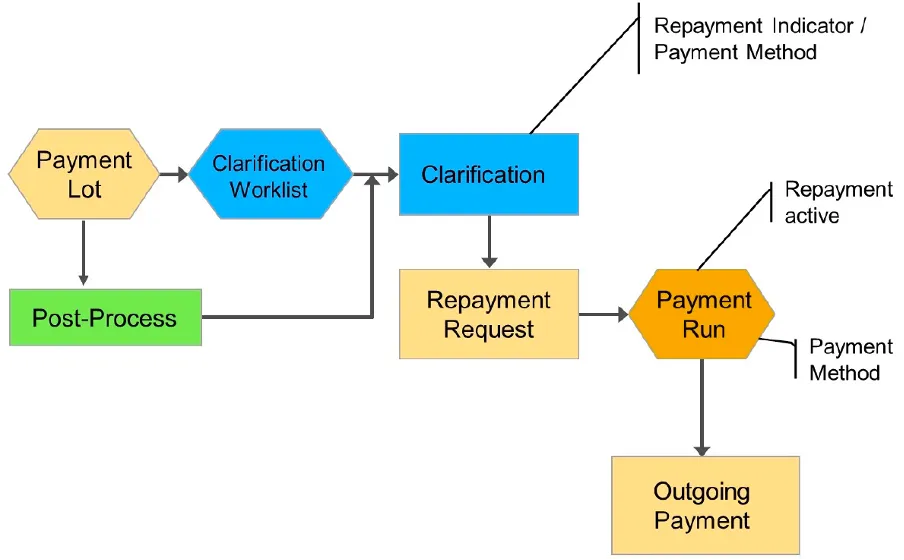
If you are unable to assign payments received, you can initiate repayment within the payment lot which then can be processed via payment program.
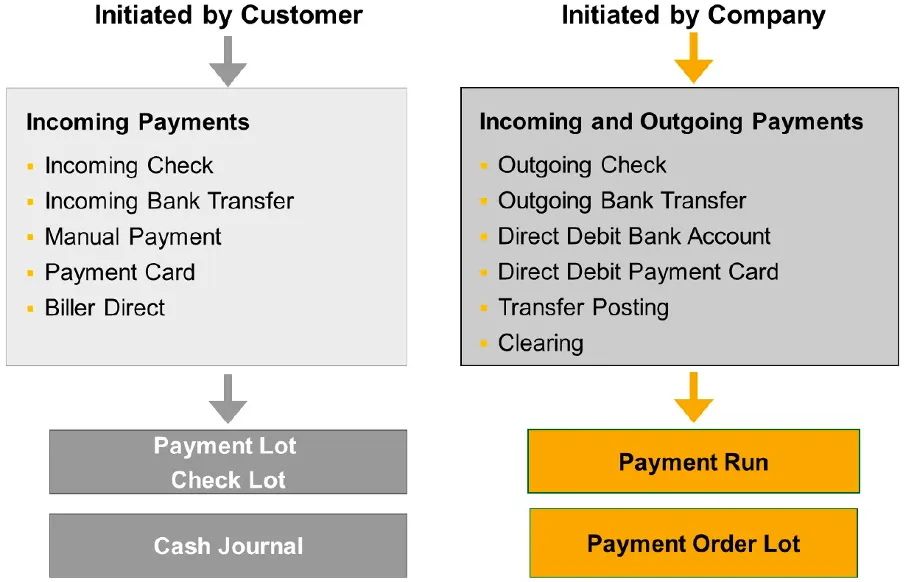
When payment initiated by the customer, the customer determines when to pay. Payments initiated by the customer can be processed by a payment lot or check lot or payment card lot or cash journal.
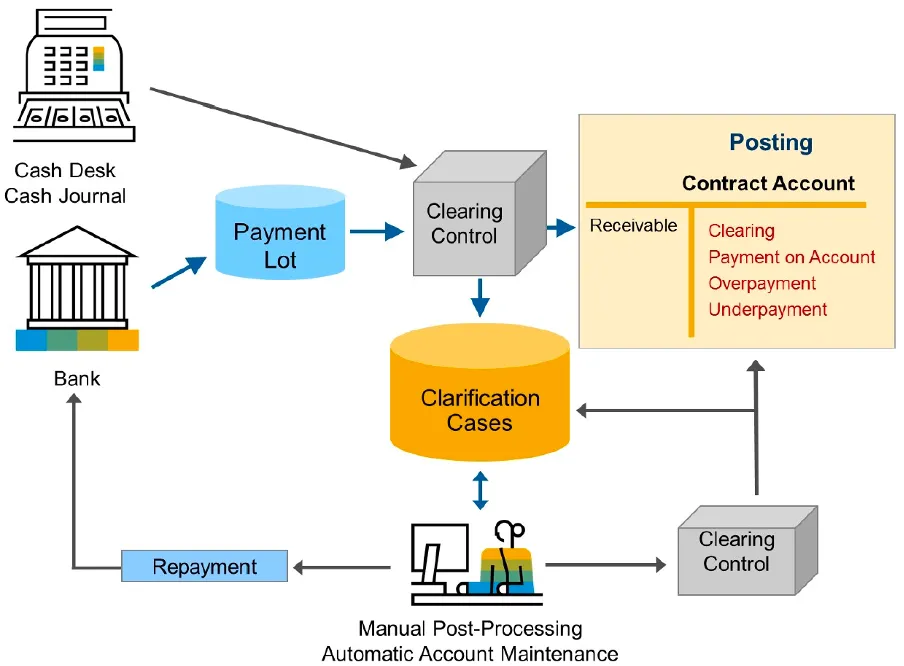
The open items gets cleared automatically via the clearing procedure or you can assign payments manually to one or more open items. Payments that could not clear open items can be posted on an account or placed in the clarification worklist to be reviewed.
When payment initiated by the company, the company determines when to collect or disburse payments to or from the business partner. Payments initiated by the company are processed by the payment program to process both incoming payments (direct debit) and outgoing payments (bank transfer).
Sample Process Flow
Payment/check lots are used in connection with payments initiated by business partners. Data from payments that have a common origin or that should be processed together are stored in one lot.
Payment/check lots can be created manually and can be automated with customer specific customizations.
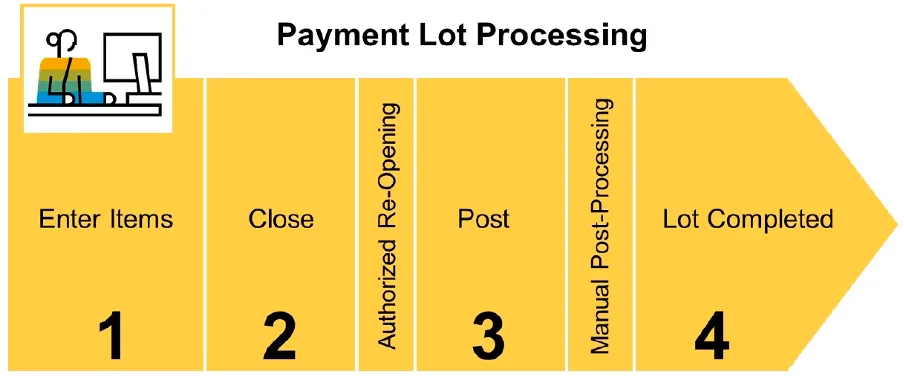
The general steps in payment lot processing are as follows:
-
Create the Payment Lot: The payment lot can be created manually or by a program (bank statement file upload).
-
Change the Payment Lot: Items can be inserted or deleted, corrections to items are permitted.
-
Close the Payment Lot: Items can no longer be inserted or deleted; however, corrections to items are permitted.
-
Post the Payment Lot: The payment lot can only be posted after it has been closed. Upon posting, payments are transferred to the contract accounts and postings are made to the appropriate clearing account. Payment differences can be automatically posted to special profit and loss accounts as per configurations.
Structure:
- Header (Data that applies to all items)
- Document type,
- Search term,
- Posting date,
- Bank clearing account,
- Company code for the bank posting,
- Currency,
- Value date and
- Reconciliation key Default Values:
- clearing reason (incoming payments)
- Selection categories (G for business partner or K for contract account).
- Item(s)
Selection categories enable you to decide which fields are to be used to select open items via a screen variant. Additional selection categories can be defined in customizing and respective selection fields can be taken from the structure FKKOP.
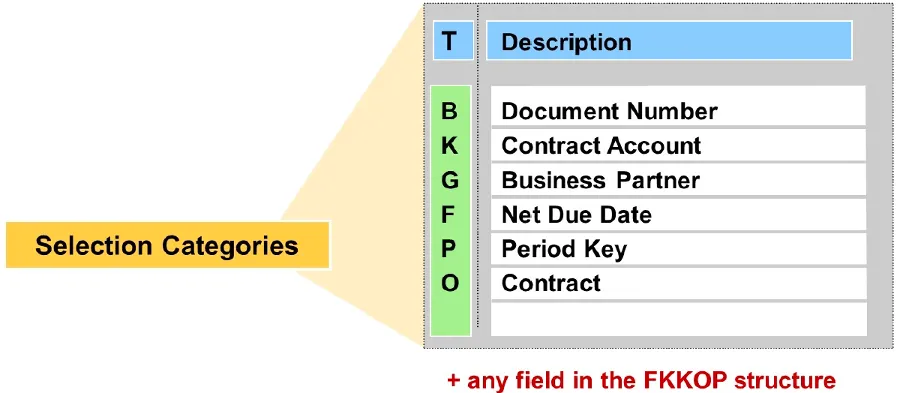
Selections within a line are linked by AND logic, while the different lines of the selections are linked by OR logic.
In the payment lot list entry, partial amounts can also be allocated.
It is possible to transfer post payments to clearing accounts using a short account assignment for which a company code and general ledger account are defined in customizing. This type of posting is necessary if a payment was received wrongly or target information coulod not be identified.
Payment Advice Notes (PAN)
You can also use the PAN number as selection criteria when entering a payment lot in addition to the business partner or the contract account. When the payment is posted, the system selects the open items of the business partner in the PAN. The system uses the entries in the PAN items to allocate clearing amounts to the selected items.
You can use the RFKKAV00 report to transfer payment advice notes from a sequential file, and generate one or more payment advice notes. It carries out the following activities:
- Read the application server file specified and check the data contained therein.
- Create one or more payment advice notes, provided the data records are correct.
- Close the payment advice notes, provided the corresponding indicator is set.
- Defective data records are saved separately and can be transferred after correction.
Payment Lots from Bank Statement
Payment lots are created and processed automatically if the payments are transferred in the form of a bank statement file (usual case).
You can use transaction FPB7 to select payments, returns and payment orders that are imported into the bank data memory. If required, the data can be transferred directly to a payment lot, payment order lot or returns lot.
Alternatively, you can output selected data from the bank data memory in a file. In another step, you can then import the created files into payment lots, payment order lots or return lots.
You can do this using the RFKKZE00 (payments, payment orders) and RFKKRL00 (returns) reports. The system uses the business transaction and the amount +/- sign to decide the lot type to which a payment position is transferred.
You can use transaction FPB17 if you convert country-specific bank formats into the Multi Cash format. Data from the Multi Cash statement file and line item file are transferred to payment and returns lots.
In customizing, you can define the rules for the automatic analysis of note to payee texts for the automatic transfer of payment data to payment lots. Using the values determined, the system then determines the selection criteria for the assignment of payments to receivables.
In customizing, you can specify a check procedure for the interpretation of the note to payee (sample function module FKK_SAMPLE_SEL_TYPE_CHECK).
You can use transaction FP_NOTE_TEST to test the note to payee analysis. You can use event 0950 for additional selections when payment data is transferred
Clarifications Processing
Items requiring clarification arise when you post a payment/check lot but either some or all payments could not be posted. When you post a payment/check lot, these items are posted to an interim account and included in a clarification worklist.
You can transfer these items from the interim account to a contract account, if you process the worklist. You can process the posting for a payment, for a payment lot or for all clarification cases for more than one payment/check lot.
SAP provides two
standard workflowsto support the clarification worklist processing as below:
-
WS21000078to allocate a clarification case to a processor before it is sent to an agent in the workflow inbox. Agent assignment and agent restriction ensure that clarification cases are only assigned to an agent once. This means that if an agent cannot process and complete a clarification case, this case is sent automatically to another agent. -
WS21000077to forward a clarification case from agent to agent, if an agent cannot clarify a case. You should activate the Workflow Direct Switch indicator in the general workflow customizing settings, so that the Next Processor query appears immediately after processing.
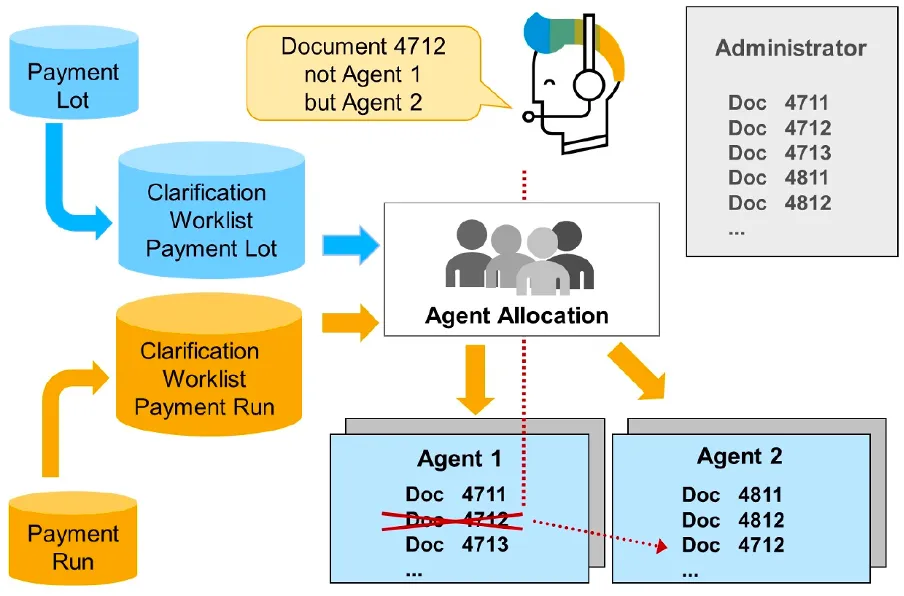
The selection options of the clarification list enable you to restrict the open clarification cases according to clarification accounts and account holders.
Role 2100008 Limited Selection Clarification WorklistandRole 2100009 Limited to Acute Clarification Casesto define mapping rules and thereby assign each clarification case to at least one processor or group of processors.
Transaction PFAC_INS to create mapping rules.
Activate roles for clarifications:
With this you can activate the roles for the clarification process for the application object PLOT (Payment Lot).
FICAIMG
>Contract Accounts Receivable and Payable
 >Technical Settings
  >Prepare Processing of Clarification Worklist
You can use the report RFKKUMBKL to transfer payments that are in clarification and that you cannot assign, and thereby remove them from the clarification worklist. Carry out the transfer posting by specifying a short account assignment to which a minimum retention period is assigned.
You can use the following functions if the credit use has to be clarified for a business partner:
- Credit clarification
- Function to process the following types of credit:
- Credit that was previously selected by the mass activity Generate Credit List and sent to clarification processing
- Credit that was directly included in the clarification worklist as a result of customizing settings
- Function to process the following types of credit:
- Credit processing
- To manually process individual credit that has not been entered by the credit list
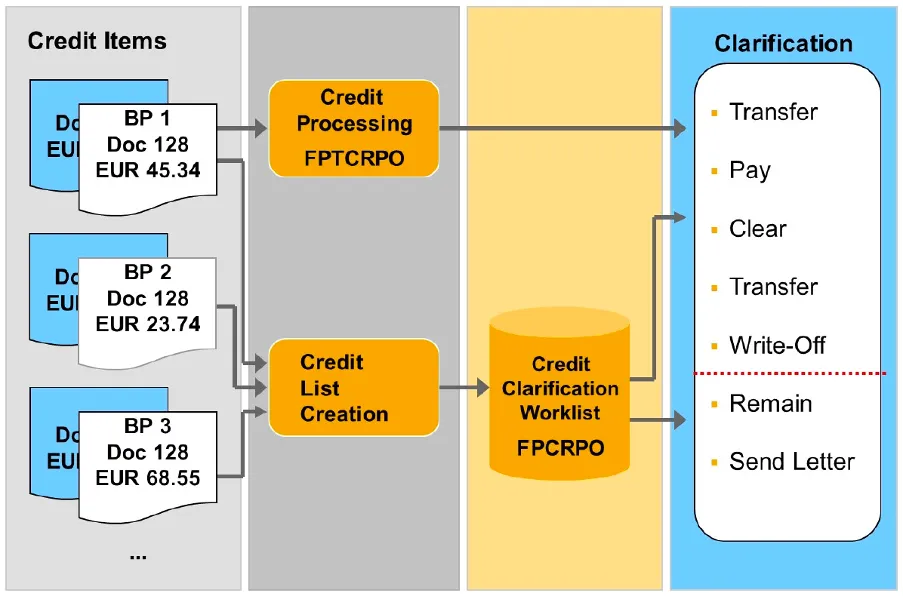
The Remain and Send Letter processing activities are available only within credit clarification.
Sample Transaction Codes
| Transaction Code | Description |
|---|---|
| FP05 | Entering and Posting Payments Manually |
| FP25 | Incoming check lot Check lots are special payment lots that are created to post check payments. |
| FP35 | Credit card lot |
| FP45 | Payment Order Lot |
| FPCPL | Clarification Processing (Payment Lot) |
| FP05CLE | Worklist: Payment Lot |
| FP30 | Find Payment |
| FPRU | Overview of Repayment Requests |
| FP18 | Reverse Repayment Request |
Customizing
FICAIMG
>Contract Accounts Receivable and Payable
 >Business Transactions
  >Payments
   >Processing Incoming and Outgoing Payments
Posting Areas
| Posting Area | Description |
|---|---|
| 1030 | Default Values for Payment Lot |
| 1031 | Default Values for Check Lot |
| 1033 | Default Values for Credit Card Lot |
| 1040 | Incoming Payment Interim Account |
| 0080 | Clearing Account for Incoming Checks |
| 0130 | Repayment of Incoming Payments |
Tables
| Table | Description |
|---|---|
| DFKKCFZST | Clarification Cases: Payment Lot |
| DFKKZA | Repayment Request |
| DFKKZF | Payment lot: Reconciliation key |
| DFKKZK | Payment lot: Header data |
| DFKKZN | Payment Lot: Notes for Clarification |
| DFKKZP | Payment lot: Data for payment |
| DFKKZPE | Payment lot: Error message for payment item |
| DFKKZPT | Payment Lot: Data for Partial Clearing of a Payment |
| DFKKZR | Payment form |
| DFKKZS | Payment lot: Further selections |
| DFKKZV | Payment Lot: Enhancement of Note to Payee |
| DFK006BX | Note to Payee - Texts |
| TFK012 | Bank clearing accounts |
Authorization Objects
F_KKZK
F_KK_KUKON
S_CFC_AUTH
Possible values
F_KK_SOND
011 Reopen Closed Payment Lot
012 Reopen Closed Returns Lot
013 Change Bank Data for Repayment from Payment Lot
014 Change Check Number in Closed Check Lot
Function Modules / BAPI
| Function Module | Description |
|---|---|
| FKK_PAYMENT_BATCH_CLARIFY_ITEM | Klärungsbearbeitung für eine Zahlung |
| FKK_PAYMENT_BATCH_LOCK_ITEM | Zahlungsposition sperren |
| FKK_PAYMENT_MANUAL_MAINTAIN | Process Payment Lot |
| FKK_PAYMENT_BATCH_POST | Buchen eines Zahlungsstapels |
| FKK_SELTAB_RESOLVE_EXTERNALS | Auflösen externer Selektionen (T_SELTAB wird verändert) |
| FKK_OPEN_ITEM_DUPLICATE_CHECK | Prüfen, ob Posten selektiert sind, die schon zum Ausgleich vorgemerkt sind |
| FKK_CREATE_DOC_MASS_AND_CLEAR | Buchen Beleg mit Ausgleich im Vetragskontokorrent (Massendaten) |
| FKK_PAYMENT_BATCH_FIND_PAYMENT | Zahlungsstapelposition zu einem Zahlungsbeleg ermitteln |
| FKK_NOTE_TEXT_READ | Finds stored contract account info by text of note to payee |
| VKEZ_PAYMLOT_BATCH_READ_0950 | IS-IS-CD 0950: Zahlungsstapelübernahme - Selektion ergänzen |
BAPI
| BAPI | Description |
|---|---|
| BAPI_CTRACPAYMINC_APPEND | Add Payments to Payment Lot |
| BAPI_CTRACPAYMINC_CLOSE | Close Payment Lot |
| BAPI_CTRACPAYMINC_CREATE | Create Payment Lot |
| BAPI_CTRACPAYMINC_RELEASE | Release Payment Lot |
| BAPI_CTRACPAYMINC_SCHEDULE | Post Payment Lot via Job |
Programs
| Program | Description |
|---|---|
| RFKKKA01 | FORM PAYMENT_LOT_POS_SELECT_WRITE |
| RFKKKA01 | FORM PAYMENT_LOT_POS_SELECT_CREATE |
| RFKKKA01 | FORM BANK_STATEMENT_PROCESS |
Reports
| Report | Description |
|---|---|
| RFKKZSTB | Post payment lot |
| RFKKZE00 | Transfer program for payment lot |
| RFKKKA00 | Data Transfer from FI Bank Statement to Payment/Returns Lot |
| RFKKPLADJ | Payment Lot: Correct Incorrect Status |
Events
| Event | Description | Sample Module |
|---|---|---|
| 0210 | Clearing: Selection Criteria: External -> Internal | FKK_SAMPLE_0240, ISU_ALLOCATION_EVENT_0240 |
| 0211 | Payment Lot: Propose Key for New Lot | FKK_SAMPLE_0211 |
| 0215 | Payment Lot: Copy Bank Details from Clarification | FKK_SAMPLE_0215 |
| 0220 | Payment Lot: Swap Selections | FKK_SAMPLE_0220 |
| 0221 | Payment Lot: Selection Proposal f. Where-Used Txt | FKK_SAMPLE_0221 |
| 0222 | Payment Lot: Include Screen for Customer Fields | FKK_SAMPLE_0222 |
| 0230 | Payment Lot: Exchange All Selections | FKK_SAMPLE_0230 |
| 0231 | Payment Lot: Supplement Credit Card Data for Posting | FKK_SAMPLE_0231 |
| 0232 | Payment Lot: Additional Data for Item | FKK_SAMPLE_0232 |
| 0233 | Payment Lot: Set Payment Date for Interest Calculation | FKK_SAMPLE_0233 |
| 0234 | Payment Lot: Before Posting | FKK_SAMPLE_0234 |
| 0235 | Payment Lot: Limit Search for Similar Keys | FKK_SAMPLE_0235 |
| 0240 | Payment Header: Check Header | FKK_SAMPLE_0240, ISU_ALLOCATION_EVENT_0240 |
| 0241 | Payment Lot: New Reconciliation Key | FKK_SAMPLE_0241 |
| 0242 | Payment Lot: Check Item | FKK_SAMPLE_0242, FKK_EVENT_0242_CVS, ISU_ALLOCATION_EVENT_0242_NEW |
| 0243 | Payment Lot: Add Item | FKK_SAMPLE_0243 |
| 0262 | Payment Lot: Check Additional Selection | FKK_SAMPLE_0262 |
| 0950 | Payment Lot Transfer: Increase Selection | FKK_SAMPLE_0950 |
| 0951 | Übernahme Zahlungsstapel: Zahlungsstapelkopf ergänzen | FKK_SAMPLE_0951 |
| 0953 | Account Stmt Transfer: Supplement Payment Item | FKK_SAMPLE_0953 |
| 0954 | Account Statement Transfer: Supplement Payment Lot Header | FKK_SAMPLE_0954 |
| 0956 | Acct Statement Tfr: Supplement Pymt Order Lot Hdr | FKK_SAMPLE_0956 |
| 0957 | Acct Statement Tfr: Supplement Payment Order Item | FKK_SAMPLE_0957 |
| 6027 | Cash Desk: Additional Info for Payment Lot | FKK_SAMPLE_6027 |
Function Groups
| Function Group | Description | Program |
|---|---|---|
| FKZ0 | Payment processing | SAPLFKZ0 |
| FKZ0AR | Payment Lot: Archive Accesses | SAPLFKZ0AR |
| FKZ0GOS | Generic Services for Payment Lot | SAPLFKZ0GOS |
| FKZ0S | Services for Payment Lot | SAPLFKZ0S |
| FKZ1 | Return payment requests | SAPLFKZ1 |
| FKZ2 | Service Functions for Payments | SAPLFKZ2 |
| FKZ3 | Payment Form Number Administration | SAPLFKZ3 |
| FKZ4 | Service Modules for Payment Lot | SAPLFKZ4 |
| FKZ5 | Payment Orders | SAPLFKZ5 |
| FKZ6 | Services for Payment Lot | SAPLFKZ6 |
Frequently asked questions
What is a payment lot in SAP FI-CA?
A payment lot stores data from payments that have a common origin or should be processed together. Payment lots handle payments initiated by business partners, are entered manually or by a program such as a bank statement upload, and are posted to contract accounts.
What are the steps in payment lot processing?
There are four steps: create the lot, change it by inserting, deleting or correcting items, close it so items can no longer be inserted or deleted, and post it. A lot can only be posted after it has been closed.
What happens to payments that cannot be assigned when a payment lot is posted?
They are posted to an interim account and included in a clarification worklist. Processing that worklist lets you transfer the items from the interim account to a contract account, for a single payment, a lot, or several lots.
Which transaction creates payment lots from a bank statement?
Transaction FPB7 selects payments, returns and payment orders imported into the bank data memory and can transfer them directly to a payment lot, payment order lot or returns lot. FPB17 converts country-specific bank formats into Multi Cash format.
Continue your trail
You now have the process context.
Save this guide, continue to the next concept or return to the Knowledge Library with your context intact.
Business Transactions
38 resources in this area.

Practical SAP notes, structured for review, reuse and long-term maintenance.
Working on an FI-CA or IS-U implementation? I take on a limited number of advisory and architecture engagements.
Get in touch →