
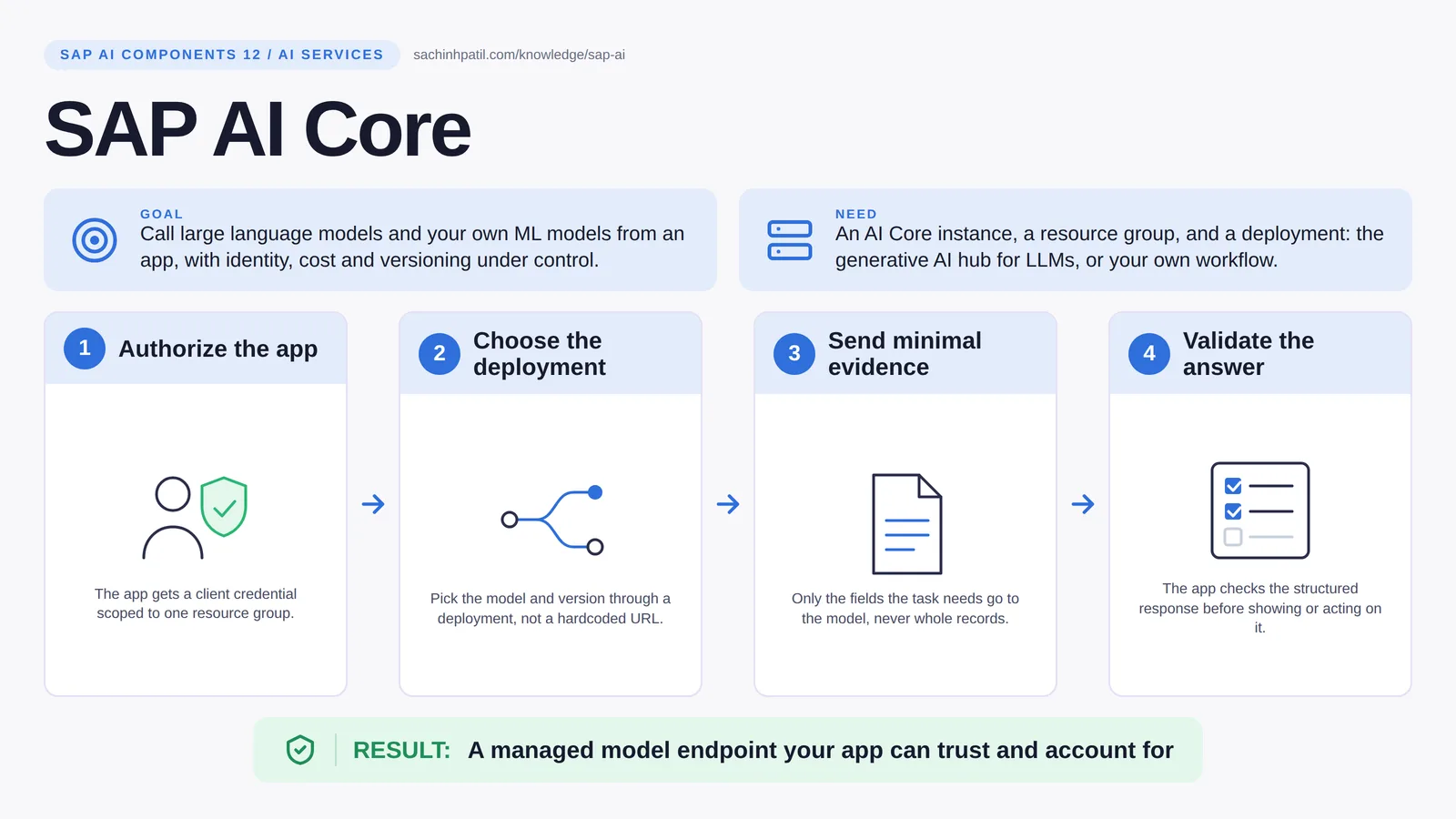
Authorize the app → Choose the deployment → Send minimal evidence → Validate the answer → A managed model endpoint your app can trust and account for. A learning overview, not a screenshot of a live system.
Intermediate · 9 min read · Part 12 of 17 in SAP AI Components Explained
Never call a model from a laptop with a personal key. Here is the SAP engine room that runs large language models from several providers under identity, cost and version control.
SAP AI Core generative AI hub is the focus of this post. SAP AI Core is the engine room where models run under supervision. Its generative AI hub gives your app one API to call large language models from several providers, with templating, grounding and filtering built in; the rest of AI Core runs your own training and inference workflows. The point of all of it is that your app never calls a model from a laptop with a personal key.
By the end you will be able to say in one sentence what SAP AI Core does, draw how data moves through it, and use the design-review line that stops most mistakes: Model output is a proposal to validate.
SAP AI Core in one sentence
The engine room where models run under supervision, so your app never calls a model from a laptop.
| Its job | Call large language models and your own ML models from an app, with identity, cost and versioning under control. |
| You need | An AI Core instance, a resource group, and a deployment: the generative AI hub for LLMs, or your own workflow. |
| Layer | AI services |
| Design check | Model output is a proposal to validate. |
The everyday picture
A controlled laboratory. Experiments run in named rooms, with a logbook, a budget and a door badge. You can use the results; you cannot wander in and change the settings.
Why SAP AI Core exists
A prototype that calls a model directly works for a demo and fails every production question: whose credential is that, which model version answered, what did it cost, what happens when the provider changes the model. AI Core answers those by putting a named, versioned, metered deployment between your app and the model.
How SAP AI Core works, in four steps
- Authorize the app. The app gets a client credential scoped to one resource group.
- Choose the deployment. Pick the model and version through a deployment, not a hardcoded URL.
- Send minimal evidence. Only the fields the task needs go to the model, never whole records.
- Validate the answer. The app checks the structured response before showing or acting on it.
Your app gets a client credential scoped to a resource group. It selects a deployment, a named configuration that says which model and which version, rather than a hardcoded provider URL. The request carries only the evidence the task needs, with a structured prompt and a required output schema. The orchestration layer can add grounding from HANA Cloud and content filtering. The answer comes back as structured data, and your app validates it before showing it to anyone or doing anything with it.
Where it sits in the SAP landscape
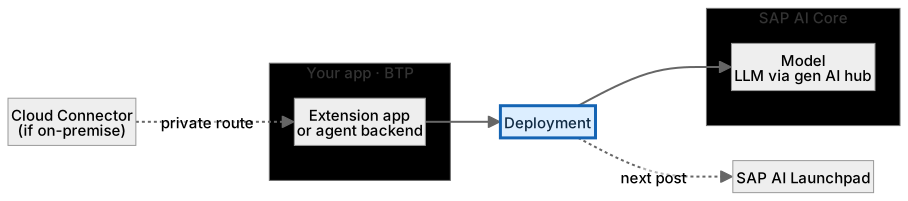
Minimal evidence, structured prompt. Model and version are chosen by the deployment.
A worked example, with numbers
The app builds a minimal evidence package for PAY-0042: the three open items, the payment amount, no customer name. It calls the orchestration deployment, which grounds the prompt with the two nearest procedure passages from HANA Cloud, masks any personal fields, and sends it to the configured model at a pinned version. The model returns structured JSON: action propose_assignment, account INV-7781, evidence list. The app validates that account against the actual open items before showing anything. The run used about 1,900 tokens, which the team tracks against its consumption budget; the version string of the model is stored with the output, so if quality drifts next month the team knows exactly what changed.
How the data flows

The check that actually matters
A model’s answer is a proposal to validate, never a fact. A fluent explanation of a payment can quote a balance that is six hours old. The app checks against S/4HANA; the model drafts. Keep an evaluation set with incomplete and contradictory cases, record which model version produced each output, and watch tokens as money.
Model output is a proposal to validate. A fluent explanation of a payment is not evidence that the balance it quotes is current. The app checks; the model drafts.
Generative AI hub vs calling a model provider directly
| Question | Option A | Option B |
|---|---|---|
| Identity and metering | Resource groups and BTP credentials | Your own key, your own accounting |
| Guardrails | Orchestration: grounding, masking, filtering | You build them |
| Switching models | Change a deployment | Change code and keys |
| Audit | Fits BTP identity and logging | Separate |
What SAP AI Core does, and what it does not
It does
- Generative AI hub: access to multiple LLM providers through one API, with orchestration (templating, grounding, filtering).
- Runs your own training and inference workflows as managed executions and deployments.
- Lets you track consumption per deployment and resource group.
It does not
- Know your business data. You must bring the evidence with each request.
- Authorize actions. The app and S/4HANA decide what may happen.
- Guarantee a model stays available. Providers and versions change.
Three real situations
Payment explanation. The app sends a minimised evidence package and gets back a structured proposal; a clerk sees the sources and decides.
Service case classification. A custom classifier runs as a deployment with a versioned configuration and an evaluation set.
Agent reasoning step. The agent asks the model to choose among approved next steps; the backend validates and authorizes each tool call.
In practice: what teams get wrong
AI Core runs AI workloads on BTP; the generative AI hub inside it is the managed gateway to large language models. Through one API you reach several providers, and SAP maintains an official list of supported models that has included OpenAI, Google, Anthropic and other providers. That list changes often and varies by region and plan, so take model names and versions from the current SAP documentation and SAP Note, not from a blog post. The orchestration service adds templating, grounding (pull evidence from HANA Cloud before the model answers), data masking and content filtering, so common guardrails are configuration rather than code. Everything runs inside a resource group with its own access, and consumption is metered; SAP documents the metric and rates per plan. You call a deployment, not a provider URL, so switching model or version is a configuration change.
From the field. I have seen a prompt tuned until the demo looked perfect, with no evaluation set behind it. In production the first awkward case produced a confident, wrong proposal and there was no way to measure how often it happened.
Other gotchas worth a line:
- Keep an evaluation set with incomplete and contradictory cases; measure before changing prompts.
- Watch tokens as cost; longer prompts should earn their place.
- Pin model versions and record which version produced each output.
- Available models, regions and terms change; check the current SAP documentation.
Terms you will hear
| Term | Plain meaning |
|---|---|
| AI Core | The BTP service that runs AI workloads. |
| Generative AI hub | The managed gateway to large language models. |
| Deployment | A named, versioned endpoint your app calls. |
| Resource group | An access and metering boundary inside AI Core. |
| Orchestration | Templating, grounding, masking and filtering around a model call. |
| Grounding | Adding retrieved evidence to a prompt. |
| Token | The unit of text a model reads and writes; consumption is usually counted in them. |
Quick self-check
- In one sentence, what is SAP AI Core’s job?
- Which decision does it not make, and who makes it instead?
- What is the one thing you would verify before calling it production-ready?
Show the answers
- Call large language models and your own ML models from an app, with identity, cost and versioning under control.
- Know your business data. You must bring the evidence with each request.
- Keep an evaluation set with incomplete and contradictory cases; measure before changing prompts.
Key takeaways
- The engine room where models run under supervision, so your app never calls a model from a laptop.
- Model output is a proposal to validate.
- Generative AI hub: access to multiple LLM providers through one API, with orchestration (templating, grounding, filtering).
- Know your business data. You must bring the evidence with each request.
- Available models, regions and terms change; check the current SAP documentation.
FAQs
Is AI Core only for generative AI?
No. It also runs classic ML training and inference. The generative AI hub is one capability inside it.
Can I use OpenAI or Anthropic models through it?
Several providers are available via the generative AI hub, subject to region and plan.
Keep going in the series
Previous: SAP Document AI Next: SAP AI Launchpad
Full map: SAP AI Components Explained — 17 posts from platform to agents.
Sources and research notes
Research checked on 21 October 2026. Product names, plans, models and regional availability change fast; the starting reference for this component is Generative AI hub in SAP AI Core. Examples use a fictional utility company and fictional cases (amounts, IDs, names); no customer landscape is described.
Recap
SAP AI Core: call large language models and your own ML models from an app, with identity, cost and versioning under control. The result is a managed model endpoint your app can trust and account for. The one thing to remember: model output is a proposal to validate.
Found this useful? The next post, SAP AI Launchpad, builds on it. Share it with the SAP colleague who keeps asking what all these components actually do.
Frequently asked questions
Is AI Core only for generative AI?
No. It also runs classic ML training and inference. The generative AI hub is one capability inside it.
Can I use OpenAI or Anthropic models through it?
SAP documents models from several providers, including OpenAI, Google and Anthropic, in the generative AI hub. Which models you can use depends on region, plan and SAP's current model list.
Further reading
- Generative AI hub in SAP AI Core — SAP
- Discovering the Orchestration Service — SAP Learning
- Generative AI hub — SAP
Continue your trail
You now have the SAP AI Components context.
Save this guide, continue to the next concept or return to the Knowledge Library with your context intact.
SAP AI Components
17 resources in this area.

Practical SAP notes, structured for review, reuse and long-term maintenance.
Working on an FI-CA or IS-U implementation? I take on a limited number of advisory and architecture engagements.
Get in touch →