
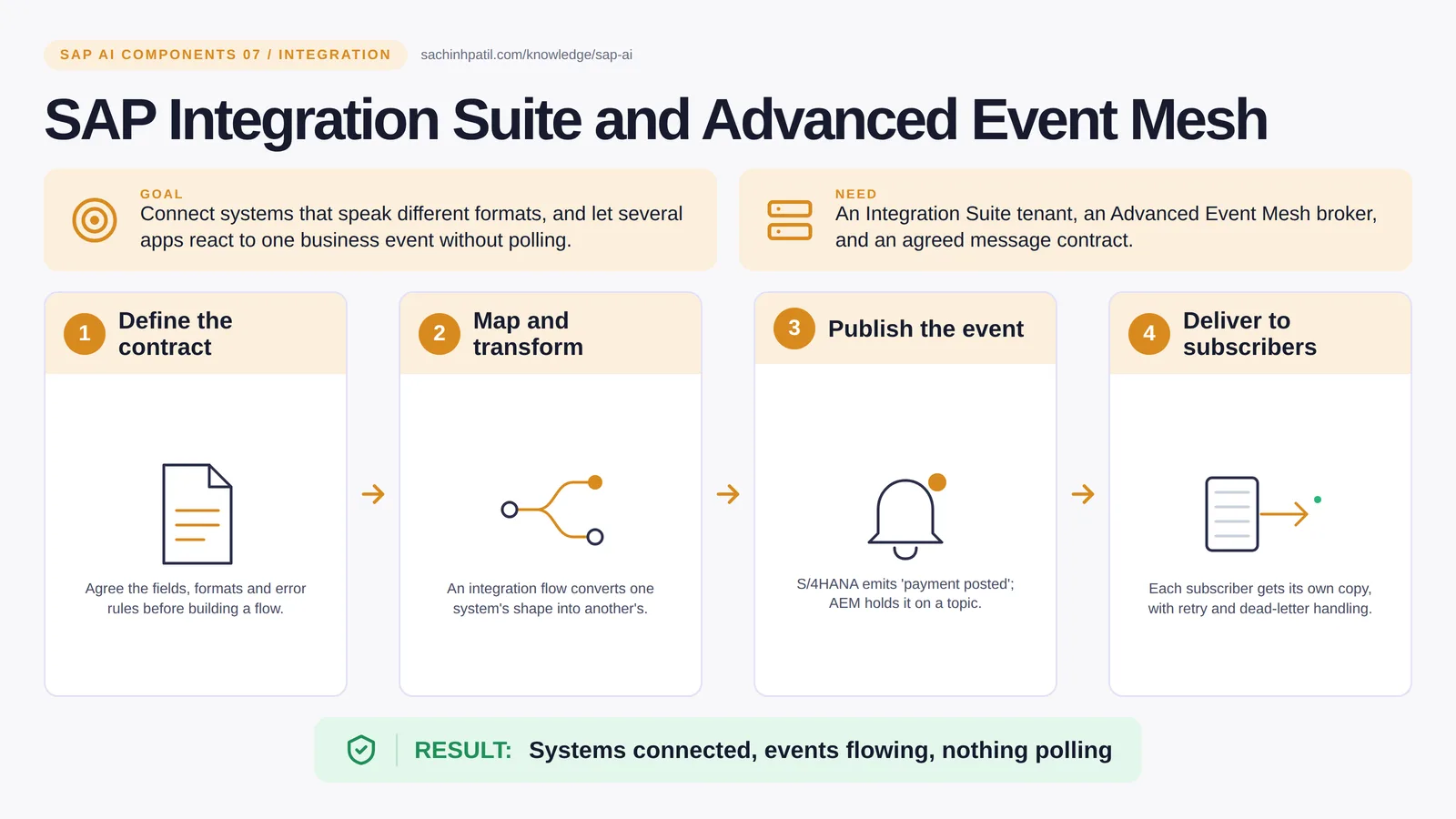
Define the contract → Map and transform → Publish the event → Deliver to subscribers → Systems connected, events flowing, nothing polling. A learning overview, not a screenshot of a live system.
Intermediate · 8 min read · Part 7 of 17 in SAP AI Components Explained
One payment posts in S/4HANA. Three systems need to know. Should each one keep asking every minute, or should the ERP just announce it once?
SAP Integration Suite is the focus of this post. Systems rarely speak the same language. SAP Integration Suite is the translator and router between them, and Advanced Event Mesh (a separate BTP service, officially “SAP Integration Suite, advanced event mesh”) is the notice board where a system can announce ‘payment posted’ once and let every interested party react. One carries addressed requests; the other broadcasts facts.
By the end you will be able to say in one sentence what SAP Integration Suite and Advanced Event Mesh does, draw how data moves through it, and use the design-review line that stops most mistakes: Delivery is not business completion.
SAP Integration Suite and Advanced Event Mesh in one sentence
The post office and the notice board between your systems: one carries addressed requests, the other announces what just happened.
| Its job | Connect systems that speak different formats, and let several apps react to one business event without polling. |
| You need | An Integration Suite tenant, an Advanced Event Mesh service with a broker, and an agreed message contract. |
| Layer | Integration |
| Design check | Delivery is not business completion. |
The everyday picture
A post office delivers a letter to one named recipient and gets a receipt. A notice board posts ‘payment received’ once, and anyone who cares reads it.
Why SAP Integration Suite and Advanced Event Mesh exists
Without a middle layer, every pair of systems needs its own custom bridge and every change breaks three of them. Without events, every app polls the ERP every few minutes asking ‘anything new?’, which is slow, expensive and still late. A request-response flow for the first problem and publish-subscribe for the second is the standard answer.
How SAP Integration Suite and Advanced Event Mesh works, in four steps
- Define the contract. Agree the fields, formats and error rules before building a flow.
- Map and transform. An integration flow converts one system’s shape into another’s.
- Publish the event. The source system emits ‘payment posted’; AEM holds it on a topic.
- Deliver to subscribers. Each subscriber gets its own copy, with retry and dead-letter handling.
In Integration Suite you draw an integration flow: receive a message from one system, map its fields into another system’s format, route by content, handle errors into a queue a person can inspect. Advanced Event Mesh adds a broker: a source such as S/4HANA publishes ‘BusinessPartner changed’ or ‘payment posted’ to a topic, and each subscriber gets its own copy through its own queue, with retry and replay. A customer app, a dunning service and an AI agent can all react to the same event without the ERP knowing they exist.
Where it sits in the SAP landscape
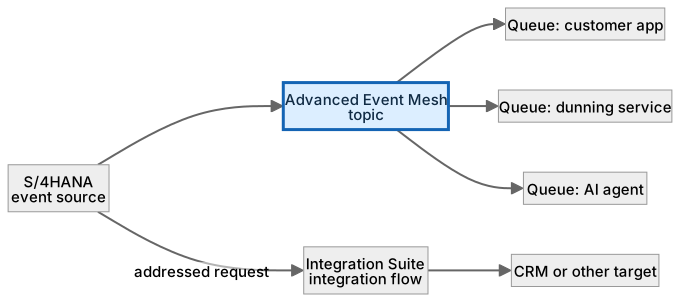
Events are emitted once and never wait for every consumer. Addressed requests go through an integration flow instead.
A worked example, with numbers
A payment posts in FI-CA for contract account 300012345, AED 1,240.00, at 11:07. S/4HANA publishes a payment.posted event (a fictional name for this example) to the topic util/fica/payment/posted. Three queues are bound: the customer app updates the balance shown in self-service, the dunning service cancels a scheduled reminder, and an analytics feed appends a row. The clarification agent is a fourth subscriber: it sees an unmatched payment event, retrieves the case and prepares a proposal, so when Reem opens her queue the draft is already there. Delivery is at-least-once, so the dunning service is built to ignore a repeat of the same payment id (PAY-778201); a duplicate event changes nothing, so the AED 1,240.00 is applied once, not twice.
How the data flows

The check that actually matters
Delivery confirmed is not business done. The broker guaranteeing that an event reached a subscriber says nothing about whether the subscriber processed it correctly, or at all. Reconcile outcomes separately, and design every consumer to tolerate seeing the same event twice.
Delivery is not business completion. AEM confirming that ‘payment posted’ was delivered says nothing about whether the receiving app processed it correctly.
Event Mesh vs Advanced Event Mesh
| Question | SAP Event Mesh | Advanced Event Mesh |
|---|---|---|
| Built on | SAP’s earlier event service | Solace-based broker |
| Topology | Single service | Brokers that can be linked into a mesh across regions |
| Protocols | AMQP, MQTT and REST | Those plus Solace protocols such as SMF |
| Replay and DMQ | Check current capabilities | Replay and dead-message queues |
| New designs | Compare both against current SAP guidance, starting with Advanced Event Mesh |
What SAP Integration Suite and Advanced Event Mesh does, and what it does not
It does
- Integration flows with mapping, routing and a catalogue of prebuilt adapters.
- API management for exposed services.
- Event streaming (Advanced Event Mesh) with topics, queues, guaranteed delivery and replay.
It does not
- Validate business meaning. A perfectly mapped wrong amount is still wrong.
- Create secure routes to on-premise systems by itself. That is Cloud Connector, or Edge Integration Cell for private flows.
- Replace an audit trail. Log the business outcome separately.
Three real situations
Payment notification. When a payment posts in FI-CA, an event fans out to the customer app, the dunning service and an analytics feed, with no batch job.
Order distribution. Orders from a web shop are mapped into the ERP format, with errors routed to a queue a person can inspect.
Agent trigger. An agent subscribes to ‘unmatched payment’ events and prepares a proposal before a clerk even opens the case.
In practice: what teams get wrong
Integration Suite is several capabilities under one roof: Cloud Integration (the flows, formerly CPI), API Management, Integration Advisor, Open Connectors, Trading Partner Management and the Integration and Migration Assessments, among others; check the current list. Advanced Event Mesh is a standalone, broker-based event service built on Solace (Cloud Integration has an Advanced Event Mesh adapter for connecting flows to it), with mesh topologies across regions, topic hierarchies, queues, guaranteed delivery and replay. The design split is simple: request-response and transformation go in a flow; broadcast-and-react goes on the mesh. S/4HANA emits business events you subscribe to; AEM holds them on topics; each consumer has its own queue so a slow consumer never blocks the others. An AI agent is just another subscriber that happens to prepare a proposal when an event arrives.
From the field. I have seen a consumer that assumed exactly-once delivery. The first duplicate event double-counted a payment in a dashboard and a manager spent a morning chasing a number that was never wrong in the ERP.
Other gotchas worth a line:
- Design for duplicates; at-least-once delivery means a consumer may see an event twice.
- Keep payloads small and carry references, not whole documents.
- Agree ownership of the message contract or every change breaks someone.
- Adapter availability and AEM plans differ; check the current SAP documentation.
Terms you will hear
| Term | Plain meaning |
|---|---|
| Integration flow | A designed pipeline: receive, map, route, send. |
| Adapter | A connector for a specific protocol or system. |
| API Management | Publishing and securing APIs for others to call. |
| Event | A fact announced once, such as ‘payment posted’. |
| Topic / queue | Where events are published and where a subscriber receives them. |
| At-least-once | Delivery guarantee that may send the same event twice. |
| Replay | Re-reading past events from the broker. |
Quick self-check
- In one sentence, what is SAP Integration Suite and Advanced Event Mesh’s job?
- Which decision does it not make, and who makes it instead?
- What is the one thing you would verify before calling it production-ready?
Show the answers
- Connect systems that speak different formats, and let several apps react to one business event without polling.
- Validate business meaning. A perfectly mapped wrong amount is still wrong.
- Design for duplicates; at-least-once delivery means a consumer may see an event twice.
Key takeaways
- The post office and the notice board between your systems: one carries addressed requests, the other announces what just happened.
- Delivery is not business completion.
- Integration flows with mapping, routing and a catalogue of prebuilt adapters.
- Validate business meaning. A perfectly mapped wrong amount is still wrong.
- Adapter availability and AEM plans differ; check the current SAP documentation.
FAQs
Event Mesh or Advanced Event Mesh?
Advanced Event Mesh is the Solace-based, broker-mesh service with more protocols and richer queueing. Compare both against current SAP guidance, and start with Advanced Event Mesh for new designs.
Do I need both Integration Suite and AEM?
Often yes: flows for request-response and transformation, AEM for publish-subscribe.
Keep going in the series
Previous: Business Application Studio, CI/CD and Cloud Transport Management Next: SAP Edge Integration Cell
Full map: SAP AI Components Explained — 17 posts from platform to agents.
Sources and research notes
Research checked on 21 October 2026. Product names, plans, models and regional availability change fast; the starting reference for this component is SAP Integration Suite. Examples use a fictional utility company and fictional cases (amounts, IDs, names); no customer landscape is described.
Recap
SAP Integration Suite and Advanced Event Mesh: connect systems that speak different formats, and let several apps react to one business event without polling. The result is systems connected, events flowing, nothing polling. The one thing to remember: delivery is not business completion.
Found this useful? The next post, SAP Edge Integration Cell, builds on it. Share it with the SAP colleague who keeps asking what all these components actually do.
Frequently asked questions
Event Mesh or Advanced Event Mesh?
Advanced Event Mesh is the Solace-based, broker-mesh service with more protocols and richer queueing. Compare both against current SAP guidance, and start with Advanced Event Mesh for new designs.
Do I need both Integration Suite and AEM?
Often yes: flows for request-response and transformation, AEM for publish-subscribe.
Further reading
- SAP Integration Suite — SAP
- Outlining SAP Integration Suite Capabilities — SAP Learning
Continue your trail
You now have the SAP AI Components context.
Save this guide, continue to the next concept or return to the Knowledge Library with your context intact.
SAP AI Components
17 resources in this area.

Practical SAP notes, structured for review, reuse and long-term maintenance.
Working on an FI-CA or IS-U implementation? I take on a limited number of advisory and architecture engagements.
Get in touch →