
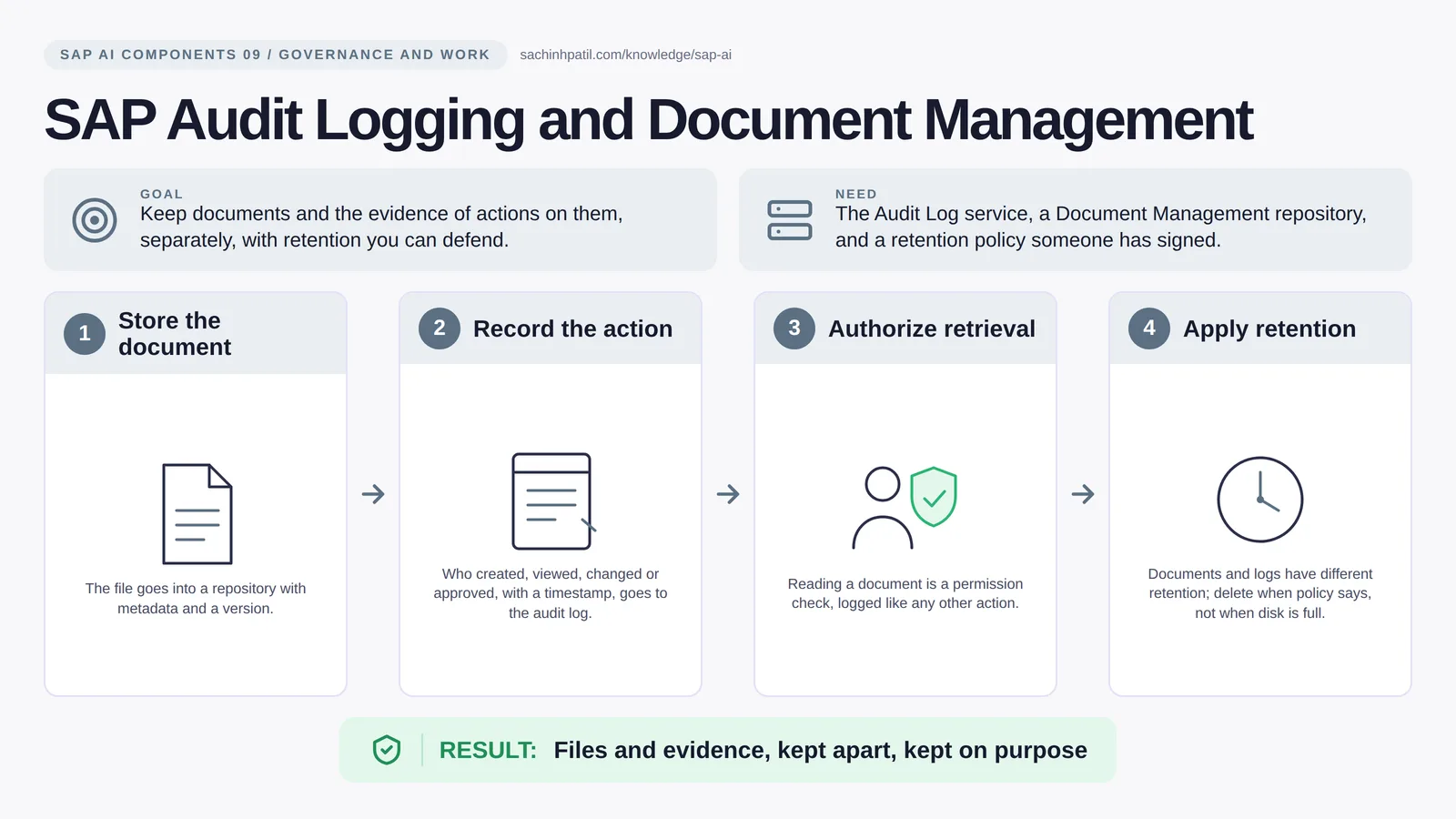
Store the document → Record the action → Authorize retrieval → Apply retention → Files and evidence, kept apart, kept on purpose. A learning overview, not a screenshot of a live system.
Intermediate · 9 min read · Part 9 of 17 in SAP AI Components Explained
An auditor asks: who approved this and what did they see? If your proof lives inside the document someone can edit, you have no proof at all.
SAP audit logging BTP is the focus of this post. Two services that people mix up: Document Management stores the files, and Audit Logging records who did what to them, and to everything else. They belong in one post because every AI scenario produces both, a document somebody acted on and a record that they did, and the two must never be the same thing.
By the end you will be able to say in one sentence what SAP Audit Logging and Document Management does, draw how data moves through it, and use the design-review line that stops most mistakes: A repository is not automatically an archive.
SAP Audit Logging and Document Management in one sentence
The filing cabinet and the visitor logbook: one keeps the paper, the other records who touched it.
| Its job | Keep documents and the evidence of actions on them, separately, with retention you can defend. |
| You need | The Audit Log service, a Document Management repository, and a retention policy someone has signed. |
| Layer | Governance and work |
| Design check | A repository is not automatically an archive. |
The everyday picture
A records office with a visitor register. Documents live in numbered folders; the register says who opened which folder and when. The two are never the same book.
Why SAP Audit Logging and Document Management exists
When an auditor asks ‘who approved this assignment and what did they see’, you need the document as it was, and a separate, tamper-resistant record of the approval. If the record lives inside the editable document, it proves nothing. If the document was never kept, the record is a sentence with no evidence behind it.
How SAP Audit Logging and Document Management works, in four steps
- Store the document. The file goes into a repository with metadata and a version.
- Record the action. Who created, viewed, changed or approved, with a timestamp, goes to the audit log.
- Authorize retrieval. Reading a document is a permission check, logged like any other action.
- Apply retention. Documents and logs have different retention; delete when policy says, not when disk is full.
Your app stores the remittance advice, the proposal and the decision in a Document Management repository with metadata and a version number. Every significant action, created, viewed, approved, rejected, is written to the Audit Log service with a timestamp, the actor and a correlation ID, not the whole payload. Retrieving a document is itself an authorization check and itself logged. The two stores have different retention: documents by legal requirement, logs by policy, and a legal hold overrides both.
Where it sits in the SAP landscape
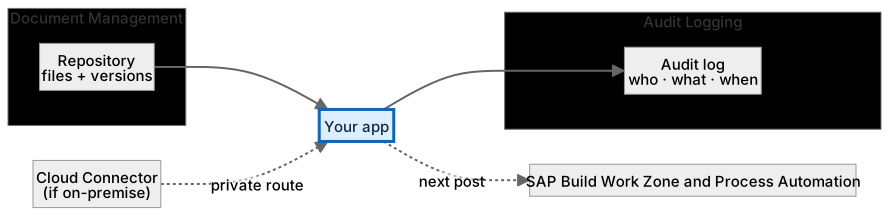
Documents in a versioned repository, events in the audit log. Different retention for each.
A worked example, with numbers
Case PAY-0042: the remittance advice PDF, the AI proposal JSON and Reem’s decision are stored in a DMS repository under folder /cases/2026/PAY-0042, each versioned. Three audit events are written: proposal.created by service-payment-agent at 09:14, document.viewed by Reem at 09:31, decision.approved by Reem at 09:33, each with the correlation id PAY-0042 and no payload. Retention: documents 10 years by finance policy, audit events 2 years by security policy (longer than the service default, so exported to the team’s own store), both overridden by a legal hold if a dispute is raised. When an auditor asks in 2027 who approved PAY-0042, the answer is one audit query plus the exact document version Reem saw, not a screenshot someone took.
How the data flows

The check that actually matters
A repository is a place; an archive is a decision. Putting a file in DMS does not make it a retained record until your retention and legal hold rules are defined and enforced. Equally, the BTP audit log covers platform events and what your app chooses to write; S/4HANA keeps its own business audit trail, and an AI agent’s every tool call should be written by its backend, never by the agent itself.
A repository is not automatically an archive. Storing a remittance advice in DMS does not make it a legally retained record. Retention and legal hold must be defined and enforced.
Platform audit log vs business audit trail
| Question | Option A | Option B |
|---|---|---|
| Scope | BTP service and app events | Financial postings inside S/4HANA |
| Owner | Platform and app team | S/4HANA / finance |
| Enough alone for compliance | No | No; you usually need both |
| Who writes AI events | The agent’s backend, never the agent itself |
What SAP Audit Logging and Document Management does, and what it does not
It does
- Audit Log: security-relevant events across BTP services, retrievable by API.
- Document Management: CMIS-based repositories with versioning and metadata (the integration option is the API-first one).
- Separate retention and access for the two.
It does not
- Prove a business decision was correct. It proves what happened and who did it.
- Store everything forever. Retention is a decision, not a default.
- Audit your own app’s logic. You must write the business-level events yourself.
Three real situations
Payment evidence package. The remittance advice, the proposal and the clerk’s decision are stored; the audit log records who approved and when.
Supplier contract review. Contract versions live in DMS; every download by a reviewer is logged.
Agent decision trace. Each tool call an agent made, and the human decision that followed, is written as an audit event, so the trace outlives the chat.
In practice: what teams get wrong
Two BTP services, deliberately separate. The Audit Log service captures security-relevant events across BTP and your own application events, retrievable by an API, with a retention that is limited by default (SAP documents 90 days for the standard plan; longer retention needs a different plan or exporting to your own store, so check current plans). The Document Management Service is built on the CMIS standard and comes in an integration option, for building document capabilities into your own applications through APIs, and an application option, a ready-made web application. Both support versioning, hierarchies and access control. The discipline is to decide, per record, what is a document (keep in DMS, versioned) and what is an event (write to the audit log, immutable), and to give the two different retention. A correlation ID links them without copying the payload into the log.
From the field. I have seen an ‘audit trail’ that was a column inside the editable case record. The first time someone corrected a typo, the timestamp changed and the evidence was worthless.
Other gotchas worth a line:
- Audit log retention on BTP is limited by default; export if you need longer.
- Do not put the whole payload in the log; carry a correlation ID.
- Legal hold overrides retention; design for it, and confirm what the service itself supports versus what your process must enforce.
- Retention periods and APIs change; check the current SAP documentation.
Terms you will hear
| Term | Plain meaning |
|---|---|
| Audit log | Immutable record of who did what, when. |
| Document Management Service | CMIS-based storage for files with versions and metadata. |
| CMIS | A standard interface for content repositories. |
| Correlation ID | A reference that links related records without copying data. |
| Retention | How long a record is kept before deletion is allowed. |
| Legal hold | A freeze that overrides retention during a dispute. |
| Immutable | Cannot be altered after it is written. |
Quick self-check
- In one sentence, what is SAP Audit Logging and Document Management’s job?
- Which decision does it not make, and who makes it instead?
- What is the one thing you would verify before calling it production-ready?
Show the answers
- Keep documents and the evidence of actions on them, separately, with retention you can defend.
- Prove a business decision was correct. It proves what happened and who did it.
- Audit log retention on BTP is limited by default; export if you need longer.
Key takeaways
- The filing cabinet and the visitor logbook: one keeps the paper, the other records who touched it.
- A repository is not automatically an archive.
- Audit Log: security-relevant events across BTP services, retrievable by API.
- Prove a business decision was correct. It proves what happened and who did it.
- Retention periods and APIs change; check the current SAP documentation.
FAQs
Is the BTP audit log enough for financial compliance?
It is the platform layer. Your application and S/4HANA still need their own business audit trail.
Can an AI agent write to the audit log?
Its backend should, for every action the agent takes. The agent itself should not be able to delete or alter entries.
Keep going in the series
Previous: SAP Edge Integration Cell Next: SAP Build Work Zone and Process Automation
Full map: SAP AI Components Explained — 17 posts from platform to agents.
Sources and research notes
Research checked on 21 October 2026. Product names, plans, models and regional availability change fast; the starting reference for this component is SAP Audit Log service. Examples use a fictional utility company and fictional cases (amounts, IDs, names); no customer landscape is described.
Recap
SAP Audit Logging and Document Management: keep documents and the evidence of actions on them, separately, with retention you can defend. The result is files and evidence, kept apart, kept on purpose. The one thing to remember: a repository is not automatically an archive.
Found this useful? The next post, SAP Build Work Zone and Process Automation, builds on it. Share it with the SAP colleague who keeps asking what all these components actually do.
Frequently asked questions
Is the BTP audit log enough for financial compliance?
It is the platform layer. Your application and S/4HANA still need their own business audit trail.
Can an AI agent write to the audit log?
Its backend should, for every action the agent takes. The agent itself should not be able to delete or alter entries.
Further reading
- SAP Audit Log service — SAP
- SAP Document Management Service — SAP
- Exploring SAP Document Management Service — SAP Learning
Continue your trail
You now have the SAP AI Components context.
Save this guide, continue to the next concept or return to the Knowledge Library with your context intact.
SAP AI Components
17 resources in this area.

Practical SAP notes, structured for review, reuse and long-term maintenance.
Working on an FI-CA or IS-U implementation? I take on a limited number of advisory and architecture engagements.
Get in touch →