
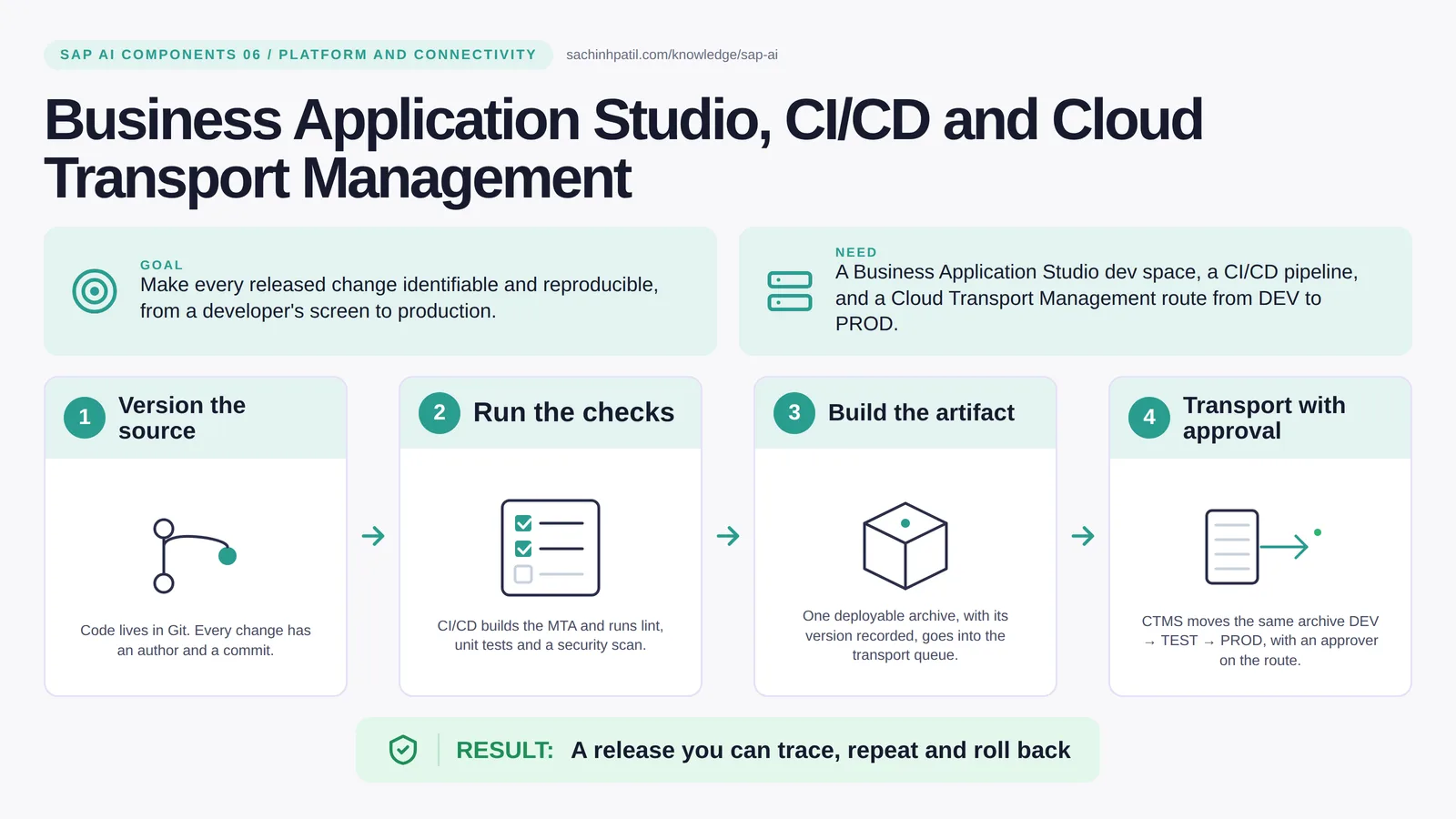
Version the source → Run the checks → Build the artifact → Transport with approval → A release you can trace, repeat and roll back. A learning overview, not a screenshot of a live system.
Foundation · 9 min read · Part 6 of 17 in SAP AI Components Explained
Which version of your payment rule is in production right now? If the answer starts with ‘whatever we deployed last Thursday’, read this.
SAP CI/CD BTP is the focus of this post. Three tools cover the journey from a developer’s screen to production: Business Application Studio to write the code, CI/CD to build and test it, and Cloud Transport Management to move the result from DEV to TEST to PROD with a named person releasing each step. Together they make every released change something you can name, repeat and roll back.
By the end you will be able to say in one sentence what Business Application Studio, CI/CD and Cloud Transport Management does, draw how data moves through it, and use the design-review line that stops most mistakes: A green build is not business validation.
Business Application Studio, CI/CD and Cloud Transport Management in one sentence
Build it, test it, move it through the stages with a paper trail nobody has to reconstruct later.
| Its job | Make every released change identifiable and reproducible, from a developer’s screen to production. |
| You need | A Business Application Studio dev space, a CI/CD pipeline, and a Cloud Transport Management route from DEV to PROD. |
| Layer | Platform and connectivity |
| Design check | A green build is not business validation. |
The everyday picture
A workshop and a dispatch depot. The workshop makes the part, the inspector stamps it, and the depot moves the stamped part from one site to the next with a signed note at each stop.
Why Business Application Studio, CI/CD and Cloud Transport Management exists
Ask a team which version of the payment rule is in production and watch the pause. If the answer involves ‘whatever was deployed last Thursday’, nobody can reproduce a bug or prove to an auditor what changed. For AI apps the problem doubles: prompts and tool definitions change behaviour just like code and need the same trail.
How Business Application Studio, CI/CD and Cloud Transport Management works, in four steps
- Version the source. Code lives in Git. Every change has an author and a commit.
- Run the checks. CI/CD builds the MTA and runs lint, unit tests and a security scan.
- Build the artifact. One deployable archive, with its version recorded, goes into the transport queue.
- Transport with approval. CTMS moves the same archive DEV → TEST → PROD, with a named person releasing it at each gate.
Source lives in Git, so every change has an author and a commit. A pipeline builds one deployable archive, runs unit tests, lint and a security scan, and fails loudly on any of them. The archive, with its version, goes into a Cloud Transport Management queue. CTMS moves that exact archive along a route, DEV to TEST to PROD. Imports into a node are triggered by someone with the right role, and many teams make that person the named approver at each gate. The same bytes arrive in production that were tested; nothing is rebuilt on the way.
Where it sits in the SAP landscape

One commit, one author. The same artifact at every stage, with a person releasing each step.
A worked example, with numbers
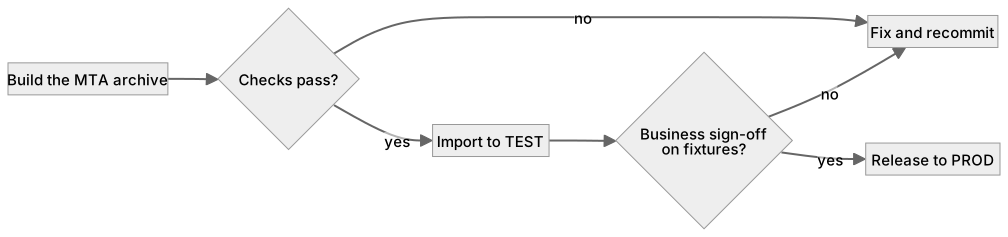
On Tuesday a developer changes the auto-assignment rule so that an exact reference and amount match within 0.5% still proposes assignment. Commit a1f3c9. The pipeline builds payment-app-1.4.2.mtar, runs 212 unit tests including the four fixture cases PAY-001 to PAY-004, a lint pass and a dependency scan, in 6 minutes. The archive goes to CTMS node DEV automatically. The collections lead runs the fixtures in TEST on Wednesday, confirms PAY-004 still requests review, and releases to PROD on Thursday at 10:00. Production now runs exactly 1.4.2, and the release record shows the commit, the test results and her name. When a complaint arrives in May, the team can check out a1f3c9 and reproduce it.
How the data flows
The check that actually matters
A green pipeline proves the code does what the developer intended. It does not prove the business got what it needed. The collections lead still has to run the fixture cases and sign off. Keep the two signatures separate: one for technical checks, one for business acceptance.
A green build is not business validation. Tests passing proves the code does what the developer meant. The collections team still has to confirm it does what the business needs.
CTMS vs ABAP transports
| Question | CTMS | ABAP transports |
|---|---|---|
| Moves | BTP artifacts: MTAs, Integration Suite content, configuration | ABAP objects inside S/4HANA |
| Approval | Import into each node on the route, by a role you assign | Via the ABAP change system or ChaRM |
| Can be combined | Yes, as separate tracks; CTMS also supports ABAP environment transports on BTP | Yes |
| Used for AI apps | Yes: prompts, tool definitions, app code | Only if the AI logic lives in ABAP |
What Business Application Studio, CI/CD and Cloud Transport Management does, and what it does not
It does
- Business Application Studio: browser-based development with SAP tooling preinstalled.
- CI/CD: pipelines that build, test and deploy MTAs, and can start from a Git webhook on each commit.
- CTMS: moves the built artifact between subaccounts along a defined route, with a transport history.
It does not
- Test business outcomes. Someone with the business role must sign off.
- Transport AI prompts by itself. Treat prompts and tool definitions as versioned artifacts too.
- Replace change management. It gives change management evidence.
Three real situations
Payment rule release. A change to the auto-assignment rule is tested with the fixture cases, built once, and promoted with the collections lead as approver.
Supplier portal update. Weekly releases go through the same route; a failed scan blocks the transport instead of someone noticing in production.
Prompt and tool change. An agent’s system prompt and tool list are files in the repo. A prompt change goes through the same pipeline as code.
In practice: what teams get wrong
Business Application Studio is a browser IDE with SAP generators and tools preinstalled, so onboarding a developer is a role assignment, not a laptop build. The Continuous Integration and Delivery service runs pipelines from a repository: build the MTA, run tests, scan, and either deploy directly to DEV or upload the archive to Cloud Transport Management. CTMS defines a landscape of nodes (DEV, TEST, PROD) and routes between them; an archive uploaded to DEV is forwarded along the route and imported into each node by someone with the import role. For AI applications, add the prompt files, the tool definitions and the evaluation set to the repository, so a change in behaviour has a commit and a transport like any other change.
From the field. I have seen prompt changes made directly in a production configuration ‘because it is just text’. Three weeks later nobody could say which wording produced a bad batch of proposals.
Other gotchas worth a line:
- Pin the artifact, not the branch; redeploying a branch is not a reproducible release.
- Keep per-environment configuration in MTA extension descriptors, not hardcoded in the artifact.
- Test data for pipelines must be fictional; never copy production records into a test job.
- Pipeline templates and supported steps change; check the current SAP documentation.
Terms you will hear
| Term | Plain meaning |
|---|---|
| BAS | Business Application Studio: SAP’s browser-based IDE. |
| CI/CD | Continuous integration and delivery: automated build, test and deploy. |
| Pipeline | The scripted sequence of build and test steps. |
| Artifact | The built, versioned archive that gets deployed. |
| CTMS | Cloud Transport Management: moves artifacts between environments. |
| Transport route | The ordered path DEV → TEST → PROD with approvals. |
| Evaluation set | Fixed test cases for an AI feature, kept in the repo. |
Quick self-check
- In one sentence, what is Business Application Studio, CI/CD and Cloud Transport Management’s job?
- Which decision does it not make, and who makes it instead?
- What is the one thing you would verify before calling it production-ready?
Show the answers
- Make every released change identifiable and reproducible, from a developer’s screen to production.
- Test business outcomes. Someone with the business role must sign off.
- Pin the artifact, not the branch; redeploying a branch is not a reproducible release.
Key takeaways
- Build it, test it, move it through the stages with a paper trail nobody has to reconstruct later.
- A green build is not business validation.
- Business Application Studio: browser-based development with SAP tooling preinstalled.
- Test business outcomes. Someone with the business role must sign off.
- Pipeline templates and supported steps change; check the current SAP documentation.
FAQs
Can I use GitHub Actions instead of SAP CI/CD?
Yes, as long as the output is the same versioned artifact that CTMS transports.
What about ABAP changes in S/4HANA?
On-premise S/4HANA changes follow the ABAP transport system (CTS or ChaRM). CTMS covers BTP content, including the ABAP environment on BTP, so they remain separate tracks.
Keep going in the series
Previous: Cloud Foundry and Kyma Next: SAP Integration Suite and Advanced Event Mesh
Full map: SAP AI Components Explained — 17 posts from platform to agents.
Sources and research notes
Research checked on 21 October 2026. Product names, plans, models and regional availability change fast; the starting reference for this component is SAP Cloud Transport Management. Examples use a fictional utility company and fictional cases (amounts, IDs, names); no customer landscape is described.
Recap
Business Application Studio, CI/CD and Cloud Transport Management: make every released change identifiable and reproducible, from a developer’s screen to production. The result is a release you can trace, repeat and roll back. The one thing to remember: a green build is not business validation.
Found this useful? The next post, SAP Integration Suite and Advanced Event Mesh, builds on it. Share it with the SAP colleague who keeps asking what all these components actually do.
Frequently asked questions
Can I use GitHub Actions instead of SAP CI/CD?
Yes, as long as the output is the same versioned artifact that CTMS transports.
What about ABAP changes in S/4HANA?
On-premise S/4HANA changes follow the ABAP transport system (CTS or ChaRM). CTMS covers BTP content, including the ABAP environment on BTP, so they remain separate tracks.
Further reading
Continue your trail
You now have the SAP AI Components context.
Save this guide, continue to the next concept or return to the Knowledge Library with your context intact.
SAP AI Components
17 resources in this area.

Practical SAP notes, structured for review, reuse and long-term maintenance.
Working on an FI-CA or IS-U implementation? I take on a limited number of advisory and architecture engagements.
Get in touch →