
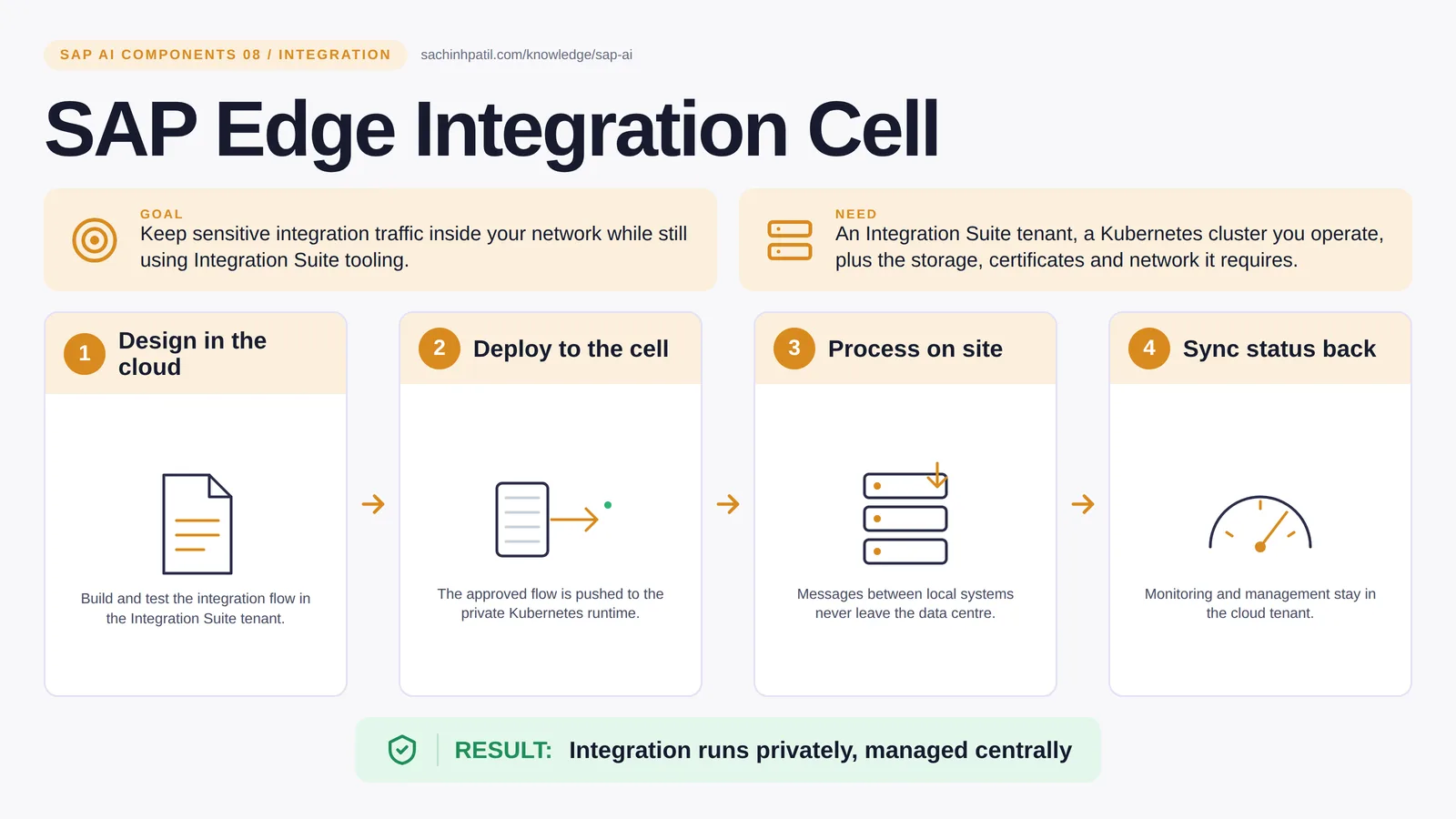
Design in the cloud → Deploy to the cell → Process on site → Sync status back → Integration runs privately, managed centrally. A learning overview, not a screenshot of a live system.
Intermediate · 8 min read · Part 8 of 17 in SAP AI Components Explained
Design in the cloud, run inside your building. For meter data and plant systems that can never touch the public cloud, this is the SAP answer.
SAP Edge Integration Cell is the focus of this post. Some integration traffic must never leave the building: meter readings, plant data, anything a regulator or a security policy keeps on site. Edge Integration Cell is the Integration Suite runtime you run yourself, on your own Kubernetes, so you design flows in the cloud and execute them in your data centre.
By the end you will be able to say in one sentence what SAP Edge Integration Cell does, draw how data moves through it, and use the design-review line that stops most mistakes: Local runtime is not total isolation.
SAP Edge Integration Cell in one sentence
Design the integration in the cloud, run it inside your own building.
| Its job | Keep sensitive integration traffic inside your network while still using Integration Suite tooling. |
| You need | An Integration Suite tenant, a Kubernetes cluster you operate, plus the databases, storage, certificates and network it requires. |
| Layer | Integration |
| Design check | Local runtime is not total isolation. |
The everyday picture
A central recipe office and a local kitchen. Recipes are written and approved centrally; the cooking happens on site, so the ingredients never leave the premises.
Why SAP Edge Integration Cell exists
Customers moving off on-premise Process Integration or Process Orchestration often face a split: they want the cloud design tools and monitoring, but part of their traffic cannot transit the public cloud. The cell resolves that by separating where a flow is designed from where it runs.
How SAP Edge Integration Cell works, in four steps
- Design in the cloud. Build and test the integration flow in the Integration Suite tenant.
- Deploy to the cell. The approved flow is pushed to the private Kubernetes runtime.
- Process on site. Messages between local systems never leave the data centre.
- Sync status back. Monitoring and management stay in the cloud tenant.
You keep designing and testing in the Integration Suite cloud tenant. SAP Edge Lifecycle Management installs and upgrades the cell on a Kubernetes cluster inside your network, and an approved flow is deployed to it. SAP recommends a dedicated cluster, and production use needs external PostgreSQL and Redis stores. Messages between local systems are received, mapped and delivered without leaving the premises. Status, logs and monitoring flow back up to the cloud tenant, so operators see one picture.
Where it sits in the SAP landscape
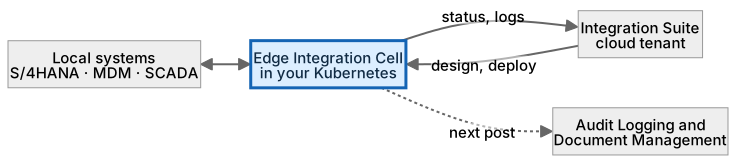
Message payloads stay between local systems and the cell; design, deployment and status use the cloud tenant. Design once, run where the data is.
A worked example, with numbers
A utility exchanges meter readings between the meter data management system and S/4HANA inside the plant network. The flow is designed and tested in the Integration Suite cloud tenant, then deployed to the cell running on a three-node cluster in the data centre. At 02:00 a batch of 48,000 readings moves from MDM to S/4HANA entirely on the local network; the payloads never leave the building. The cloud tenant shows the run succeeded, the count and the duration, because status flows up even though data does not. The local team keeps a calendar reminder 30 days before the cell’s certificates expire and renews them before anything breaks.
How the data flows

The check that actually matters
Local does not mean isolated. The cell needs a channel to the cloud tenant for deployment and monitoring, and that channel has to be designed and secured like any other. And unlike the cloud runtime, the cluster, its storage, its upgrades and its certificate renewals are yours to own. The subscription does not come with a team.
Local runtime is not total isolation. The cell still talks to the cloud tenant for deployment and monitoring. Plan that channel like any other.
Edge Integration Cell vs Cloud Connector
| Question | Edge Integration Cell | Cloud Connector |
|---|---|---|
| Job | Runs integration flows locally | Exposes on-premise services to BTP apps |
| You operate | A Kubernetes cluster and its data stores | A small agent installed on-premise |
| Data path | Messages stay in your network | Requests tunnel out to BTP |
| Use together | Often: the cell runs flows, the connector exposes services |
What SAP Edge Integration Cell does, and what it does not
It does
- Runs Integration Suite flows on customer-managed Kubernetes.
- Keeps message payloads inside the private network.
- Uses the same design tools and monitoring as the cloud runtime.
It does not
- Provide connectivity on its own. That is Cloud Connector, post 03.
- Run itself. You own cluster versions, storage and certificates.
- Remove the cloud dependency entirely; design and management stay there.
Three real situations
Private meter exchange. Meter readings move between the meter-data system and S/4HANA inside the plant network, with the flow designed centrally.
Factory integration. Shop-floor systems exchange mapped, routed messages inside the plant network; only the management channel to the cloud tenant leaves it.
Agent-adjacent processing. An on-site flow prepares a minimal, anonymised evidence package before anything is sent to a cloud model.
In practice: what teams get wrong
Edge Integration Cell is the hybrid runtime option of Integration Suite. SAP positions Integration Suite as the successor to Process Integration and Process Orchestration, and the cell as the choice for scenarios that must stay inside the private network. You design and manage flows in the cloud tenant; the cell, a set of containers on a Kubernetes cluster you run, executes the ones that must stay local. It runs many of the same capabilities as the cloud runtime, though not all, so coverage for your specific adapters and interfaces is a checklist item. You own the cluster, the persistent storage, the databases, the load balancer, the certificates and the backups. SAP’s planning guide lists exact resource and external-service requirements per release.
From the field. I have seen a go-live slip because nobody owned certificate renewal on the cell. It worked for 90 days, then every flow stopped on the same morning.
Other gotchas worth a line:
- Sizing is yours: persistent storage, node capacity and backups.
- Certificates expire; set the renewal process before go-live.
- Not every adapter available in the cloud runtime is supported on the cell.
- Requirements change with each release; check the current SAP documentation.
Terms you will hear
| Term | Plain meaning |
|---|---|
| Edge runtime | The on-premise execution engine of Integration Suite. |
| Kubernetes cluster | The container platform you operate for the cell. |
| Cloud tenant | Where flows are designed and monitored. |
| Adapter coverage | Which connectors the cell supports for your interfaces. |
| Persistent storage | Disk the cell needs for messages and state. |
| Certificate rotation | Renewing the cell’s certificates before they expire. |
| Hybrid integration | Design central, run local. |
Quick self-check
- In one sentence, what is SAP Edge Integration Cell’s job?
- Which decision does it not make, and who makes it instead?
- What is the one thing you would verify before calling it production-ready?
Show the answers
- Keep sensitive integration traffic inside your network while still using Integration Suite tooling.
- Provide connectivity on its own. That is Cloud Connector, post 03.
- Sizing is yours: persistent storage, node capacity and backups.
Key takeaways
- Design the integration in the cloud, run it inside your own building.
- Local runtime is not total isolation.
- Runs Integration Suite flows on customer-managed Kubernetes.
- Provide connectivity on its own. That is Cloud Connector, post 03.
- Requirements change with each release; check the current SAP documentation.
FAQs
Is this just Process Orchestration on Kubernetes?
It is the hybrid runtime of Integration Suite, built for flows that must stay in your network. Integration Suite is SAP’s positioned successor to PI/PO.
Do I still need Cloud Connector?
For BTP apps reaching on-premise systems, yes. The cell handles integration flows, not general connectivity; the Cloud Connector bundled with Edge Lifecycle Management cannot be reused for other applications.
Keep going in the series
Previous: SAP Integration Suite and Advanced Event Mesh Next: SAP Audit Logging and Document Management
Full map: SAP AI Components Explained — 17 posts from platform to agents.
Sources and research notes
Research checked on 21 October 2026. Product names, plans, models and regional availability change fast; the starting reference for this component is Edge Integration Cell. Examples use a fictional utility company and fictional cases (amounts, IDs, names); no customer landscape is described.
Recap
SAP Edge Integration Cell: keep sensitive integration traffic inside your network while still using Integration Suite tooling. The result is integration runs privately, managed centrally. The one thing to remember: local runtime is not total isolation.
Found this useful? The next post, SAP Audit Logging and Document Management, builds on it. Share it with the SAP colleague who keeps asking what all these components actually do.
Frequently asked questions
Is this just Process Orchestration on Kubernetes?
It is the hybrid runtime of Integration Suite, built for flows that must stay in your network. Integration Suite is SAP's positioned successor to PI/PO.
Do I still need Cloud Connector?
For BTP apps reaching on-premise systems, yes. The cell handles integration flows, not general connectivity; the Cloud Connector bundled with Edge Lifecycle Management cannot be reused for other applications.
Further reading
- Edge Integration Cell — SAP
- FAQ on Edge Integration Cell — SAP Community
- Migration to SAP Integration Suite, Edge Integration Cell — SAP Learning
Continue your trail
You now have the SAP AI Components context.
Save this guide, continue to the next concept or return to the Knowledge Library with your context intact.
SAP AI Components
17 resources in this area.

Practical SAP notes, structured for review, reuse and long-term maintenance.
Working on an FI-CA or IS-U implementation? I take on a limited number of advisory and architecture engagements.
Get in touch →