
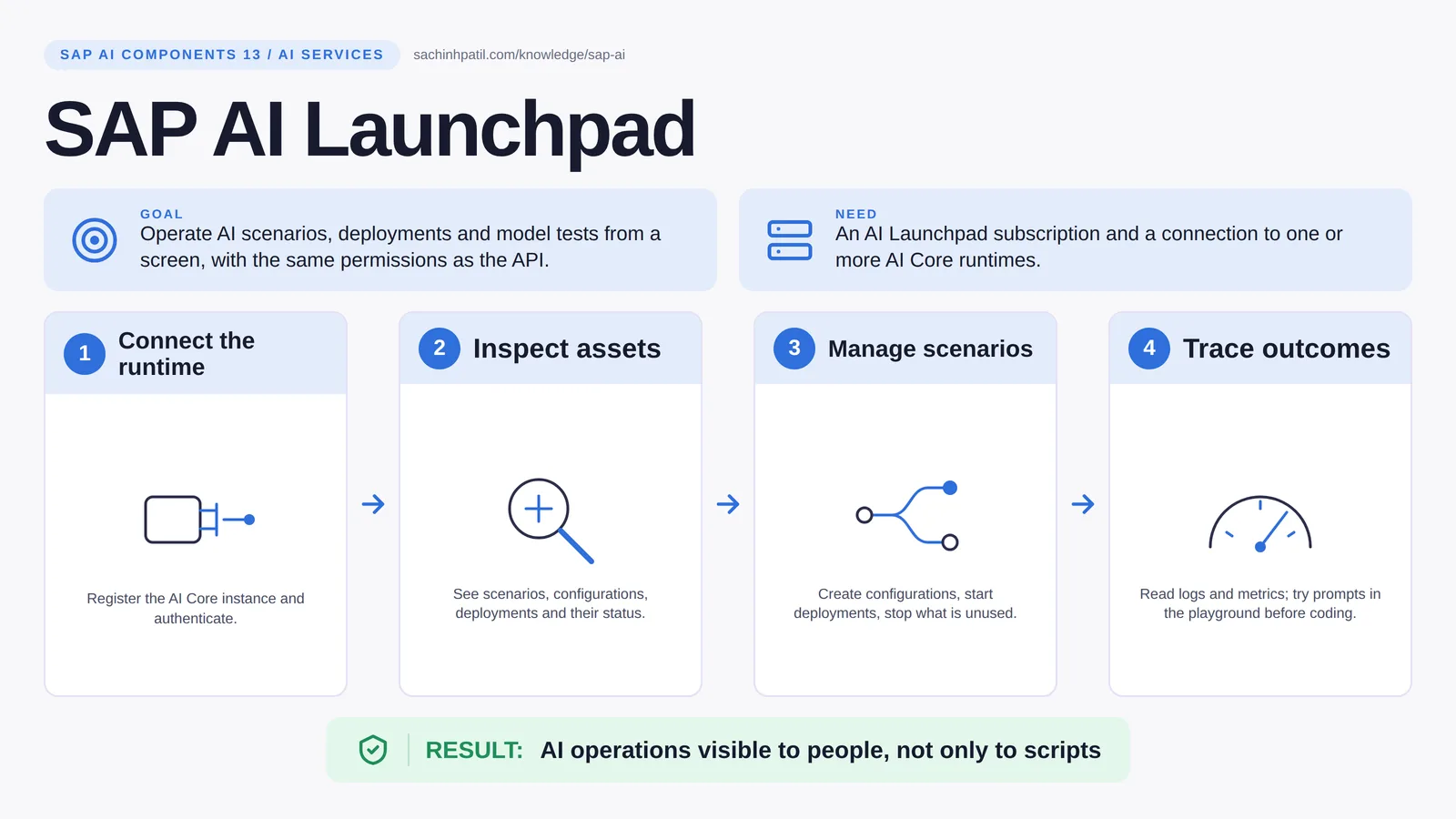
Connect the runtime → Inspect assets → Manage scenarios → Trace outcomes → AI operations visible to people, not only to scripts. A learning overview, not a screenshot of a live system.
Intermediate · 8 min read · Part 13 of 17 in SAP AI Components Explained
Your model is ‘running’. Is it any good? Green status and real quality are two different things, and this is where you tell them apart.
SAP AI Launchpad is the focus of this post. SAP AI Launchpad is the control panel for AI Core. It shows what is deployed, which version and how it is doing, with usage and consumption information, and it lets an operator start, stop and configure scenarios without writing a line of code. It also hosts the prompt playground, where you can try a prompt against fixture data before anyone builds an app around it.
By the end you will be able to say in one sentence what SAP AI Launchpad does, draw how data moves through it, and use the design-review line that stops most mistakes: A running deployment is not output quality.
SAP AI Launchpad in one sentence
The control panel for everything running in AI Core, so you can see it without writing code.
| Its job | Operate AI scenarios, deployments and model tests from a screen, with role-based access aligned to AI Core resource groups. |
| You need | An AI Launchpad subscription and a connection to one or more AI Core runtimes. |
| Layer | AI services |
| Design check | A running deployment is not output quality. |
The everyday picture
An airport operations room. It shows which flights are running, where, and how late. It does not fly the plane; the runtime does that.
Why SAP AI Launchpad exists
Operators, auditors and project leads will not run curl commands to see whether the payment-proposal model is live. They need a screen. Without one, old deployments can keep consuming resources after cutover and nobody notices, and the only person who knows what is running is the developer who left.
How SAP AI Launchpad works, in four steps
- Connect the runtime. Register the AI Core instance and authenticate.
- Inspect assets. See scenarios, configurations, deployments and their status.
- Manage scenarios. Create configurations, start deployments, stop what is unused.
- Trace outcomes. Read logs and metrics; try prompts in the playground before coding.
You subscribe to AI Launchpad in a BTP subaccount and connect it to one or more AI Core runtimes. With a role aligned to a resource group, an operator sees scenarios, configurations, deployments and executions, reads their logs and metrics, and can stop what is unused. Prompt management in the generative AI hub lets a team store and iterate on prompts; the playground runs them against a chosen model or deployment.
Where it sits in the SAP landscape
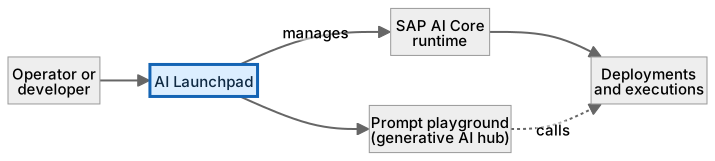
Role-based, like the API it fronts. What is running, where, and how much it is used.
A worked example, with numbers
After the payment model moves to version 1.4.2, the operator opens AI Launchpad, sees two deployments live: payment-proposal-1.4.1 and 1.4.2. Version 1.4.2 has handled 4,100 requests today at about 2,000 tokens each (roughly 8.2 million tokens); 1.4.1 has handled 3 (stragglers pointing at the old URL). She checks 1.4.1 has had no traffic for an hour, stops it, and the idle cost ends. In the playground she tries a tricky prompt against 1.4.2 with fixture PAY-002 and sees it return request_review, as expected. She records that in the evaluation notes, not as proof, because a good playground run is one case, not a test suite.
How the data flows

The check that actually matters
A green deployment status means the endpoint answers. It says nothing about whether the answers are right; that is measured by your evaluation set, outside the dashboard. Give operators the smallest role that does the job, and treat playground experiments as experiments: record the useful ones with the evaluation set, not as proof.
A running deployment is not output quality. Green status means the endpoint answers. Whether the answers are right is measured by your evaluation set, not by the dashboard.
AI Launchpad vs the AI Core API
| Question | Option A | Option B |
|---|---|---|
| Audience | Operators, auditors, leads | Developers and apps |
| Interface | A screen | REST API |
| Strength | See, operate, try prompts | Automate and integrate |
| You need | Launchpad for people | API for apps; usually use both |
What SAP AI Launchpad does, and what it does not
It does
- Operations UI for AI Core: scenarios, deployments, executions, logs.
- Prompt playground and prompt management for the generative AI hub.
- Role-based access aligned with AI Core resource groups.
It does not
- Run models. It manages what AI Core runs.
- Replace monitoring of your app. It shows the AI side only.
- Approve business outcomes. Quality needs an evaluation process.
Three real situations
Payment model operations. The operator sees the payment-proposal deployment, its version and its token usage, and stops an old version after cutover.
Multiple AI scenarios. A team runs a classifier and an LLM scenario side by side and compares consumption per resource group.
Prompt experimentation. A consultant tries a prompt in the playground with fixture data before anyone writes code.
In practice: what teams get wrong
AI Launchpad is the operations and governance front end for AI Core. It connects to one or more runtimes and shows scenarios, configurations, deployments and executions, with their logs, status and consumption. For the generative AI hub it adds prompt management and a playground where you try prompts against a chosen deployment with sample data. Access is role-based and aligned to AI Core resource groups, so an operator sees only what they should. It is the screen auditors and project leads ask for, and the place a team stops a superseded deployment after a cutover so it does not keep consuming resources.
From the field. I have seen three old deployments left running after a cutover because nobody had a screen to notice them. They ran quietly for a quarter.
Other gotchas worth a line:
- Stop unused deployments; a running deployment can keep consuming resources while idle (check your plan).
- Give operators the smallest role that lets them do the job.
- Playground results are not test results; record them with the evaluation set.
- Features and plans change; check the current SAP documentation.
Terms you will hear
| Term | Plain meaning |
|---|---|
| Scenario | A registered AI use case in AI Core. |
| Configuration | The settings that define a deployment. |
| Deployment | A running, callable endpoint. |
| Execution | A training or batch run. |
| Playground | A screen to try prompts interactively. |
| Prompt management | Versioning and storing prompts. |
| Consumption | Usage, such as tokens, that the runtime records. |
Quick self-check
- In one sentence, what is SAP AI Launchpad’s job?
- Which decision does it not make, and who makes it instead?
- What is the one thing you would verify before calling it production-ready?
Show the answers
- Operate AI scenarios, deployments and model tests from a screen, with role-based access aligned to AI Core resource groups.
- Run models. It manages what AI Core runs.
- Stop unused deployments; a running deployment can keep consuming resources while idle (check your plan).
Key takeaways
- The control panel for everything running in AI Core, so you can see it without writing code.
- A running deployment is not output quality.
- Operations UI for AI Core: scenarios, deployments, executions, logs.
- Run models. It manages what AI Core runs.
- Features and plans change; check the current SAP documentation.
FAQs
Do I need Launchpad if I use the API?
Not strictly, but operators and auditors will want a screen, not a curl command.
Can business users use it?
It is an operations tool. Business users should see results in the application, not here.
Keep going in the series
Previous: SAP AI Core Next: SAP Datasphere and Master Data Governance
Full map: SAP AI Components Explained — 17 posts from platform to agents.
Sources and research notes
Research checked on 21 October 2026. Product names, plans, models and regional availability change fast; the starting reference for this component is SAP AI Launchpad. Examples use a fictional utility company and fictional cases (amounts, IDs, names); no customer landscape is described.
Recap
SAP AI Launchpad: operate AI scenarios, deployments and model tests from a screen, with role-based access aligned to AI Core resource groups. The result is ai operations visible to people, not only to scripts. The one thing to remember: a running deployment is not output quality.
Found this useful? The next post, SAP Datasphere and Master Data Governance, builds on it. Share it with the SAP colleague who keeps asking what all these components actually do.
Frequently asked questions
Do I need Launchpad if I use the API?
Not strictly, but operators and auditors will want a screen, not a curl command.
Can business users use it?
It is an operations tool. Business users should see results in the application, not here.
Further reading
- SAP AI Launchpad — SAP
- SAP AI Launchpad on SAP Community — SAP Community
- SAP generative AI hub (prompt playground and prompt management) — SAP
Continue your trail
You now have the SAP AI Components context.
Save this guide, continue to the next concept or return to the Knowledge Library with your context intact.
SAP AI Components
17 resources in this area.

Practical SAP notes, structured for review, reuse and long-term maintenance.
Working on an FI-CA or IS-U implementation? I take on a limited number of advisory and architecture engagements.
Get in touch →