
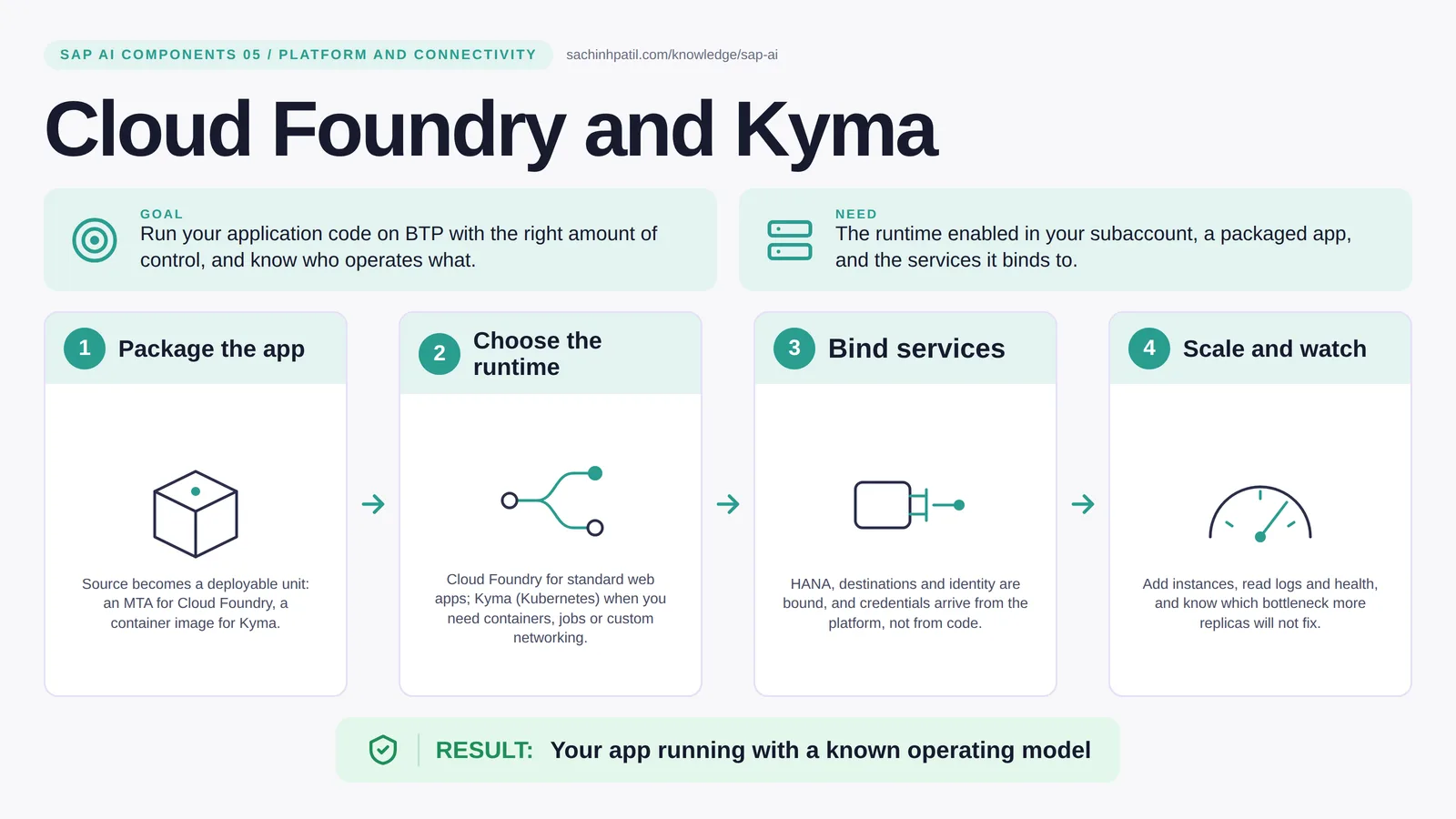
Package the app → Choose the runtime → Bind services → Scale and watch → Your app running with a known operating model. A learning overview, not a screenshot of a live system.
Foundation · 9 min read · Part 5 of 17 in SAP AI Components Explained
Staffed kitchen or rent-the-kitchen? Picking the wrong BTP runtime costs months. Here is the choice in one table.
Cloud Foundry vs Kyma is the focus of this post. Code has to run somewhere. On BTP you have two runtimes: Cloud Foundry, where you push your application and the platform builds and operates it, and Kyma, a managed Kubernetes where you bring containers and get more control in exchange for more responsibility. The choice is less about technology than about who operates what.
By the end you will be able to say in one sentence what Cloud Foundry and Kyma does, draw how data moves through it, and use the design-review line that stops most mistakes: More replicas do not fix every bottleneck.
Cloud Foundry and Kyma in one sentence
Two kinds of kitchen for your code: one fully staffed, one you equip and run yourself.
| Its job | Run your application code on BTP with the right amount of control, and know who operates what. |
| You need | The runtime enabled in your subaccount, a packaged app, and the services it binds to. |
| Layer | Platform and connectivity |
| Design check | More replicas do not fix every bottleneck. |
The everyday picture
Cloud Foundry is a restaurant kitchen with staff: you hand over the recipe and they cook. Kyma is a fitted kitchen you rent: more freedom, but you run the ovens.
Why Cloud Foundry and Kyma exists
Teams get this wrong in both directions. Some reach for Kubernetes because it sounds serious and then spend months on cluster upgrades for a two-service app. Others squeeze a scheduled batch job with custom networking into Cloud Foundry and fight the platform. Picking by workload shape and team skill avoids both.
How Cloud Foundry and Kyma works, in four steps
- Package the app. Source becomes a deployable unit: an MTA for Cloud Foundry, a container image for Kyma.
- Choose the runtime. Cloud Foundry for standard web apps; Kyma (Kubernetes) when you need containers, scheduled jobs or custom networking.
- Bind services. HANA, destinations and identity are bound, and credentials arrive from the platform, not from code.
- Scale and watch. Add instances, read logs and health, and know which bottleneck more replicas will not fix.
On Cloud Foundry you build an MTA archive and deploy it (or cf push a single app), and buildpacks turn your Node.js, Java or Python into a running app with a URL. Services such as HANA, destinations and identity are bound to it; the credentials appear in the app’s environment, never in your source. On Kyma you deploy a container image to a namespace, define its resources, and can enable modules such as Serverless functions, Eventing and Istio networking. Both runtimes work with the same identity services, Cloud Connector and service catalog, so a landscape often runs the UI on Cloud Foundry and heavier workers on Kyma.
Where it sits in the SAP landscape
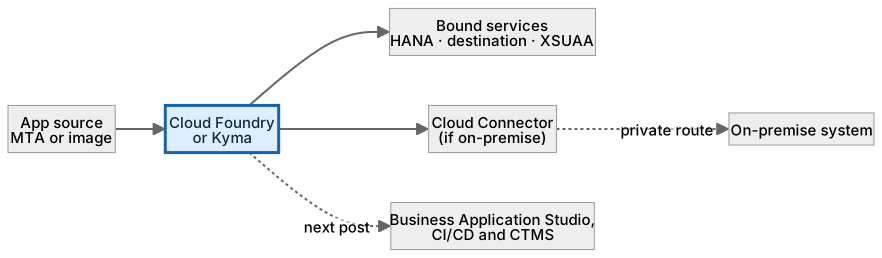
The same app talks to services and, through Cloud Connector, to on-premise systems. Credentials arrive from the platform, never from source.
A worked example, with numbers
The payment-evidence service is a 400-line Node.js app. On Cloud Foundry: an MTA deployment, 256 MB memory, two instances, bound to HANA Cloud and the FICA_ODATA destination. It answers in 220 ms, of which 180 ms is the S/4HANA call. The team notices it slows to 900 ms at month end and scales to six instances. Nothing improves: the bottleneck is the single S/4HANA OData service, not the app. They add a 60-second cache for unchanged contract accounts and go back to two instances; cached reads return in about 40 ms (the 220 ms minus the 180 ms backend call). The nightly job that pre-builds evidence for the next day’s queue runs on Kyma as a CronJob; on Cloud Foundry the SAP Job Scheduling service could trigger it instead, but this team already needs a custom container.
How the data flows
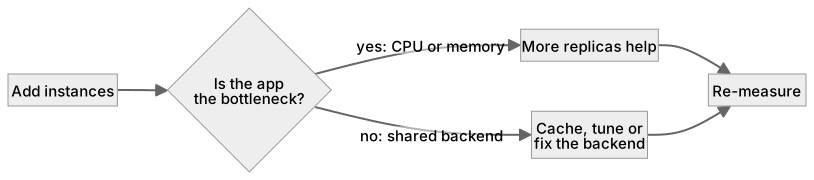
The check that actually matters
Scaling is the usual misunderstanding. Ten instances of an app that all wait on the same slow S/4HANA call are still slow; you have scaled the wrong thing. Measure where the time goes before adding replicas. And on Kyma, remember that workloads, resource limits and the modules you enable are yours to look after.
More replicas do not fix every bottleneck. Ten app instances all waiting on the same slow S/4HANA call are still slow. Scale what is actually limiting.
Cloud Foundry vs Kyma
| Question | Cloud Foundry | Kyma |
|---|---|---|
| You give it | Source code or an MTA | A container image |
| You operate | The app and its bindings | Workloads, namespaces, resource limits, enabled modules |
| Scheduling / jobs | Via SAP Job Scheduling service | Kubernetes CronJobs, functions, event triggers |
| Networking control | Basic | Istio, network policies per service |
| Pick when | Standard CAP / Fiori extension | Containers, jobs, custom networking |
What Cloud Foundry and Kyma does, and what it does not
It does
- Cloud Foundry: push code, platform builds and runs it, buildpacks handle the stack.
- Kyma: SAP-managed Kubernetes runtime with optional modules such as Serverless, Eventing and Istio.
- Both bind to the same BTP services and the same identity and connectivity.
It does not
- Decide your architecture for you. Pick by team skills and workload shape.
- Make an app secure by itself. Authorization still lives in the app and the backend.
- Replace a transport process. That is CI/CD and CTMS, post 06.
Three real situations
Payment evidence service. A small Node.js service on Cloud Foundry reads open items through a destination and returns a tidy evidence package to the UI.
Order extension. A manufacturer runs an order-validation microservice on Kyma because it needs a scheduled job and a custom container.
Agent backend. An agent’s tool server runs on Kyma with per-tool network policies, so a tool can only reach the system it wraps.
In practice: what teams get wrong
Most SAP extensions start with the Cloud Application Programming model (CAP) on Cloud Foundry, because the tooling, the service bindings and the Fiori integration are designed for it. Kyma earns its place when you need something Cloud Foundry does not do well: long-running or scheduled jobs, custom networking between services, sidecars or specialised containers. Kyma also runs event-driven functions through its Eventing module. In both runtimes, credentials come from service bindings, so a well-built app does not change when it moves. What changes is operations: Cloud Foundry gives you a quota and a cockpit view; Kyma gives you a Kubernetes cluster, and someone on your team has to own its workloads, limits and module versions (check SAP’s documentation for what SAP upgrades for you).
From the field. I have seen a two-service extension moved to Kyma ‘for the future’ and then spend more effort on Kubernetes operations than on the business logic for a year.
Other gotchas worth a line:
- Cloud Foundry memory quota is per subaccount; a stuck instance can starve its neighbours.
- Kyma means you own workload operations, resource limits and the modules you enable.
- Put credentials in service bindings; never in environment variables you typed by hand.
- Runtime versions, quotas and supported buildpacks change; check the current SAP documentation.
Terms you will hear
| Term | Plain meaning |
|---|---|
| Runtime | Where application code executes. |
| Cloud Foundry | BTP’s managed app platform: push code, it runs. |
| Kyma | BTP’s managed Kubernetes runtime with optional modules. |
| Buildpack | Turns source code into a runnable app automatically. |
| MTA | Multi-target application: one deployable archive for SAP apps. |
| Service binding | The link that gives an app its credentials for a service. |
| Replica / instance | One running copy of the app. |
Quick self-check
- In one sentence, what is Cloud Foundry and Kyma’s job?
- Which decision does it not make, and who makes it instead?
- What is the one thing you would verify before calling it production-ready?
Show the answers
- Run your application code on BTP with the right amount of control, and know who operates what.
- Decide your architecture for you. Pick by team skills and workload shape.
- Cloud Foundry memory quota is per subaccount; a stuck instance can starve its neighbours.
Key takeaways
- Two kinds of kitchen for your code: one fully staffed, one you equip and run yourself.
- More replicas do not fix every bottleneck.
- Cloud Foundry: push code, platform builds and runs it, buildpacks handle the stack.
- Decide your architecture for you. Pick by team skills and workload shape.
- Runtime versions, quotas and supported buildpacks change; check the current SAP documentation.
FAQs
Which should I pick first?
Cloud Foundry, unless you already need containers or long-running jobs, or Kubernetes skills are on the team.
Can an app use both?
Yes. Many landscapes run the UI on Cloud Foundry and heavier workers on Kyma.
Keep going in the series
Previous: SAP HANA Cloud Next: Business Application Studio, CI/CD and Cloud Transport Management
Full map: SAP AI Components Explained — 17 posts from platform to agents.
Sources and research notes
Research checked on 21 October 2026. Product names, plans, models and regional availability change fast; the starting reference for this component is Cloud Foundry environment. Examples use a fictional utility company and fictional cases (amounts, IDs, names); no customer landscape is described.
Recap
Cloud Foundry and Kyma: run your application code on BTP with the right amount of control, and know who operates what. The result is your app running with a known operating model. The one thing to remember: more replicas do not fix every bottleneck.
Found this useful? The next post, Business Application Studio, CI/CD and Cloud Transport Management, builds on it. Share it with the SAP colleague who keeps asking what all these components actually do.
Frequently asked questions
Which should I pick first?
Cloud Foundry, unless you already need containers or long-running jobs, or Kubernetes skills are on the team.
Can an app use both?
Yes. Many landscapes run the UI on Cloud Foundry and heavier workers on Kyma.
Further reading
Continue your trail
You now have the SAP AI Components context.
Save this guide, continue to the next concept or return to the Knowledge Library with your context intact.
SAP AI Components
17 resources in this area.

Practical SAP notes, structured for review, reuse and long-term maintenance.
Working on an FI-CA or IS-U implementation? I take on a limited number of advisory and architecture engagements.
Get in touch →