
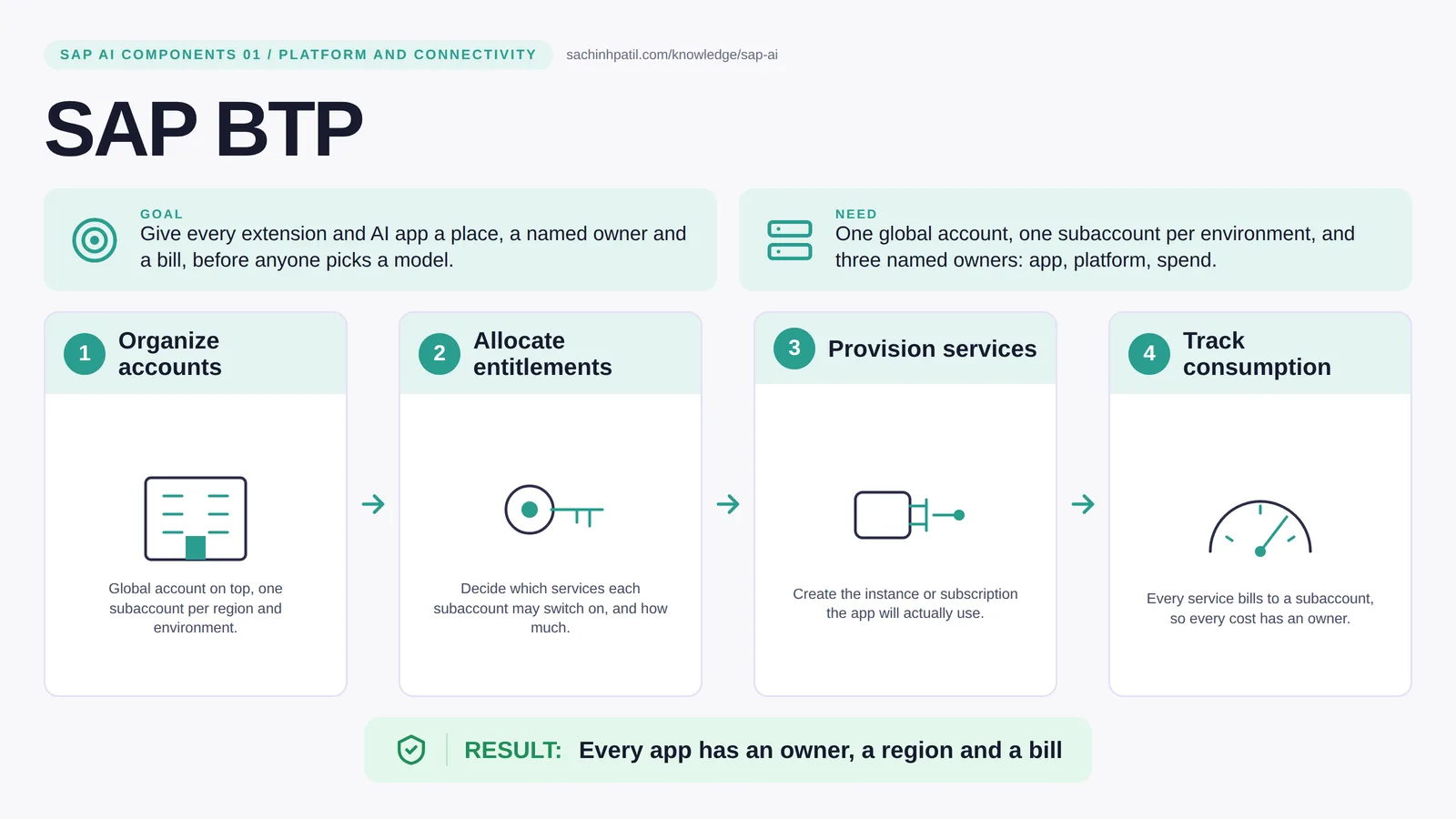
Organize accounts → Allocate entitlements → Provision services → Track consumption → Every app has an owner, a region and a bill. A learning overview, not a screenshot of a live system.
Foundation · 9 min read · Part 1 of 17 in SAP AI Components Explained
Your AI pilot works. Now who owns it, which region holds its data, and whose budget is it burning? If you cannot answer in ten seconds, this post is for you.
SAP BTP explained is the focus of this post. If S/4HANA is the ledger, SAP BTP is the building next door where you are allowed to build things that talk to the ledger. Before anyone argues about which AI model to use, somebody has to decide which floor the app lives on, who holds the keys and who pays the electricity bill. That is what BTP accounts, entitlements and quotas are for.
By the end you will be able to say in one sentence what SAP BTP does, draw how data moves through it, and use the design-review line that stops most mistakes: Access is not posting authority.
SAP BTP in one sentence
The office building your SAP extensions live in: floors, keys and an electricity meter for every tenant.
| Its job | Give every extension and AI app a place, a named owner and a bill, before anyone picks a model. |
| You need | One global account, one subaccount per environment, and three named owners: app, platform, spend. |
| Layer | Platform and connectivity |
| Design check | Access is not posting authority. |
The everyday picture
Think of a company campus. The campus is the global account, each department building is a subaccount, the approved equipment list is the entitlements, and the meter on the wall is consumption.
Why SAP BTP exists
Most failed pilots fail for a boring reason. A developer builds something useful in a trial account. Another team wants it. Now nobody can say which region holds the data, who owns the subscription, or whose budget the model calls are hitting. Adding features does not answer any of those questions. An account structure does.
How SAP BTP works, in four steps
- Organize accounts. Global account on top, one subaccount per region and environment.
- Allocate entitlements. Decide which services each subaccount may switch on, and how much.
- Provision services. Create the instance or subscription the app will actually use.
- Track consumption. Every service bills to a subaccount, so every cost has an owner.
A global account is the account tied to your commercial contract with SAP. Under it you create subaccounts, one per environment and region: DEV, TEST, PROD, each with its own users and its own services. You can optionally group subaccounts in directories and manage entitlements per directory. An entitlement is the right to use a service plan; a quota is the maximum amount you may consume. By default a subaccount can use what the global account holds, so restricting DEV is something an administrator has to do deliberately. Only when you actually create a service instance or subscribe to an application does something exist that an app can bind to. Think of it as: allowed to buy, bought, plugged in.
Where it sits in the SAP landscape
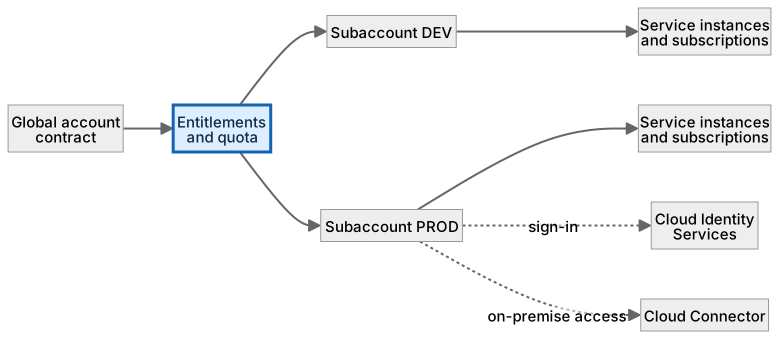
One contract, many subaccounts. Entitlements and quota are assigned down; the app binds to instances in a subaccount and consumption is reported per subaccount.
A worked example, with numbers
A utility wants a payment-exception app with an AI proposal step. The account design: global account UtilityCo; subaccounts UTIL-DEV (eu10), UTIL-PROD (eu10); entitlements in DEV for HANA Cloud (30 GB), AI Core (standard), Destination, XSUAA; in PROD the same with HANA at 60 GB. Owners: Priya (app), Omar (platform), Finance controller (spend). First month: DEV consumed 1.2 million model tokens, reported against the DEV subaccount rather than buried in a shared bill. When PROD went live, the DEV entitlements stayed at 30 GB, so the pilot could not quietly grow; only PROD got 60 GB. Total HANA Cloud quota across the two subaccounts is 90 GB, and that sum is the number Omar checks against the contract. That is the whole point.
How the data flows

The check that actually matters
The trap is confusing platform access with business permission. A BTP administrator who can create any service in the PROD subaccount still cannot approve a payment, because that permission lives in S/4HANA’s role, not in BTP. Keep the two lists separate and name an owner for each.
Access is not posting authority. An administrator who can create services in the subaccount still cannot approve a payment in S/4HANA.
SAP BTP vs extending inside S/4HANA
| Question | On BTP | Inside S/4HANA |
|---|---|---|
| Where the code runs | On BTP, separately deployed and versioned | Inside the S/4HANA system |
| Upgrade impact | Lower; it sits outside the S/4HANA code line, though released APIs still need regression tests | High; custom code must be retested each upgrade |
| Access to AI services | Native: AI Core, Document AI, HANA vector | Through BTP anyway, so you need it regardless |
| Best for | New apps, agents, integrations, UI | Small field or validation changes close to the data |
What SAP BTP does, and what it does not
It does
- Separates development, test and production into subaccounts with their own access.
- Controls which services exist, in which region, under which quota.
- Attributes consumption so a pilot cannot quietly become an unexplained production cost.
It does not
- Grant business permissions in S/4HANA. Those stay with S/4HANA roles.
- Replace your business system. It hosts the extension, not the ledger.
- Choose a model. That is a design decision, served through AI Core and the generative AI hub, post 12.
Three real situations
Collections pilot. A utility runs a payment-exception app in a DEV subaccount. The DEV user cannot obtain a PROD credential, and the pilot’s AI usage shows up on its own line.
Supplier portal. A manufacturer extends supplier onboarding on BTP instead of inside S/4HANA, with its own release cycle and owner.
AI app ownership. An AI team gets a subaccount, model access and a usage report under one accountable owner before anyone else is invited in.
In practice: what teams get wrong
On a real project the account design is a one-page document, and it is worth writing before the first service is provisioned. It lists each subaccount with its region, purpose and owner; for each service, whether it is an instance or a subscription, and which plan; and the three people who can answer questions about the app, the platform and the invoice. At SAP Sapphire 2026 SAP introduced the SAP Business AI Platform, which brings together SAP BTP, SAP Business Data Cloud and SAP Business AI, with Joule Studio for building agents and SAP AI Agent Hub for governing them (per SAP News; exact packaging and availability may change). Either way, the same account document is where your AI workloads get their boundary. Treat it as living: every new service goes in with a line, and every pilot has an end date.
From the field. I have watched a pilot run for eight months in a trial-style subaccount with nobody on the invoice line. When it was finally moved, the region did not match the production system and the whole data residency review started over.
Other gotchas worth a line:
- An entitlement is permission to provision; it is not a running service.
- Choose the region for the whole chain, including the model provider.
- Subaccounts separate environments; your app still has to separate tenants.
- Service plans and limits change; check the current SAP documentation before committing.
Terms you will hear
| Term | Plain meaning |
|---|---|
| Global account | The commercial contract with SAP. One per company, usually. |
| Subaccount | A fenced area inside the global account with its own users, region and services. |
| Entitlement | Permission for a subaccount to use a service plan. |
| Quota | How much of that service the subaccount may use. |
| Service instance | A created, bindable resource such as a database. |
| Subscription | Access to a ready-made SAP application in your subaccount. |
| Clean core | Keeping custom logic outside S/4HANA so upgrades stay simple. |
Quick self-check
- In one sentence, what is SAP BTP’s job?
- Which decision does it not make, and who makes it instead?
- What is the one thing you would verify before calling it production-ready?
Show the answers
- Give every extension and AI app a place, a named owner and a bill, before anyone picks a model.
- Grant business permissions in S/4HANA. Those stay with S/4HANA roles.
- An entitlement is permission to provision; it is not a running service.
Key takeaways
- The office building your SAP extensions live in: floors, keys and an electricity meter for every tenant.
- Access is not posting authority.
- Separates development, test and production into subaccounts with their own access.
- Grant business permissions in S/4HANA. Those stay with S/4HANA roles.
- Service plans and limits change; check the current SAP documentation before committing.
FAQs
Do I need more than one subaccount?
Yes. At minimum one for development and one for production, so a test user cannot reach production data by accident.
Is BTP where S/4HANA runs?
No. S/4HANA is the business system. BTP is where you build around it.
Keep going in the series
Next: SAP Cloud Identity Services
Full map: SAP AI Components Explained — 17 posts from platform to agents.
Sources and research notes
Research checked on 21 October 2026. Product names, plans, models and regional availability change fast; the starting reference for this component is SAP BTP account model. Examples use a fictional utility company and fictional cases (amounts, IDs, names); no customer landscape is described.
Recap
SAP BTP: give every extension and AI app a place, a named owner and a bill, before anyone picks a model. The result is every app has an owner, a region and a bill. The one thing to remember: access is not posting authority.
Found this useful? The next post, SAP Cloud Identity Services, builds on it. Share it with the SAP colleague who keeps asking what all these components actually do.
Frequently asked questions
Do I need more than one subaccount?
In practice, yes. At minimum one for development and one for production, so a test user cannot reach production data by accident.
Is BTP where S/4HANA runs?
No. S/4HANA is the business system. BTP is where you build around it.
Further reading
Continue your trail
You now have the SAP AI Components context.
Save this guide, continue to the next concept or return to the Knowledge Library with your context intact.
SAP AI Components
17 resources in this area.

Practical SAP notes, structured for review, reuse and long-term maintenance.
Working on an FI-CA or IS-U implementation? I take on a limited number of advisory and architecture engagements.
Get in touch →