
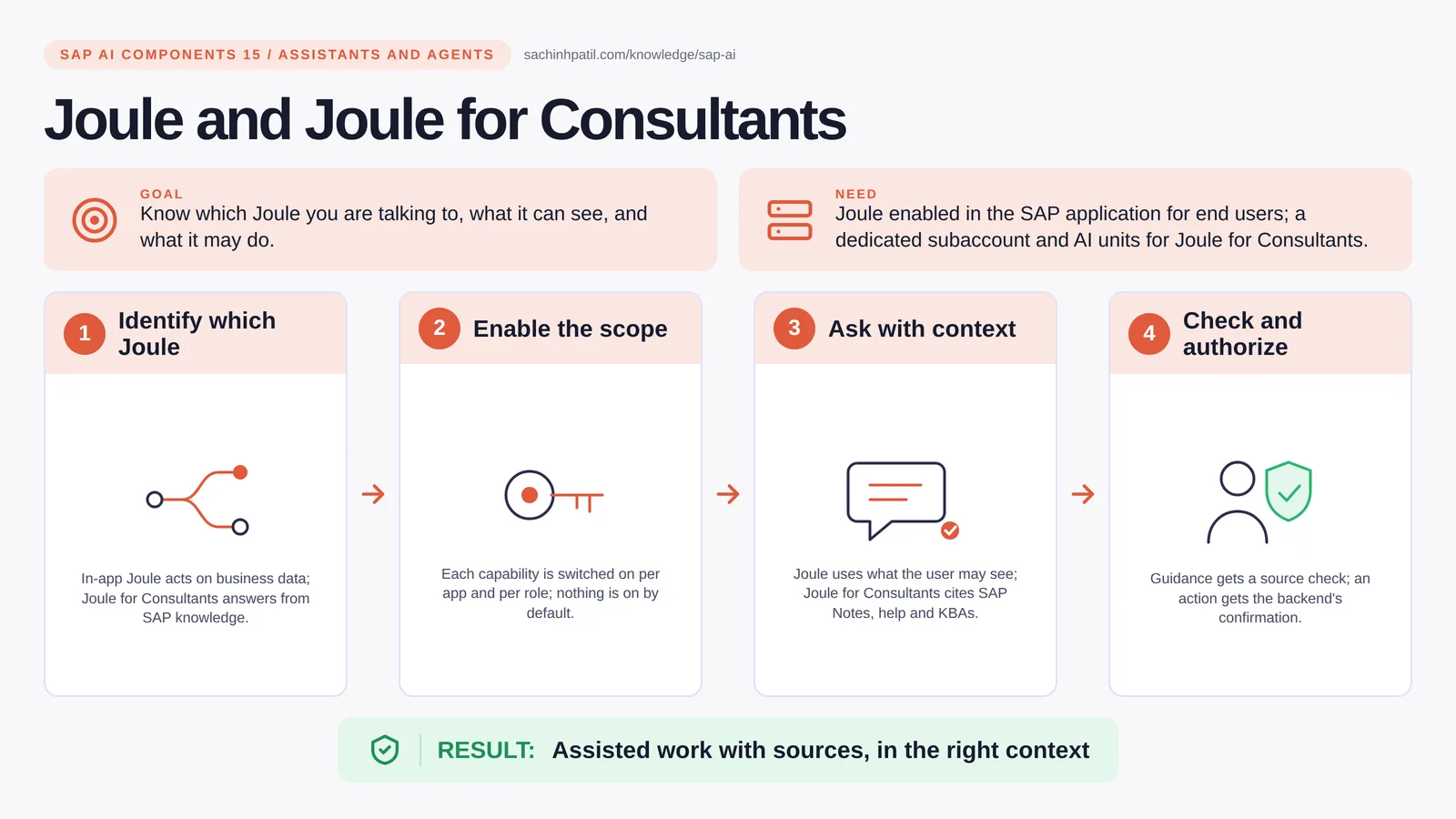
Identify which Joule → Enable the scope → Ask with context → Check and authorize → Assisted work with sources, in the right context. A learning overview, not a screenshot of a live system.
Advanced · 9 min read · Part 15 of 17 in SAP AI Components Explained
Same name, two products, very different powers. One acts on your business data; one never touches it. Mixing them up is where projects go wrong.
Joule for Consultants is the focus of this post. Two products share the name Joule and do different jobs. Joule, inside S/4HANA and other SAP apps, acts on your business data in the user’s own authorization context, and Joule Agents take on multi-step tasks. SAP Joule for Consultants is a separate product: a conversational assistant that answers from SAP’s curated documentation, Notes and knowledge base articles, with citations; it does not read your system’s configuration or data.
By the end you will be able to say in one sentence what Joule and Joule for Consultants does, draw how data moves through it, and use the design-review line that stops most mistakes: Guidance needs source and release checks.
Joule and Joule for Consultants in one sentence
Two assistants with the same name: one works inside your SAP apps, one answers consultants from SAP’s own knowledge.
| Its job | Know which Joule you are talking to, what it can see, and what it may do. |
| You need | Joule enabled in the SAP application for end users; a dedicated BTP subaccount and AI units for Joule for Consultants. |
| Layer | Assistants and agents |
| Design check | Guidance needs source and release checks. |
The everyday picture
A service desk with specialist advisers. One adviser sits inside the office and can act on your files. The other is on the phone with the manuals and SAP Notes open, and never touches your files.
Why Joule and Joule for Consultants exists
Consultants spend hours in SAP Notes and help pages; business users spend hours finding the right app and filter. Both assistants cut that time, but confusing the two is dangerous: expecting Joule for Consultants to know your landscape, or expecting in-app Joule to bypass a role it does not have.
How Joule and Joule for Consultants works, in four steps
- Identify which Joule. In-app Joule acts on business data; Joule for Consultants answers from SAP knowledge.
- Enable the scope. Capabilities are enabled per application and governed by roles; check what is on in your landscape.
- Ask with context. Joule uses what the user may see; Joule for Consultants cites SAP Notes, help and KBAs.
- Check and authorize. Guidance gets a source check; an action gets the backend’s confirmation.
In-app Joule is enabled per application and per capability; it answers questions, navigates to apps with filters set, and in supported cases executes transactions, always as the user and within the user’s roles. Joule for Consultants is provisioned in its own dedicated BTP subaccount and consumes AI units (SAP’s learning material notes an EU10/EU11 data-residency requirement for the subaccount); you ask it how to configure a dunning procedure or what an ABAP class does, and it answers with citations to Notes and documentation, and can work with files you upload. Joule Studio is where you build your own skills and agents; post 16 covers that.
Where it sits in the SAP landscape
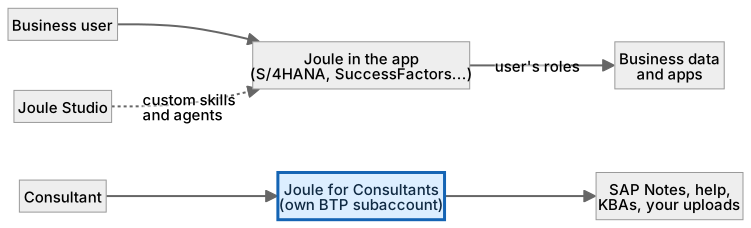
Joule acts within the user’s roles. Joule for Consultants answers from SAP knowledge, not from your systems.
A worked example, with numbers
A consultant configuring FI-CA dunning asks Joule for Consultants (a hypothetical session): ‘steps to set up a dunning procedure with two levels’. It answers with a configuration path and cites SAP Notes and a help page; the consultant opens the notes and confirms they apply to the release in the sandbox before changing anything. Meanwhile Reem, in S/4HANA, asks in-app Joule: ‘show overdue items for contract account 300012345’ (a fictional account). Joule opens the relevant Fiori app with the filter already set, because it is acting as Reem and she has the role to see those items. Neither assistant did the other’s job: one gave cited guidance, one acted on live data in context.
How the data flows

The check that actually matters
A confident answer is not a tested one. Joule for Consultants may describe a feature that exists in a release you do not have; open the cited note and check the version in a sandbox. In-app Joule sees what the user sees and no more, which is exactly right, and a transaction it reports as done should be confirmed by the backend, not by the chat.
Guidance needs source and release checks. A confident answer about a Fiori app may describe a feature that is not in your release. Open the cited note and check the version.
Joule vs Joule for Consultants
| Question | Option A | Option B |
|---|---|---|
| Sees your data | Yes, in the user’s context | No; SAP knowledge and your uploads |
| Can act | Navigate and transact in SAP apps | Answer and cite |
| Needs | Enablement per app and role | Its own subaccount and AI units |
| Use for | Doing the work | Learning how, with sources |
What Joule and Joule for Consultants does, and what it does not
It does
- Joule: conversational, navigational and transactional help embedded in S/4HANA, SuccessFactors and more; Joule Agents for multi-step tasks.
- Joule for Consultants: answers from SAP documentation, Notes and KBAs with citations; can explain ABAP code and work with uploaded files.
- Both consume AI units.
It does not
- Bypass authorizations. Joule sees what the user sees.
- Make Joule for Consultants aware of your landscape. It answers from SAP knowledge and what you upload; SAP also describes optional custom grounding, which is a deliberate setup.
- Replace testing. A cited note is a starting point, not a test result.
Three real situations
Utility process guidance. A consultant asks how to configure a dunning procedure in FI-CA and gets steps with the relevant notes cited.
Business task assistance. A collections clerk asks Joule in S/4HANA to show overdue items for a contract account and gets the app opened with the filter set.
Custom assistant extension. A team builds a Joule skill or agent in Joule Studio, so the assistant can call the team’s own payment-evidence tool.
In practice: what teams get wrong
The Joule family has grown into layers. Joule Assistants sit with the user and coordinate; Joule Agents carry out multi-step business tasks (SAP has announced dozens of delivered agents and thousands of Joule Skills; counts differ between announcements, so check the current catalogue); Joule Work is the shared surface where assistants and agents meet the user, still rolling out as of this writing; Joule Studio, part of SAP Build, is where you build your own skills and agents; Joule for Developers helps with ABAP; and Joule for Consultants answers from SAP’s knowledge base with citations. In-app Joule always acts in the user’s authorization context. Joule for Consultants needs its own subaccount, consumes AI units, and does not connect to your systems; it reads SAP documentation, Notes and KBAs, and files you upload. Agent-to-agent (A2A) support is meant to let Joule agents work with agents beyond SAP; post 16 covers where that stands.
From the field. I have seen a team expect Joule for Consultants to read their system and troubleshoot a live config. It does not; it answers from SAP’s knowledge, and that expectation wasted a week.
Other gotchas worth a line:
- AI units are a shared budget; monitor who consumes them.
- Joule for Consultants needs its own subaccount; plan the entitlement early.
- Treat answers about configuration as drafts until verified in a sandbox.
- Capabilities per product and release change quickly; check the current SAP documentation.
Terms you will hear
| Term | Plain meaning |
|---|---|
| In-app Joule | The assistant embedded in SAP apps, acting as the user. |
| Joule Agents | Multi-step agents with business-process expertise. |
| Joule Assistants | Coordinators that turn intent into agent actions. |
| Joule Work | The shared surface where users meet assistants and agents. |
| Joule Studio | Where you build custom skills and agents, in SAP Build. |
| Joule for Consultants | Cited answers from SAP knowledge; no access to your system. |
| AI units | The consumption metric these assistants share. |
Quick self-check
- In one sentence, what is Joule and Joule for Consultants’s job?
- Which decision does it not make, and who makes it instead?
- What is the one thing you would verify before calling it production-ready?
Show the answers
- Know which Joule you are talking to, what it can see, and what it may do.
- Bypass authorizations. Joule sees what the user sees.
- AI units are a shared budget; monitor who consumes them.
Key takeaways
- Two assistants with the same name: one works inside your SAP apps, one answers consultants from SAP’s own knowledge.
- Guidance needs source and release checks.
- Joule: conversational, navigational and transactional help embedded in S/4HANA, SuccessFactors and more; Joule Agents for multi-step tasks.
- Bypass authorizations. Joule sees what the user sees.
- Capabilities per product and release change quickly; check the current SAP documentation.
FAQs
Can Joule for Consultants see my system?
No. It answers from SAP’s curated knowledge base and what you upload in the chat; it does not read your system.
What are Joule Agents and Joule Studio?
Joule Agents handle multi-step tasks, and SAP delivers some; Joule Studio is where you build your own. See post 16.
Keep going in the series
Previous: SAP Datasphere and Master Data Governance Next: Agent Platforms, A2A, MCP and APIs
Full map: SAP AI Components Explained — 17 posts from platform to agents.
Sources and research notes
Research checked on 21 October 2026. Product names, plans, models and regional availability change fast; the starting reference for this component is Provisioning SAP Joule for Consultants. Examples use a fictional utility company and fictional cases (amounts, IDs, names); no customer landscape is described.
Recap
Joule and Joule for Consultants: know which Joule you are talking to, what it can see, and what it may do. The result is assisted work with sources, in the right context. The one thing to remember: guidance needs source and release checks.
Found this useful? The next post, Agent Platforms, A2A, MCP and APIs, builds on it. Share it with the SAP colleague who keeps asking what all these components actually do.
Frequently asked questions
Can Joule for Consultants see my system?
No. It answers from SAP's curated knowledge base and what you upload in the chat; it does not read your system.
What are Joule Agents and Joule Studio?
Joule Agents handle multi-step tasks, and SAP delivers some; Joule Studio is where you build your own. See post 16.
Further reading
Continue your trail
You now have the SAP AI Components context.
Save this guide, continue to the next concept or return to the Knowledge Library with your context intact.
SAP AI Components
17 resources in this area.

Practical SAP notes, structured for review, reuse and long-term maintenance.
Working on an FI-CA or IS-U implementation? I take on a limited number of advisory and architecture engagements.
Get in touch →