
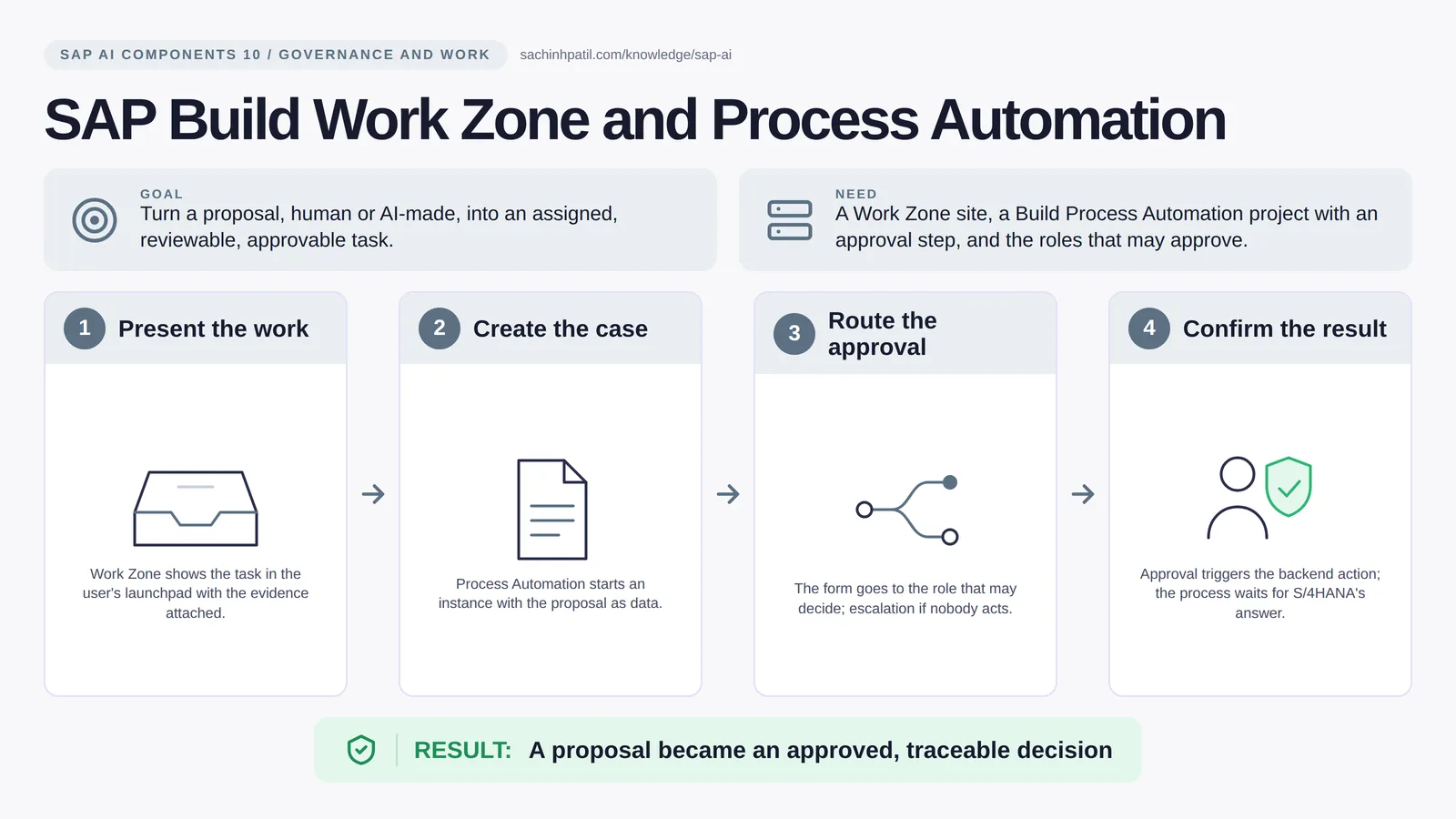
Present the work → Create the case → Route the approval → Confirm the result → A proposal became an approved, traceable decision. A learning overview, not a screenshot of a live system.
Intermediate · 9 min read · Part 10 of 17 in SAP AI Components Explained
AI writes a proposal in a second. Who approves it, on what evidence, and what happens when they say no? The human-in-the-loop, built properly.
SAP Build Process Automation is the focus of this post. A proposal is not a decision until someone accountable makes it one. SAP Build Work Zone is where work shows up for people, and SAP Build Process Automation is the workflow that routes a case to the right approver, waits, escalates and keeps the slip. Together they are the human-in-the-loop that every AI proposal has to pass through.
By the end you will be able to say in one sentence what SAP Build Work Zone and Process Automation does, draw how data moves through it, and use the design-review line that stops most mistakes: Approval is not a confirmed posting.
SAP Build Work Zone and Process Automation in one sentence
The desk where work shows up, and the form that routes the decision to the right person.
| Its job | Turn a proposal, human or AI-made, into an assigned, reviewable, approvable task. |
| You need | A Work Zone site, a Build Process Automation project with an approval step, and the roles that may approve. |
| Layer | Governance and work |
| Design check | Approval is not a confirmed posting. |
The everyday picture
A utility front desk with a case-routing office. The desk shows each clerk their queue; the routing office sends every case to whoever must sign it, in order, and keeps the slip.
Why SAP Build Work Zone and Process Automation exists
AI generates proposals faster than people can review them. Without a routing layer, proposals sit in a chat window, nobody owns them, and the first time one is acted on without review is the first incident. A process instance with a named approver, a deadline and a log turns a suggestion into governed work.
How SAP Build Work Zone and Process Automation works, in four steps
- Present the work. Work Zone shows the task in the user’s launchpad with the evidence attached.
- Create the case. Process Automation starts an instance with the proposal as data.
- Route the approval. The form goes to the role that may decide; escalation if nobody acts.
- Confirm the result. Approval triggers the backend action; the process waits for S/4HANA’s answer.
The app, or an agent, creates a process instance with the proposal and references to the evidence. Process Automation looks up who may decide, places a task in that person’s inbox (My Inbox, surfaced through Work Zone) and starts a timer. The approver sees the evidence, approves or rejects, and the process calls the backend API: on approval, S/4HANA is asked to post. The process is only complete when S/4HANA answers with a document number. Rejection routes to manual handling, and a missed deadline escalates to a named person.
Where it sits in the SAP landscape
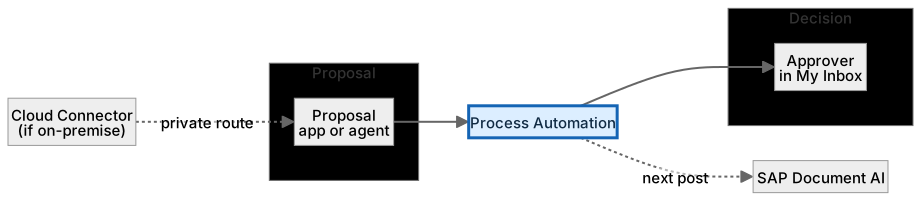
Human or AI, same entry point. Sees evidence, decides, is recorded.
A worked example, with numbers
The clarification agent proposes assigning payment PAY-0042 to invoice INV-7781, evidence [exact_reference, exact_amount, same_currency]. It starts a process instance; Process Automation routes a task to the role PaymentApprover, which is Reem’s lead, Sana. The task lands in Sana’s inbox at 09:15 with the proposal, the three evidence points and a link to the remittance advice. An SLA timer gives her 4 hours; after 3 with no action it would escalate to the team manager. Sana approves at 09:40. The workflow calls S/4HANA to post the assignment and waits; S/4HANA returns document 4900001234. Only now is the process complete. Had she rejected, the case would route to manual review with her reason attached.
How the data flows

The check that actually matters
Clicking Approve starts the posting; it does not finish it. The process must read S/4HANA’s response and treat an error as an error. The approver’s role has to exist in both the workflow and the backend, and the decision has to be recorded against a named person even when an AI pre-checked the case.
Approval is not a confirmed posting. A clerk clicking Approve starts the posting. The process is only done when S/4HANA returns a document number.
Work Zone vs the Fiori launchpad
| Question | Option A | Option B |
|---|---|---|
| Includes the launchpad | Yes | It is the launchpad |
| Adds | Workspaces, cards, external content, branding | — |
| Good for | A single entry point across SAP and non-SAP | Classic Fiori app access |
| Role in AI flows | Where approvals and tasks surface |
What SAP Build Work Zone and Process Automation does, and what it does not
It does
- Work Zone: a launchpad and workspace that surfaces tasks and apps in one place.
- Process Automation: visual workflows, forms, decisions and automations.
- Task inbox, deadlines and escalation you model in the process, and process monitoring.
It does not
- Post to S/4HANA itself. It calls an API and must check the response.
- Replace authorization. The approver role must exist in the process and in the backend.
- Make an AI proposal correct. It makes it reviewable.
Three real situations
Payment clarification approval. An AI-prepared assignment proposal lands in the collections lead’s inbox with evidence; approval posts it, rejection sends it to manual review.
Supplier onboarding. A form collects supplier data, routes it to procurement and finance in turn, and creates the vendor only after both approve.
AI proposal review. Any agent output that would change business data goes through the same approval step as a human proposal.
In practice: what teams get wrong
Build Work Zone is the launchpad and workspace layer: it surfaces apps, tasks and cards, including from outside SAP, in one branded site. Build Process Automation provides visual workflows, forms, decisions and business rules, and an option to automate repetitive steps. Deadlines and escalation are modelled in the process, so check the current feature list for exactly what your plan includes. The two meet in the inbox: a workflow puts a task in Work Zone, the approver acts, and the workflow calls the backend. For AI, the rule is that any output that would change business data enters the same approval path as a human proposal, with a named approver and a recorded decision; the AI may pre-fill and pre-check, but the accountable click is a person’s.
From the field. I have seen a workflow with a beautiful approval path and no rejection path. The first time an approver said no, the case vanished, and it took a week to notice the backlog.
Other gotchas worth a line:
- Design the rejection path first; it is the one people forget.
- Attach references to evidence, not copies of it.
- Time-outs need an owner; an escalation nobody reads is not an escalation.
- Feature scope and licensing of Build differ by plan; check the current SAP documentation.
Terms you will hear
| Term | Plain meaning |
|---|---|
| Work Zone | The launchpad and workspace that shows users their tasks and apps. |
| Process Automation | Visual workflows, forms and decisions on BTP. |
| Task / inbox | Where an approver sees and acts on work. |
| Decision table | A rules grid the workflow evaluates. |
| SLA timer | A deadline that triggers escalation. |
| Escalation | Routing to someone else when nobody acts in time. |
| Human-in-the-loop | A required human decision inside an automated flow. |
Quick self-check
- In one sentence, what is SAP Build Work Zone and Process Automation’s job?
- Which decision does it not make, and who makes it instead?
- What is the one thing you would verify before calling it production-ready?
Show the answers
- Turn a proposal, human or AI-made, into an assigned, reviewable, approvable task.
- Post to S/4HANA itself. It calls an API and must check the response.
- Design the rejection path first; it is the one people forget.
Key takeaways
- The desk where work shows up, and the form that routes the decision to the right person.
- Approval is not a confirmed posting.
- Work Zone: a launchpad and workspace that surfaces tasks and apps in one place.
- Post to S/4HANA itself. It calls an API and must check the response.
- Feature scope and licensing of Build differ by plan; check the current SAP documentation.
FAQs
Is Work Zone just the Fiori launchpad?
It includes the launchpad and adds workspaces, cards and content from outside SAP.
Can the approval step call an AI?
Yes, to summarise or pre-check, but the decision must be recorded against a named person.
Keep going in the series
Previous: SAP Audit Logging and Document Management Next: SAP Document AI
Full map: SAP AI Components Explained — 17 posts from platform to agents.
Sources and research notes
Research checked on 21 October 2026. Product names, plans, models and regional availability change fast; the starting reference for this component is SAP Build Process Automation. Examples use a fictional utility company and fictional cases (amounts, IDs, names); no customer landscape is described.
Recap
SAP Build Work Zone and Process Automation: turn a proposal, human or AI-made, into an assigned, reviewable, approvable task. The result is a proposal became an approved, traceable decision. The one thing to remember: approval is not a confirmed posting.
Found this useful? The next post, SAP Document AI, builds on it. Share it with the SAP colleague who keeps asking what all these components actually do.
Frequently asked questions
Is Work Zone just the Fiori launchpad?
It includes the launchpad and adds workspaces, cards and content from outside SAP.
Can the approval step call an AI?
Yes, to summarise or pre-check, but the decision must be recorded against a named person.
Further reading
Continue your trail
You now have the SAP AI Components context.
Save this guide, continue to the next concept or return to the Knowledge Library with your context intact.
SAP AI Components
17 resources in this area.

Practical SAP notes, structured for review, reuse and long-term maintenance.
Working on an FI-CA or IS-U implementation? I take on a limited number of advisory and architecture engagements.
Get in touch →