
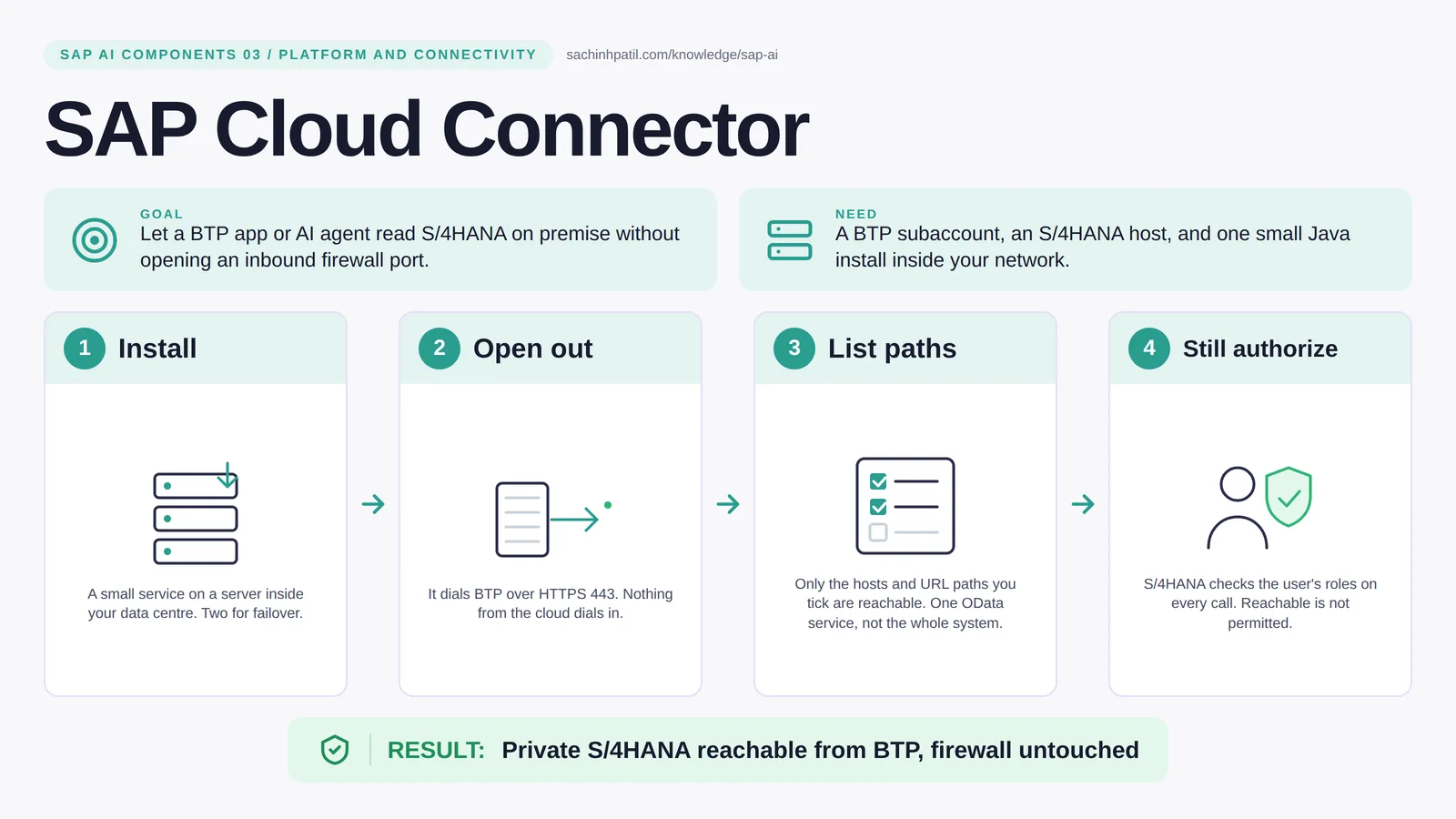
Install → Open out → List paths → Still authorize → Private S/4HANA reachable from BTP, firewall untouched. A learning overview, not a screenshot of a live system.
Foundation · 9 min read · Part 3 of 17 in SAP AI Components Explained
The cloud needs your on-premise S/4HANA data. Security says no inbound ports. Both are right, and this one component is how.
SAP Cloud Connector is the focus of this post. Your S/4HANA system sits inside a network with no public door, and that is a good thing. Cloud Connector is the piece that lets an app on SAP BTP reach it anyway, without you opening that door. It is small, it runs on a server you own, and it is the single most common reason a BTP project is either safe or quietly unsafe.
By the end you will be able to say in one sentence what SAP Cloud Connector does, draw how data moves through it, and use the design-review line that stops most mistakes: Reachability is not authorization.
SAP Cloud Connector in one sentence
A tunnel from your own data centre to SAP BTP, opened from the inside. The cloud never knocks on your firewall.
| Its job | Let a BTP app or AI agent read S/4HANA on premise without opening an inbound firewall port. |
| You need | A BTP subaccount, an S/4HANA host, and one small Java install inside your network. |
| Layer | Platform and connectivity |
| Design check | Reachability is not authorization. |
The everyday picture
Think of a bank back office with no public door. A trusted runner steps out to the counter, collects the request, brings back the answer. Nobody from outside ever enters the building.
Why SAP Cloud Connector exists
A cloud app needs to read open items from an on-premise system. The naive answer is a firewall rule that lets the cloud in. Security teams rightly refuse. The alternative is a component inside your network that dials out to BTP, keeps that connection open, and passes only the requests you have pre-approved back to the private system. Outbound only, allow-listed, logged.
How SAP Cloud Connector works, in four steps
- Install. A small service on a server inside your data centre. Add a second instance for failover.
- Open out. It dials BTP over HTTPS 443. Nothing from the cloud dials in.
- List paths. Only the hosts and URL paths you tick are reachable. One OData service, not the whole system.
- Still authorize. S/4HANA checks the user’s roles on every call. Reachable is not permitted.
You install Cloud Connector on a server in your data centre and point it at your BTP subaccount. It opens an HTTPS connection outward on port 443 and holds it. In its admin screen you list exactly which internal hosts and which URL paths may be reached: for example one OData service for contract accounts, nothing else. A BTP app then calls a destination that names the connector, the request rides down the tunnel, the connector checks the path against the list, and S/4HANA answers. With principal propagation the real user’s identity travels too, so S/4HANA knows it is the clerk asking, not a generic technical user.
Where it sits in the SAP landscape
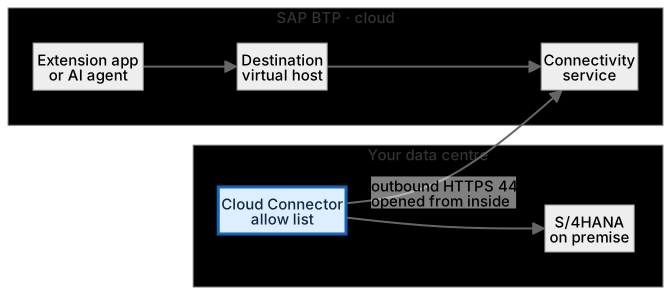
The connector dials out and holds the tunnel; requests travel back down it. S/4HANA still checks the user’s roles before anything posts.
A worked example, with numbers
A BTP app needs open items for contract account 300012345. The destination FICA_ODATA points to virtual host s4-fica:443. The connector’s list allows exactly one path, /sap/opu/odata/sap/FICA_OPENITEMS_SRV, with sub-paths. At 09:14 the app calls that path with a $filter on the contract account; the request rides the tunnel, the connector matches the path, S/4HANA authenticates the propagated user Reem, applies her role, and returns 3 open items totalling AED 1,240.00 quickly. The same app asking for /sap/opu/odata/sap/API_BUSINESS_PARTNER is refused by the connector (an error response, typically 403) before S/4HANA ever sees it. Nothing in the firewall changed; the connector’s logs show one allowed and one denied request.
How the data flows

The check that actually matters
The connector decides what is reachable. S/4HANA decides what is permitted. A path being on the list does not mean every user may call it; the authorization check still happens in the business system, on every request. That is also why an AI agent whose only tool wraps one allowed path is safe by construction: even a confused model cannot reach a URL that was never listed.
Reachability is not authorization. A collections clerk whose app can reach the FI-CA OData service still cannot clear a payment without the posting role in S/4HANA.
Cloud Connector vs VPN
| Cloud Connector | VPN | |
|---|---|---|
| What it exposes | A list of specific hosts and paths | A whole network segment |
| Direction | Outbound from you | Network-level, both directions |
| Identity awareness | Yes, with principal propagation | No, it is network only |
| Best for | BTP apps reaching on-premise SAP | Site-to-site networking |
SAP Private Link is a separate option for reaching selected SAP and hyperscaler-hosted systems privately; it is not a replacement for Cloud Connector on a network you run yourself. Check which fits your landscape.
What SAP Cloud Connector does, and what it does not
It does
- Opens an outbound HTTPS connection on port 443, so no inbound firewall rule is needed.
- Exposes only the hosts and URL paths you list, for example one OData service, not the whole system.
- Carries HTTP and RFC calls, and other TCP-based protocols, for apps in the connected subaccount.
It does not
- Authorize anyone. Reaching a service is not permission to use it.
- Transform or route messages. That is Integration Suite, post 07.
- Run integration logic on site. That is Edge Integration Cell, post 08.
Three real situations
Read payment evidence. A collections app on BTP reads open items for one contract account through a single OData path. The connector allows that path and nothing else.
Private inventory lookup. A supplier portal checks stock in an on-premise system during a quote. The warehouse system never gets a public address.
Agent tool boundary. An AI agent’s only tool is a wrapper around one allowed path. Even a badly behaved model cannot reach a URL the connector does not list.
In practice: what teams get wrong
On a project the connector appears in three documents: the network request (one outbound rule, port 443, to the BTP region), the access control list (host, port, path, and whether sub-paths are allowed), and the destination configuration in the subaccount, which names the virtual host the app will call. The virtual host is a deliberate indirection: the app never learns the real internal hostname. For RFC you list function module names instead of URL paths. High availability means a master and a shadow instance, and monitoring their heartbeat is part of go-live. Principal propagation needs trust set up in both directions: the connector must trust your identity provider’s tokens, and S/4HANA must trust the connector’s certificate and map the user. Without it, every call arrives as one technical user, which auditors notice.
From the field. I have seen an access list entry of ‘/’ with sub-paths allowed ‘to get the demo working’. It was still there nine months later, in production, exposing every OData service in the system.
Other gotchas worth a line:
- Run two connectors in a high-availability pair; one is a single point of failure.
- The access control list is per host and path; broad prefixes widen the door more than people expect.
- Patch it. It is software you operate, not a managed service.
- Principal propagation lets S/4HANA see the real user; without it, every call looks like one technical user.
Terms you will hear
| Term | Plain meaning |
|---|---|
| Outbound tunnel | A connection opened from inside your network to BTP and kept open. |
| Access control list | The connector’s list of allowed hosts, ports and paths. |
| Virtual host | The alias the cloud app sees; hides the real internal hostname. |
| Destination | A BTP configuration that tells an app how and where to call. |
| Principal propagation | Carrying the real user’s identity through to S/4HANA. |
| Master / shadow | Two connectors for high availability. |
| RFC | SAP’s older call protocol; also tunnelled, listed by function name. |
Quick self-check
- In one sentence, what is SAP Cloud Connector’s job?
- Which decision does it not make, and who makes it instead?
- What is the one thing you would verify before calling it production-ready?
Show the answers
- Let a BTP app or AI agent read S/4HANA on premise without opening an inbound firewall port.
- Authorize anyone. Reaching a service is not permission to use it.
- Run two connectors in a high-availability pair; one is a single point of failure.
Key takeaways
- A tunnel from your own data centre to SAP BTP, opened from the inside. The cloud never knocks on your firewall.
- Reachability is not authorization.
- Opens an outbound HTTPS connection on port 443, so no inbound firewall rule is needed.
- Authorize anyone. Reaching a service is not permission to use it.
- Principal propagation lets S/4HANA see the real user; without it, every call looks like one technical user.
FAQs
Is Cloud Connector the same as a VPN?
No. A VPN joins networks. Cloud Connector exposes a short list of specific services to one BTP subaccount.
Does it work with S/4HANA Cloud?
Public cloud editions are reached directly; Cloud Connector is for systems inside your own network, including private editions you operate.
Keep going in the series
Previous: SAP Cloud Identity Services Next: SAP HANA Cloud
Full map: SAP AI Components Explained — 17 posts from platform to agents.
Sources and research notes
Research checked on 21 October 2026. Product names, plans, models and regional availability change fast; the starting reference for this component is SAP Cloud Connector. Examples use a fictional utility company and fictional cases (amounts, IDs, names); no customer landscape is described.
Recap
SAP Cloud Connector: let a BTP app or AI agent read S/4HANA on premise without opening an inbound firewall port. The result is private s/4hana reachable from btp, firewall untouched. The one thing to remember: reachability is not authorization.
Found this useful? The next post, SAP HANA Cloud, builds on it. Share it with the SAP colleague who keeps asking what all these components actually do.
Frequently asked questions
Is Cloud Connector the same as a VPN?
No. A VPN joins networks. Cloud Connector exposes a short list of specific services to one BTP subaccount.
Does it work with S/4HANA Cloud?
Public cloud editions are reached directly over the internet; Cloud Connector is for systems in a network you control, such as your own data centre. For other hosting models, such as S/4HANA Cloud Private Edition, the connectivity option depends on how the network is set up, so check with your SAP and network teams.
Further reading
- SAP Cloud Connector — SAP
- Setting Up Cloud Connector for Principal Propagation — SAP Learning
- Explaining the SAP Cloud Connector — SAP Learning
Continue your trail
You now have the SAP AI Components context.
Save this guide, continue to the next concept or return to the Knowledge Library with your context intact.
SAP AI Components
17 resources in this area.

Practical SAP notes, structured for review, reuse and long-term maintenance.
Working on an FI-CA or IS-U implementation? I take on a limited number of advisory and architecture engagements.
Get in touch →