
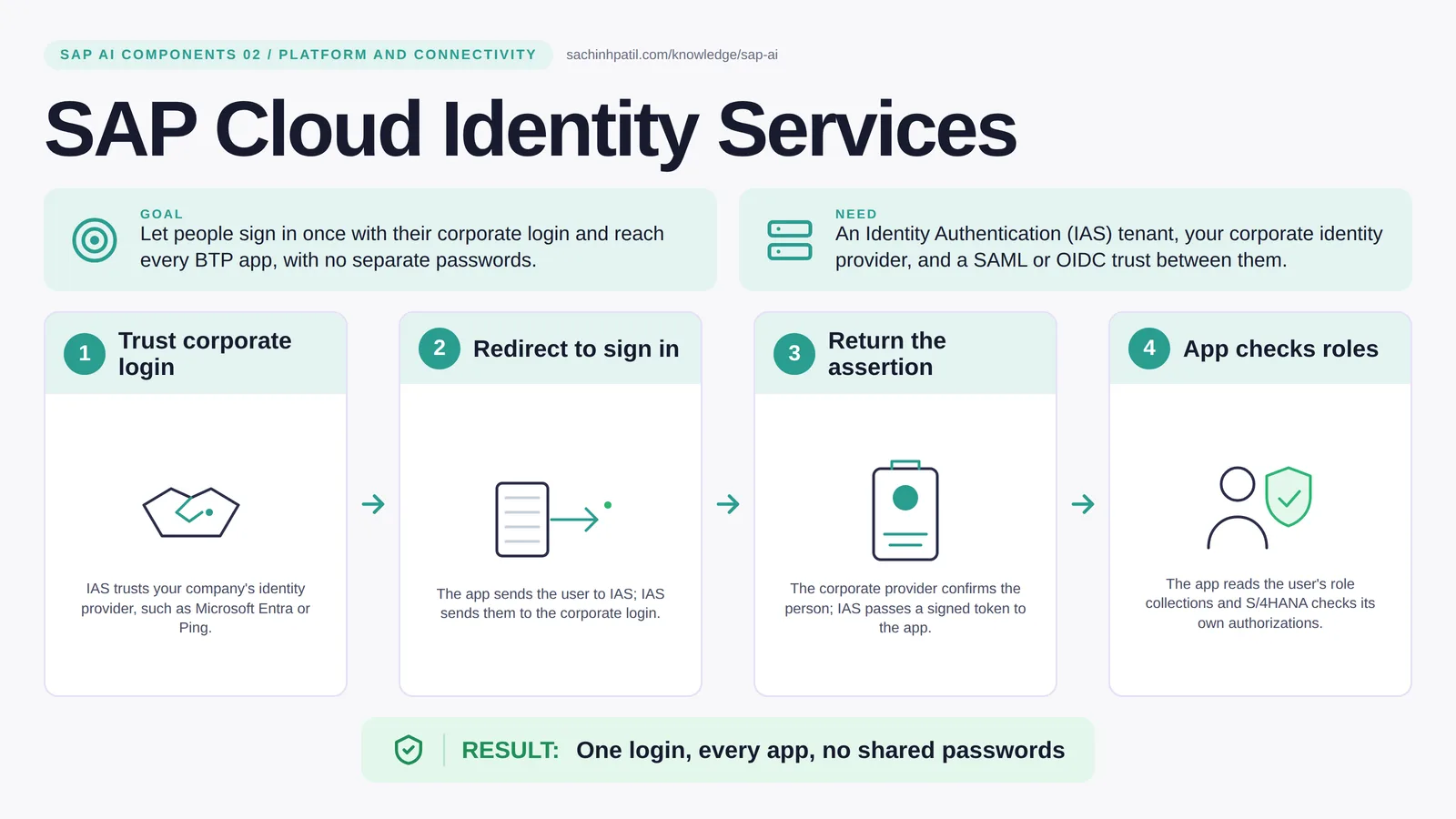
Trust corporate login → Redirect to sign in → Return the assertion → App checks roles → One login, every app, no shared passwords. A learning overview, not a screenshot of a live system.
Foundation · 9 min read · Part 2 of 17 in SAP AI Components Explained
One badge, every door. Then why can a signed-in user still be refused at the counter? The difference between identity and permission, explained with an airport.
SAP Cloud Identity Services is the focus of this post. Every app needs to know who is sitting at the keyboard. SAP Cloud Identity Services, and specifically its Identity Authentication part (IAS), is the reception desk that checks your corporate badge once and vouches for you to every BTP app. No separate SAP password, no copying users around.
By the end you will be able to say in one sentence what SAP Cloud Identity Services does, draw how data moves through it, and use the design-review line that stops most mistakes: Identity is not business permission.
SAP Cloud Identity Services in one sentence
The reception desk that checks your badge once, so every SAP app knows who you are.
| Its job | Let people sign in once with their corporate login and reach every BTP app, with no separate passwords. |
| You need | An Identity Authentication (IAS) tenant, your corporate identity provider, and a SAML or OIDC trust between them. |
| Layer | Platform and connectivity |
| Design check | Identity is not business permission. |
The everyday picture
Picture an airport. The identity checkpoint confirms you are you. It does not decide which gate you may board; the airline does that at the gate.
Why SAP Cloud Identity Services exists
Without a central identity service, each app keeps its own user list, people get three passwords, leavers keep access for months, and an AI assistant has no reliable way to know who is asking. One trusted sign-in fixes all four.
How SAP Cloud Identity Services works, in four steps
- Trust corporate login. IAS trusts your company’s identity provider, such as Microsoft Entra or Ping.
- Redirect to sign in. The app sends the user to IAS; IAS sends them to the corporate login.
- Return the assertion. The corporate provider confirms the person; IAS passes a signed token to the app.
- App checks roles. The app reads the user’s role collections and S/4HANA checks its own authorizations.
You configure a trust between IAS and your corporate identity provider, such as Microsoft Entra or Ping, using SAML or OpenID Connect. When a user opens a BTP app, the app sends them to IAS, IAS sends them to the corporate login, the corporate login confirms the person, and a signed token travels back. The app reads the groups in that token and maps them to role collections. The whole trip is usually quick, and the password stays with the corporate provider.
Where it sits in the SAP landscape
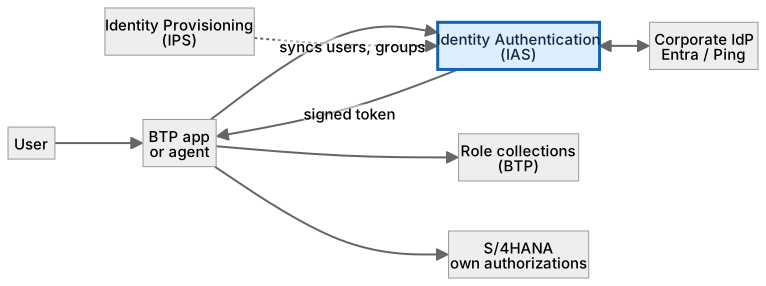
Passwords stay with the corporate provider. The app maps token groups to role collections; S/4HANA still checks its own roles.
A worked example, with numbers
Reem is a collections clerk. She opens the payment-review app at 08:02. The app redirects her to IAS; IAS redirects to the corporate Entra tenant, where she already signed in that morning, so no password prompt appears. A SAML assertion comes back with her email and the group COLLECTIONS_REVIEWER. The subaccount maps that group to the role collection PaymentReviewer, and the app shows her queue of 14 cases (a sign-in step that typically feels instant). When she opens case PAY-0042 and clicks Propose, the backend calls S/4HANA with her identity propagated (the Cloud Connector post shows how); S/4HANA checks her FI-CA authorizations and allows the read. If she clicked Post, S/4HANA would refuse: her role allows review, not posting.
How the data flows

The check that actually matters
Identity answers who. It never answers what they may do. A valid token for a collections clerk gets her into the review app; whether she may clear a payment is still decided by her FI-CA authorization in S/4HANA on every call. For AI agents the rule is stricter: an agent uses its own service identity scoped to its tools, never a borrowed human session.
Identity is not business permission. A signed token proves who the clerk is. Whether she may clear a payment is decided by her FI-CA role in S/4HANA.
IAS vs XSUAA
| Question | IAS | XSUAA |
|---|---|---|
| Job | Who are you (authentication, federation) | What may you do in this app (authorization) |
| Issues | SAML assertion or OIDC ID token | OAuth access token with scopes |
| Configured by | Identity admin, trust to corporate IdP | App security descriptor and role collections |
| In practice | Both: IAS authenticates, XSUAA authorizes the app | Both: IAS authenticates, XSUAA authorizes the app |
What SAP Cloud Identity Services does, and what it does not
It does
- Provide single sign-on across apps using standards such as SAML 2.0 and OpenID Connect.
- Can act as a proxy to your corporate identity provider, so passwords stay there rather than in SAP.
- Carries user attributes and groups the app can map to role collections.
It does not
- Decide what a user may do in S/4HANA. Authorization stays in the business system.
- Replace Cloud Connector. Identity is who; connectivity is how.
- Log business actions. Audit logging does that, post 09.
Three real situations
Collections clerk. A clerk opens a payment-review app with her normal corporate login. Her group maps to a reviewer role; S/4HANA still refuses any posting she is not authorized for.
Employee onboarding. A new hire appears in the corporate directory and can reach every BTP app the next morning without an SAP-side user being created by hand.
Assistant with user context. An AI assistant answers in the user’s own authorization context, so it cannot surface a record the person could not open themselves.
In practice: what teams get wrong
Two main services hide behind the name SAP Cloud Identity Services. Identity Authentication (IAS) handles sign-in and federates to your corporate provider; Identity Provisioning (IPS) keeps user and group lists synchronised between systems. A new BTP subaccount trusts SAP’s default identity provider (SAP ID service) out of the box; for business users you add your IAS tenant as a custom trust and, usually, make it the default. The subaccount’s XSUAA then trusts IAS, and role collections are assigned either to users or to groups carried in the token. For machine calls, a service identity with its own credential is used instead of a person; this is what an agent’s backend or a nightly job should use. Principal propagation, covered in the Cloud Connector post, lets the person’s identity continue into S/4HANA so the business system applies the person’s own roles.
From the field. I have seen a team give an AI agent a real user’s refresh token ‘for the demo’. Three weeks later the agent was still acting as that person in production logs.
Other gotchas worth a line:
- Test the token lifetime and refresh behaviour, not just the first login.
- Group names drift; agree stable group names and map them to role collections deliberately.
- A service-to-service call needs its own identity, not a borrowed user token.
- Which protocol and features apply depends on the app; check the current SAP documentation.
Terms you will hear
| Term | Plain meaning |
|---|---|
| IAS | Identity Authentication service: the sign-in and federation service on BTP. |
| IPS | Identity Provisioning: syncs users and groups between systems. |
| Identity provider (IdP) | The system that proves who you are, such as Microsoft Entra. |
| SAML / OIDC | Two standard protocols for passing a signed proof of identity. |
| Assertion / token | The signed message that says ‘this is Reem, in these groups’. |
| Role collection | A BTP bundle of permissions assigned to users or groups. |
| Service identity | A non-human identity used by apps, jobs and agents. |
Quick self-check
- In one sentence, what is SAP Cloud Identity Services’s job?
- Which decision does it not make, and who makes it instead?
- What is the one thing you would verify before calling it production-ready?
Show the answers
- Let people sign in once with their corporate login and reach every BTP app, with no separate passwords.
- Decide what a user may do in S/4HANA. Authorization stays in the business system.
- Test the token lifetime and refresh behaviour, not just the first login.
Key takeaways
- The reception desk that checks your badge once, so every SAP app knows who you are.
- Identity is not business permission.
- Provide single sign-on across apps using standards such as SAML 2.0 and OpenID Connect.
- Decide what a user may do in S/4HANA. Authorization stays in the business system.
- Which protocol and features apply depends on the app; check the current SAP documentation.
FAQs
Is this the same as the old SAP ID service?
IAS is the current cloud identity service for BTP; the older SAP ID service is being superseded. Check your tenant.
Do agents sign in too?
A service identity is used for agents, scoped to what the agent may call. It should never reuse a human user’s session.
Keep going in the series
Previous: SAP BTP Next: SAP Cloud Connector
Full map: SAP AI Components Explained — 17 posts from platform to agents.
Sources and research notes
Research checked on 21 October 2026. Product names, plans, models and regional availability change fast; the starting reference for this component is SAP Cloud Identity Services. Examples use a fictional utility company and fictional cases (amounts, IDs, names); no customer landscape is described.
Recap
SAP Cloud Identity Services: let people sign in once with their corporate login and reach every BTP app, with no separate passwords. The result is one login, every app, no shared passwords. The one thing to remember: identity is not business permission.
Found this useful? The next post, SAP Cloud Connector, builds on it. Share it with the SAP colleague who keeps asking what all these components actually do.
Frequently asked questions
Is this the same as the old SAP ID service?
No. SAP ID service is the default identity provider that comes with a new BTP subaccount and is meant for SAP-side users such as developers and administrators. For your business users, you normally add IAS, connected to your corporate login. Check your own tenant setup.
Do agents sign in too?
A service identity is the right pattern for agents, scoped to what the agent may call. It should never reuse a human user's session.
Further reading
- SAP Cloud Identity Services — SAP
- Analyzing SAP Cloud Identity Services — SAP Learning
- SAP Cloud Identity Services - Identity Provisioning — SAP Community
Continue your trail
You now have the SAP AI Components context.
Save this guide, continue to the next concept or return to the Knowledge Library with your context intact.
SAP AI Components
17 resources in this area.

Practical SAP notes, structured for review, reuse and long-term maintenance.
Working on an FI-CA or IS-U implementation? I take on a limited number of advisory and architecture engagements.
Get in touch →